
Introduction to Microsoft Dynamics: Its Role in Business Today
For today’s businesses, and particularly in today’s digital economy, the characteristics of a successful solution are unique and dependent on an organization’s current and future needs. As such, the purpose of this introduction is to enable you to identify, evaluate, and understand how Microsoft Dynamics can best support your business operations. Microsoft Dynamics supports the integrated operation of a large number of software applications, which allow users to efficiently manage multiple operations related to customer service, finance, sales, and many others. In addition to allowing you to adapt the software solutions to meet the needs and requirements of a wide variety of businesses and the organizations within those businesses based on technology and data, it allows organizations to make real-time strategic decisions in the areas of business development, marketing, product development, etc.
What Is Microsoft Dynamics? Main Features and Modules
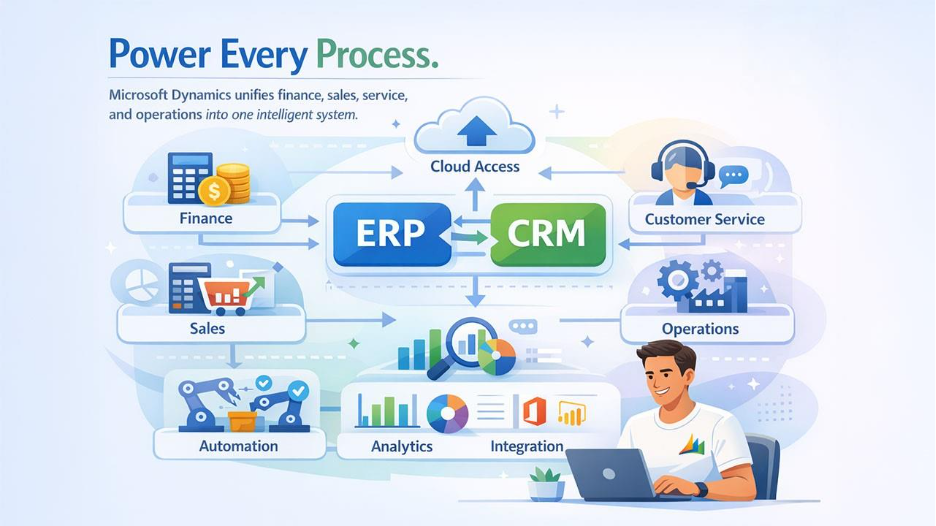
Microsoft Dynamics is a suite of applications for enterprise resource planning (ERP) and customer relationship management (CRM) which is designed to combine all business processes into one. Core modules for finance, sales, service, and operations are included with the suite, as well as the option to deploy Microsoft Dynamics in the cloud; this offers companies the ability to access information from anywhere. Microsoft Dynamics integrates with other Microsoft tools, such as Office 365 and Power BI. Additionally, Microsoft Dynamics automates various repetitive processes including invoice generating or inventory managing; therefore, it saves users from manually entering their data into a computer system. Companies are able to select the modules that are relevant to them, allowing for flexibility for different sized companies.
Overview of Microsoft Dynamics 365 ERP and CRM Solutions
Microsoft Dynamics 365 is an integrated platform for ERP (Enterprise Resource Planning) as well as CRM (Customer Relationship Management). The ERP aspect is responsible for back-office support such as Supply Chain and Human Resources while the CRM aspect is responsible for front-office activities including Marketing and Customer Service. An example would be Dynamics 365 Sales, which helps users track Leads and Opportunities, while Dynamics 365 Finance helps users with Budgeting, Compliance, etc. There are many different applications within Dynamics 365 including scalable solutions that grow with your business. Additionally, the use of Artificial Intelligence (AI) provides insight into Customer Behavior and stock optimization.
Key Advantages of Microsoft Dynamics for ERP
Another advantage of Microsoft Dynamics 365 is that it centralizes your DATA, which improves the quality and accuracy of your information, thereby reducing errors across your departments. There are advanced Analytics applications that allow Business Owners to track and measure Performance Metrics in Real-Time. Microsoft Dynamics 365 also has Security Features that protect sensitive data. Lastly, Microsoft provides continuous system updates to keep your Microsoft Dynamics 365 current with the latest technological trends(s) and advancement(s). In summary, Dynamics 365 is an excellent solution for Automating Workflows, which leads to Cost Savings, Increased Efficiency, and Faster Processing Time. For businesses seeking tailored functionality, exploring custom ERP configurations within Dynamics can further enhance operational alignment.
Scenarios Where Microsoft Dynamics Adds Real Value to Your Operations
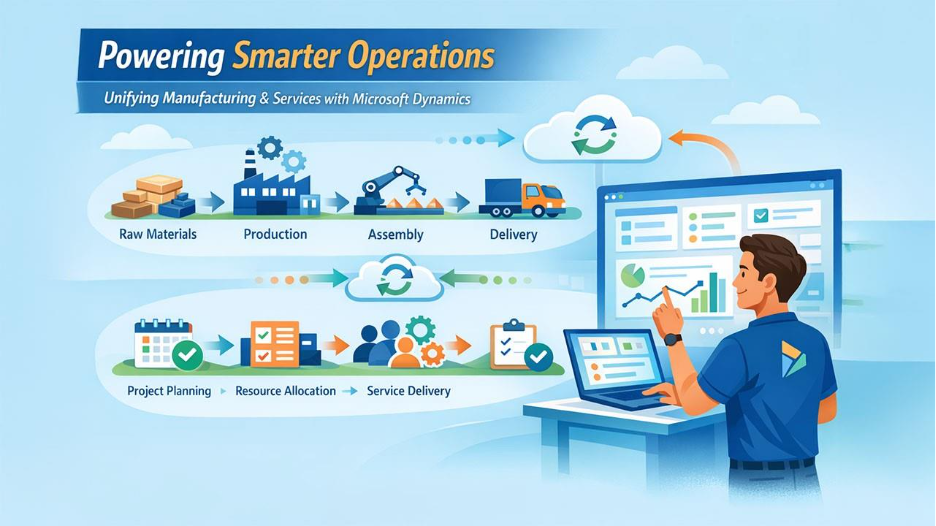
There are a number of scenarios where Microsoft Dynamics can provide great SV for businesses. One such scenario is when multiple business functions must be coordinated together and eliminate business silos. In the example of Manufacturing, Dynamics can be used to track production from raw materials through the entire process of fabrication, assembly, and delivery of finished goods. Services (or service-based) businesses benefit from utilizing Microsoft Dynamics' project management capabilities. Project management allows businesses to allocate staff better, eliminate staff overlap, and to manage better the amount of labor utilized in creating deliverables.
Supporting Growth in Expanding Companies with Microsoft Dynamics
As businesses grow, it may be difficult to stay ahead of SV with increased amounts of volume/transactions, an area where Microsoft Dynamics can also help businesses. With Microsoft Dynamics, businesses are able to scale their resources in the cloud automatically as the business grows, which greatly reduces the disruption caused when adding additional users or functionality to the system. Additionally, as businesses enter other geographical areas with new currencies or languages, Microsoft Dynamics provides the function of multi-lingual/multi-currency support, enabling businesses to provide standardization across their operational processes in new locations. Experienced Dynamics business central consultants frequently guide companies through these expansion phases to ensure configurations match both current needs and future growth.
Managing Customer Relationships with Microsoft Dynamics CRM
The CRM module of Microsoft Dynamics helps businesses build and manage their relationships with customers by tracking all of their interactions across various channels including email, social media, phone and in-person meetings; this will ensure that nothing falls through the cracks. The application includes automated follow-up reminders and customized communication methods to increase customer satisfaction. In addition, sales teams can access valuable information about leads through the sales module of Microsoft Dynamics and prioritize leads based on this data, ultimately leading to increased conversion rates.
Controlling Supply Chain Operations via Microsoft Dynamics
Supply Chain Management (SCM), on the other hand, requires the coordination and management of suppliers, inventory, and the distribution of products. Microsoft Dynamics provides a complete view of the supply chain, enabling businesses to forecast demand more accurately and eliminate stockouts. By integrating with IoT devices, Microsoft Dynamics allows businesses to track their products in real-time; this level of visibility enables reduction of delays as well as waste, which is important for companies in such industries as retail and logistics.
Handling Finance Processes with Microsoft Dynamics Finance
The Finance modules of Microsoft Dynamics automate various accounting functions such as ledger management and tax compliance. Organizations can also integrate a payroll system with Microsoft Dynamics 365 to streamline HR and finance operations within a unified platform. Automation of these repetitive accounting tasks allows accounting staff to spend more time on analysis. In addition, the Finance modules support companies operating in multiple countries by providing features specific to different regulatory environments. Reporting tools are also included in the Finance modules and allow businesses to create complete financial statements in minutes instead of days, making audits and planning much easier.
Using Data and Reports in Microsoft Dynamics Systems
Data is one of the most valuable assets of a company, and Microsoft Dynamics allows users to easily access their data through the creation of customized dashboards. By using these dashboards, users have the ability to create reports on sales trends, efficiencies within operations etc., without having to go through IT. Furthermore, by integrating with Power BI, Microsoft Dynamics also allows users to display their data in a visual format (charts and graphs) for easier comprehension. Properly setting up these analytics features during rollout is where D365 implementation services typically deliver the most immediate and lasting value to decision-makers.
Business Scenarios Where Microsoft Dynamics Creates Added Complexity
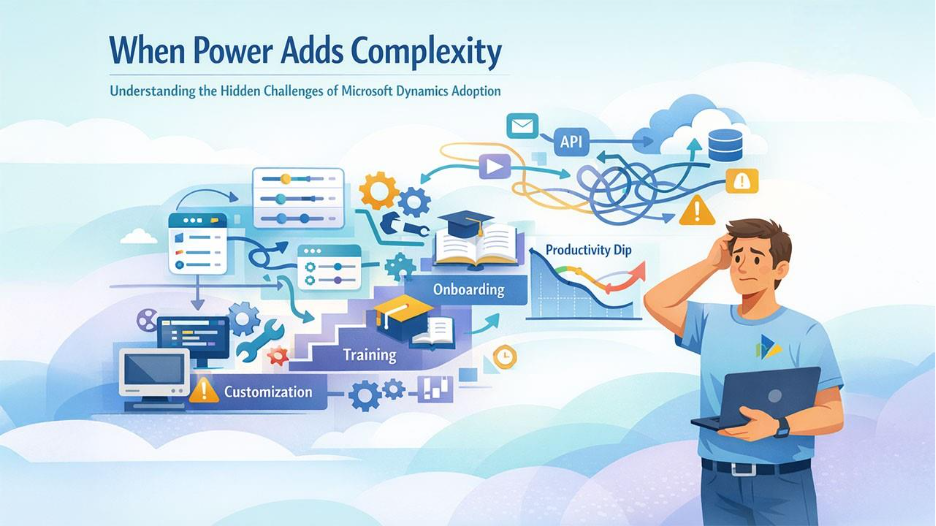
Microsoft Dynamics offers advantages but can also create challenges for companies. Organizations with unique processes will likely need additional configuration to set up Microsoft Dynamics properly, and newer systems may not be compatible with legacy technology. Smaller organizations may experience a steep learning curve, which can lead to some temporary loss of productivity while team members get used to the system.
Extensive Customization and Microsoft Dynamics Implementation Challenges
While enabling a business to customize the way the software fits its specific needs, customization will potentially also add time to the project plan. Companies making extensive modifications will need to engage the services of an expert consultant in order to avoid exceeding the initial budget on extensive changes, as there will be challenges associated with the necessity of testing changes to ensure existing functions are not compromised. Engaging a professional Dynamics consultant can assist a business with specialized consultation during the software setup.
Connecting Microsoft Dynamics to Older Systems
Integrating Microsoft Dynamics with older software can result in data inconsistency. Most times, integrating older software into Microsoft Dynamics requires middleware or developing a custom API to create integration points. Middleware or developing custom APIs creates an additional layer of complexity due to the increased amount of time and effort it will take to maintain and support these integrations. Older platforms may also not support modern security standards, which can lead to potential security vulnerabilities. Therefore, mapping out data flow is critical for successful integration and to avoid any data flow interruptions.
Cost and Return Considerations for Smaller Companies Using Microsoft Dynamics
For smaller businesses, implementation costs include both licensing and setup fees, which may be a financial strain for smaller businesses. In addition, on-going operation costs associated with updates and support will also increase over the months and years. Nevertheless, while realizing the return on investment from operational efficiencies will generally take ahead of time, smaller businesses should weigh whether the return on increased efficiencies is large enough to warrant the costs of implementation.
User Training and Adoption Issues with Microsoft Dynamics
Training is essential since new users may be overwhelmed by the interface. New users tend to resist change to tools they previously used that were simpler to use than Dynamics 365. Customers experience problems adopting Dynamics 365 when they do not complete training sessions adequately or do not utilize practice sessions enough. Providing ongoing support can ease some of the burden, but there are initial challenges to implementing Dynamics 365.
Regulatory and Security Requirements in Controlled Industries Using Microsoft Dynamics
Many industries, such as healthcare and finance, have regulations that they must abide by. Dynamics 365 complies with many of these regulations, but to comply with the regulations, Dynamics 365 requires additional steps when configuring. Although Dynamics 365 has security features such as encryption, auditing requires additional documentation. To comply with the regulations in highly regulated industries, additional validations are required to ensure the safety of the data within the application.
How to Evaluate If Microsoft Dynamics Is the Right Fit for Your Business
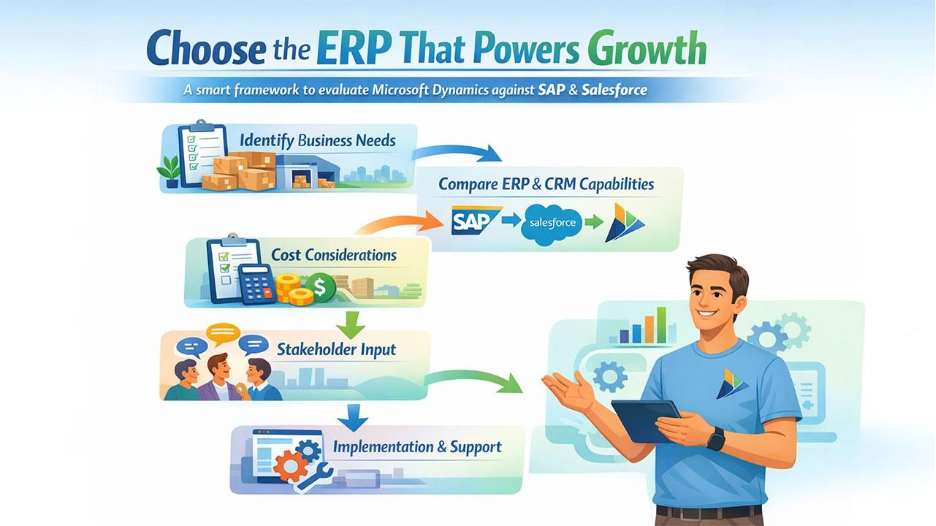
There are various ways to evaluate a system besides looking at the demo version of the system and trying it out, however, this is a good way to see how easy or difficult the system is to use, and will also help you determine if the system has an intuitive design and is easy for the users to learn how to operate. You should always begin your assessment of an ERP system by first listing the essential features/functions that you will use on a regular basis, such as managing inventory or CRM (Customer Relationship Management). After this initial step, the next part of the assessment would be to identify where there are issues or difficulties in your existing systems. It’s also important that throughout this process you include key stakeholders from each department to gather as much comprehensive feedback/input as possible about the effectiveness of each feature/function and determine if the feature/function would support the operations of the business.
SAP has a lot of great features/functions to support large/enterprise businesses; however, one negative often mentioned with SAP is that the way it is structured makes it a little more difficult to customize compared to other options. Salesforce has developed itself as a leader for providing a very robust CRM platform along with many other useful third-party application integrations (Salesforce AppExchange) but it doesn't necessarily provide you with the same depth of ERP functionality that SAP does, nor as many third-party applications that can interface with the ERP system. If you’re looking for a solution that has a good mix of both strong ERP functionalities and also good CRM functionalities, Microsoft Dynamics can provide you with a bit of both, especially through Microsoft’s integration of its products.
When it comes down to the associated costs between each option, generally speaking you will often find SAP is one of the more expensive ERP solutions on the market; however, Salesforce is going to be more affordable on a subscription basis, which often ends up being less than SAP.
Once you’ve determined which of the above three options will potentially work best for your organization/operations, it's time to start developing your plan for implementing the system into your business. Before any implementation takes place, you need to establish the scope of what will be done when the project will be completed (the completion date), and the resources/people (the project team) who will be assigned to work on the project, begin training users on the new ERP system as soon as possible, and identify all of the activities that will take place as part of implementing the system. It is also important to note that once you do implement the solution into your organization you should provide regular support and monitor the success of the new system after the launch/unveiling of the solution and adjust any issues that are identified during the post-launch monitoring process.
Conclusion: Maximizing Value from Microsoft Dynamics While Minimizing Complexity
When using Microsoft Dynamics (formerly called Microsoft Dynamics NAV) to improve overall operations, success is realized when the company has the right size, processes, and capacity to implement a new system. Companies that implement Microsoft Dynamics typically experience improvements in data quality, faster reporting, better customer follow-up, and more efficient use of resources as compared to companies that don’t. As a result, Microsoft Dynamics works best for companies that have well-defined workflows, have sufficient transaction volume for Microsoft Dynamics to generate meaningful reports, and are committed to having a complete and robust installation and staff training on the system.
Because of the inherent complexity that comes with working with Microsoft Dynamics in an organization, these complexities can arise from the level of customization, how the company integrates Microsoft Dynamics into its existing processes, and potential resistance from users to the Microsoft Dynamics platform. These challenges typically impact small businesses or those with very few IT personnel available to support the organization and the Microsoft Dynamics implementation, businesses with custom needs, and businesses using legacy or obsolete systems and infrastructure.
Generally, companies that begin by identifying the major pain points in today’s environment for a company and then developing a phased rollout plan for Microsoft Dynamics and implementing a comprehensive plan for the implementation of Microsoft Dynamics, and continued support after implementation, will see success with Microsoft Dynamics.
%201.png)

%201.png)

%201.png)