

You suddenly received an exploding Azure bill due to a forgotten VM here and an oversized database there. You panic and open Azure Advisor, hoping to optimize the spend, and guess what it suggests?
Shut down the one and only test server.
Azure Advisor promises personalized guidance to optimize your cloud environment all within Azure, and yes, in a lot of ways, it does deliver. But does it really help in the right ways when you struggle with cloud cost management as your team and environment grow?
We answer that in detail below.
What is Azure Advisor?
Azure Advisor is a free, built-in recommendation engine provided by Microsoft. Think of it as a digital cloud assistant that scans your Azure environments and shows opportunities to improve. Azure Advisor’s main goal is to help you and your team implement Microsoft best practices in your cloud environment to achieve peak performance and efficiency without increasing costs.
Azure Advisor gives personalized, actionable recommendations around the following five concepts.
- Cost: Identifies and presents ways in which you can cut spending or use resources more efficiently.
- Performance: Suggests configurations that’ll help improve responsiveness and throughput.
- Security: It’ll surface potential vulnerabilities or misconfigurations so you can fix them before they put your cloud environment at risk.
- Reliability: Recommends design adjustments so your system can build greater fault tolerance.
- Operational excellence: Gives tips to improve the efficiency of processes and make maintenance simple.
Accessing Azure Advisor is simple and free to use. All you have to do is:
- Go to the Azure Portal
- Select the Advisor icon at the top or search for it in the search bar
- View the dashboard with categorized insights and suggested fixes for your active resources
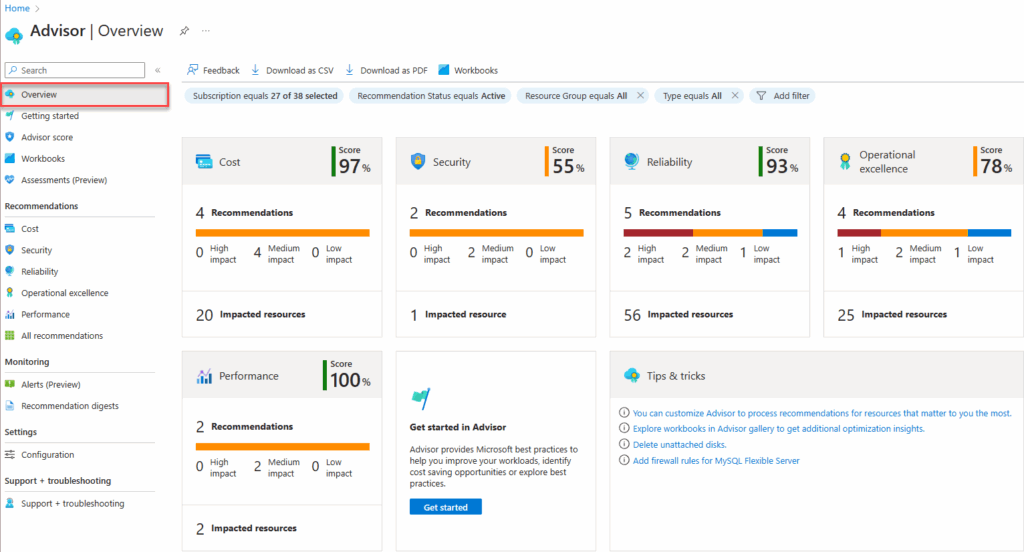
How Azure Advisor helps with cost optimization
With Azure Advisor, you can identify inefficiencies and get recommended actions to reduce costs. It’s a good solution for quick, actionable guidance for beginner Azure users to reduce unnecessary Azure spending.
Here are its four main benefits:
- Identify idle or underutilized resources to scale down
- Get right-sizing and workload optimization suggestions based on your actual usage
- Get Savings Plans and Reservations recommendations that can help lower your long-term costs
- Integrate Azure Advisor with Azure Cost Management to align with the Well-Architected Framework
What Azure Advisor can’t do?
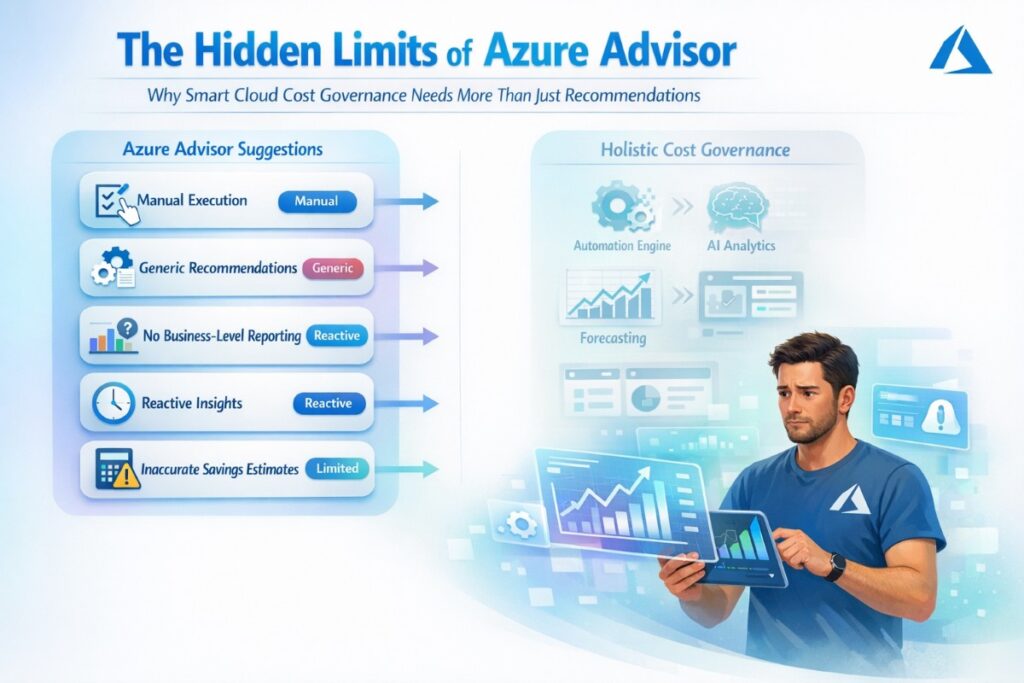
While Azure Advisor is a great starting point to implement cost optimization, it can’t replace a holistic cost governance system powered with automations. It comes with clear limitations, particularly for growing teams that are managing larger, more complex environments.
Here’s a list of limitations we think you should be aware of:
- Manual execution: Azure Advisor suggests ways to optimize your Azure spend, but you can’t automate them. You’ll need to follow through manually.
- Limited customizing options: Recommendations on Advisor are based on general Microsoft best practices. They’re not really personalized to your business context or goals.
- Lack of business-level reporting: If you want visibility in cost centers, project budgets, or department-level usage, Azure Advisor won’t suffice because it simply doesn’t know and understand your finance structure.
- Partial coverage: Advanced FinOps benefit from features that promote proactive monitoring with budget forecasting, alerts, and anomaly detection. Advisor is simply a ‘reactive’ advisory tool that’ll inform you on current or past issues.
- Savings estimate accuracy: If you offer enterprise discounts or irregular usage, the projected savings Advisor shows can be misleading, as they’re calculated against pay-as-you-go rates and assume consistent usage. It doesn’t account for any negotiated discounts, commitments, or fluctuating usage.
When is Azure Advisor enough?
There are cases when Azure Advisor is quite effective in certain scenarios. This is especially true for early-stage SaaS startups with small teams and simple Azure setups.
Using Azure Advisor alone may be enough if:
- You have just a few subscriptions or resources: In that case, Advisor will see pretty much everything and point out obvious optimization opportunities like cleaning up idle VMs, unattached disks, or underused databases.
- You are running young, low complexity projects: Optimizing these often starts by cleaning up easy targets like shutting off forgotten test servers, deleting old and unused storage, and resizing. You won’t need any extra tooling to address these standard issues.
- You can’t afford more tools: Many prefer sticking to Azure Advisor because it’s free and built-in. It’s ideal when you’re not ready to invest in a full FinOps platform.
- You just need an initial cleanup and optimization: Advisor gets you quick and easy wins for simple tasks like shutting down idle VMs, resizing over-allocated services, or cutting down on unused resources.
- TL;DR: Azure Advisor will suffice if your cloud footprint is relatively small and you’re just getting started with cloud cost control. It’ll show you exactly what needs immediate fixing without spending those extra bucks on license fees or a learning curve. Treat it as a self-service first step.
When is Azure Advisor not enough?
When your Azure environment grows, its complexity grows. When you’re managing multiple environments, collaborating with different stakeholders, or hoping for a system that provides predictive capabilities, you’ll realize the limitations of Azure Advisor.
Growing SaaS businesses with large teams or organizations that have implemented a scaled FinOps will need more than what Advisor offers.
Here are some scenarios when you should be thinking beyond Azure Advisor.
- If you’re managing multiple tenants: Azure Advisor operates at the individual subscription level, so you won’t get a consolidated view for multiple subscriptions or tenants. This makes manual optimization a slow and tedious process.
- If you want to implement proactive optimization: We mentioned earlier that Advisor is reactive. It’ll only point out issues after they have occurred. So if you want a tool that proactively alerts you about budget overruns, misconfigurations, or high-spend anomalies in real time, then Advisor isn’t going to be enough.
- You want forecasting and financial planning capabilities: If you want to model future costs, track spend projections, or ensure your cloud usage is in line with business budgets, you’ll need additional tooling.
- You need FinOps reporting and unit economics: Azure Advisor will fall short if you’re looking to implement cloud cost allocation by teams, features, or business units. You’ll need a tool that can offer reports like “cost per customer” or “cost per deployment.”
- You want to automate workflows: In mature SaaS orgs, cost optimization is continuous. But there’s no way to do it manually, and Advisor's recommendations don't automatically translate into tickets, tasks, or anything actionable without a whole lot of extra work building external systems.
TL;DR: Azure Advisor will not be enough if you need enterprise-grade FinOps practice. It can’t handle the scale, multi-tenancy, the complexity of governance, and detailed financial reporting that large organizations need.
Azure Advisor in a broader cost optimization strategy
So, what do you do? Do you ditch Azure Advisor when you scale?
No.
But you definitely need to start viewing it as one part of a larger FinOps toolkit.
Azure Advisor complements (but does not replace) a holistic cost governance strategy. For example, while you rely on Advisor to pinpoint specific savings actions, you can also use Azure Cost Management and Budgets to provide visibility of spend, budgeting, and alerting. Together, they can help you move from data to action.
Before you even reach the optimization stage, your migration approach plays a major role in future cloud costs. Poor rehosting decisions, overprovisioned architectures, or rushed lift-and-shift strategies can lock in inefficiencies from day one. If you're still in the adoption phase, understanding structured cloud migration planning is critical to avoiding long-term Azure overspending. Learn more about practical cloud migration strategies that support scalable and cost-efficient cloud environments.
So, in practice, you should look forward to building a process that looks something like this:
- Use Cost Management to monitor budgets and usage trends
- Use Advisor to identify waste
- Use custom policies, third-party tools to implement automation scripts, or manual approvals to implement the recommendations.
Azure Advisor can be quite valuable in the early ‘inform’ stage of FinOps. You may use it to teach teams what wastes look like and to quickly reclaim some spend. Then, as your company grows, you’ll add layers to sophisticate FinOps practices with:
- Cost allocation
- Showback dashboards
- Predictive budgeting
- Policy-driven governance
- Possibly multi-cloud support
Azure Advisor will continue to remain a part of this picture, and you can even integrate the results from it into FinOps tools via API. However, it should never be the only cost management tool in your kit.
How Cloud Cost Optimization Supports CRM Performance
Cloud cost management is not only an infrastructure concern. For businesses running CRM systems in the cloud, inefficient resources can also affect the cost, scalability, and reliability of customer-facing operations.
A CRM platform may connect sales, marketing, customer support, billing, and other business systems. These workflows can generate significant amounts of customer data and require reliable infrastructure to keep information available across teams. As the CRM environment grows, businesses need to balance performance with responsible cloud resource usage.
This is where CRM and cloud optimization strategies can work together.
For example, organizations can review whether their CRM-related databases, application servers, storage resources, and integrations are appropriately sized for actual workloads. Azure Advisor can help identify certain underutilized or overprovisioned resources, while broader cost management practices can help teams understand how infrastructure spending relates to specific applications and business functions.
CRM integration is another important consideration. When a CRM connects with email platforms, marketing automation tools, billing systems, customer support applications, and other services, data moves across multiple systems. A well-planned CRM integration strategy can help businesses centralize customer information, reduce duplicate data entry, and create more efficient workflows.
Automation also plays a role. Instead of relying entirely on manual updates, businesses can automate repetitive CRM processes such as lead assignment, customer follow-ups, data synchronization, and notifications. This can reduce operational effort while helping teams maintain more consistent customer records.
For businesses managing cloud-based CRM environments, the goal should not simply be to reduce infrastructure costs. The broader objective is to create an environment where cloud resources, CRM workflows, and customer data processes work efficiently together. This approach can help organizations control spending while continuing to support reliable customer operations.
OutRightCRM focuses on CRM capabilities, integrations, and automation that help businesses manage customer relationships and streamline business processes. When combined with structured cloud cost management, CRM teams can take a more complete approach to balancing technology performance, operational efficiency, and infrastructure spending.
Tools and capabilities beyond Azure Advisor
Ready to go beyond basic cost hygiene? We’ve got many tools to recommend, both native and third-party, that can add to Azure’s capabilities of cost optimization:
The native Azure tools to consider
- Azure Cost Management and Azure Budgets: These tools will give you a detailed analysis of your spend, set budgets, and alert you before your costs cross thresholds. These can be good tools to track and control costs across your subscriptions and departments.
- Azure Policy and Azure Automation: These tools can let you enforce cost-related rules like blocking VM SKUs that get too expensive. They’ll also support auto-remediating actions like scheduling VM shutdowns as per Logic Apps or runbooks.
- Azure Pricing and TCO tools: Tools like Azure Pricing Calculator and Azure Migrate can help you forecast costs before you launch services. This is something Advisor doesn’t do at all.
Two types of third-party platforms to include
When you want deeper capabilities, you’ll want to find reliable third-party FinOps tools. There are two types of tools to look into:
- FinOps platforms: You can use these tools if you want advanced capabilities like cost analytics, unit cost tracking, predictive forecasts, and automation for multi-cloud environments.
- SaaS tools: Tools like these help with early anomaly detection and provide reports that are in line with your business. The cost allocation is tailored to your delivery models.
If you’re serious about cost control, use these third-party tools as complementary to Azure native services to deliver end-to-end FinOps. They’ll help your team move from reactive cost observation to proactive, automated cost governance.
But here’s a thing, sustainable cost reduction demands more than tech tools. It depends on adopting FinOps best practices organization-wide. You’ll need to treat cloud cost as a shared responsibility across finance, engineering, and product teams.
Integrate all tools and best practices together in your cloud environment, and you’ll plug the gap of Advisor.
How Turbo360 enhances cost optimization beyond Azure Advisor

By now, you know that Azure Advisor can only give so much, but can’t tell the full story of your cloud environment in alignment with your business structure or needs. That’s where Turbo360 comes into play.
Turbo360 is built specifically to help organizations operationalize and scale cloud cost optimization across environments, teams, and use cases. Here’s how it extends the qualities of Azure Advisor:
- Centralized visibility across Azure environments: You’ve got multiple subscriptions, tenants, and regions? Turbo360 consolidates all its cost data under a unified interface. You only need to rely on one stop to get a clear understanding of where your every penny is going across the entire Azure footprint.
- Automate suggestions into action: No more manual follow-ups. With Turbo360, you can turn Azure Advisor recommendations into automated workflows. Whether it's scaling down idle resources, scheduling shutdowns, or triggering alerts, the actions just happen, without constant intervention.
- Detect anomaly or cost spikes before they happen: Turbo360 keeps tracking your environment to detect any sudden cost anomalies or usage spikes. This way, your teams can respond before unexpected bills.
- Get forecasts and plan budgets confidently: With built-in forecasting tools, you get to model future spend, set realistic budgets, and plan for growth. You can adjust strategies by comparing projected costs and actual costs.
- Business-aligned reporting: Turbo360 gives you reports that help you understand cloud costs by product, feature, customer, or business unit with rich tagging and allocation support. This gives leaders insights that tie cloud spend to business impact.
- Integrate and enhance Azure Advisor: Turbo360 doesn’t replace Azure Advisor; it works with it to extend its qualities. Feed Advisor’s insights and get prioritized tasks, tickets, or automation scripts to close the loop between insight and execution.
So, while Azure Advisor points out issues that are making you spend too much money on cloud, Turbo360 gives you the power to fix them without extensive manual effort. It makes Azure FinOps an organization-wide sustainable practice.
Conclusion
Azure Advisor is a valuable free resource that helps a new SaaS company with small teams get started with cloud cost optimization. It can point out obvious idle resources, oversized workloads, and opportunities to minimize your cloud spend. However, for growing SaaS companies or organizations that manage Azure at scale, Advisor alone isn’t enough. They need proactive governance, cross-team collaboration, and tools that close the gap between insight and action. And without automation, customization, and business-aligned insights, cost optimization becomes complex and unsustainable.
Turbo360 closes the Azure Advisor gap by turning its suggestions into automated, ongoing optimization. With centralized visibility, real-time anomaly detection, forecasting, and business-friendly reporting, Turbo360 lets you reduce Azure costs in a way that seamlessly scales with your business. Book a Turbo360 demo and see it in action.
%201.png)

%201.png)

%201.png)