

Ask most businesses where their CRM data comes from, and they will point to forms, imports, or integrations. Rarely does anyone say email. But email is where a huge chunk of customer information lives. How a team handles it has a direct effect on how clean, accurate, and useful the CRM data ends up being.
This is not purely on email marketing or open rates. It is about the day-to-day email communication that happens between your team and your customers, and the quiet ways it either supports (or erodes) the data your whole business depends on.
Emails Are a Primary Source of CRM Data
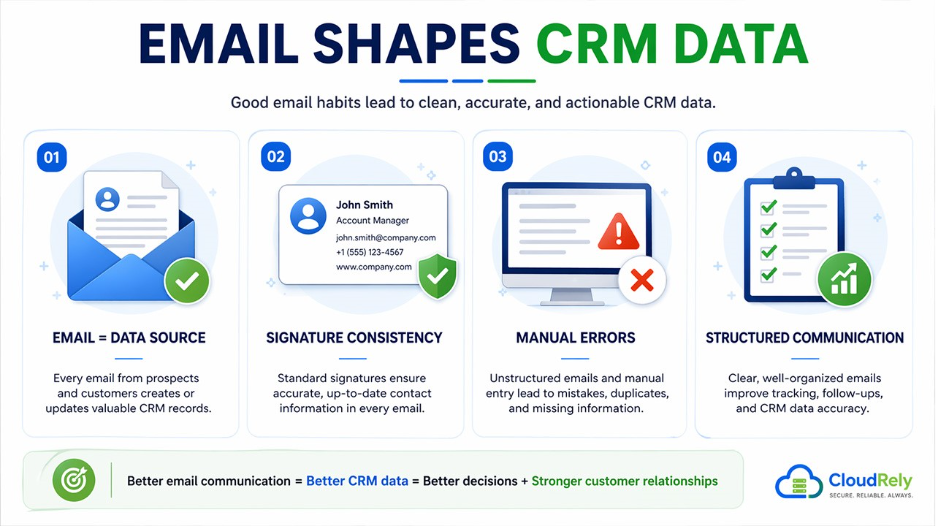
A prospect replying to an outreach email means a new contact record. Meanwhile, a client sending a note mentioning they changed roles is an update nobody will catch unless someone is paying attention. A customer complaining over email and getting it resolved is an interaction that belongs in the CRM timeline.
When this stuff gets logged properly, the CRM builds a reliable history over time. When it does not, the gaps pile up. Contacts get duplicated, and fields stay blank. Old phone numbers and job titles linger in the system long after they stopped being accurate.
The problem is not usually the CRM itself, but the habits around email on what gets logged, when, and by whom.
Inconsistent Email Signatures Create Data Gaps
Many businesses tend to overlook the email signature. Every outbound email your team sends is a small data package. All the name, title, phone number, and company are contact information that ends up in someone's inbox and, ideally, in your CRM. When that information is inconsistent or outdated, it creates noise.
One rep still has their old title in their signature. Another never added a direct number. A third has contact details that changed two office moves ago. Multiply that across a team, and you have a steady stream of inaccurate data flowing into every email thread.
Standardizing signatures is the fix. A free email signature generator can help every team member maintain an accurate, consistent email signature block without relying on people to remember to update it themselves.
That consistency carries over into the CRM. This means that contacts captured from email threads will have the right details from the start, rather than needing cleanup later.
It also does not hurt that a clean, professional email signature tells clients they are dealing with an organized business. That alone tends to improve response rates, which means more trackable interactions make it into the system.
Manual Data Entry Errors Are an Email Problem
Most CRM systems still depend on someone reading an email and deciding what to log. That sounds simple, but it leaves a lot of room for inconsistency.
Email formatting plays a bigger role here than most people expect. When a customer sends a long, rambling email with five different topics rolled into one, whoever logs it must interpret it.
Two people might read that same email and pull out completely different key points. Over time, that subjectivity creates messy records. There could be two reps logging the same account in different ways, with no clear picture of what happened.
The reverse is also true. When your team sends structured emails with clear subject lines, one clear call to action, and organized body text, customers tend to respond in kind. That makes responses easier to process, easier to log, and less likely to be misinterpreted or skipped entirely.
Email communication skills are not just a courtesy thing. They feed directly into the accuracy of what ends up in your CRM.
Response Times and Follow-Up Gaps Distort the Timeline
CRM data hinges on a timeline. It serves as a running account of every meaningful touchpoint with a customer. When email threads go cold or when follow-ups happen outside the system, that timeline develops holes.
Slow response times are often a sign of unclear ownership. If nobody knows whose job it is to reply to a particular email thread, it either gets ignored or gets replied to late. By the time someone logs it in the CRM, the context has shifted. The customer has already followed up again, gone quiet, or taken their business elsewhere.
Some teams use an email alert system to flag threads that have not had a response within a set window. Others connect their email client directly to the CRM so interactions are logged automatically. Either approach reduces the chances of something slipping through unrecorded.
It is worth pointing out that better response time management is not just a customer service win. It is a data completeness win. A CRM that reflects what is happening with each account is one your team can make real decisions from.
Internal Communications Pollute Shared Records
Not everything in an email thread belongs in the CRM. Internal back-and-forth between account managers, strategy notes, and status updates between teammates. None of that is customer data, but it tends to get logged anyway. This is especially for teams without clear email policies around what goes into the system and what does not.
The result is records that are technically full but practically useless. A new rep takes over an account, opens the CRM, and wades through a mix of client emails and internal threads. It is hard to read, and important context gets buried. Worse, they might repeat outreach that has already happened because the relevant email was lost in the noise.
Using proper distribution lists to separate internal and external communication helps. So does training teams on what needs to be logged versus what can stay in a shared inbox. The goal is not to log everything, but to log the right things.
Email etiquette also plays a quiet role here. When internal threads are clearly labeled and easy to distinguish from customer-facing messages, accidental logging drops significantly. It sounds minor, but across a large team, it adds up.
Email Analytics Can Signal Data Quality Issues Early
Your email analytics will often tell you your CRM has a problem before anything else does.
A high bounce rate on outbound emails almost always means contact records have gone stale. Email addresses that were accurate two years ago may belong to people who have changed jobs, retired, or moved to a different company. If a meaningful percentage of your emails are bouncing, that is a data problem hiding inside a deliverability problem.
A low email response rate can mean that the right people are not in your system, or that contacts are not being segmented the way they should be. Either way, the signal is worth following up on inside the CRM, not just in the email tool.
Treating email analytics as a feedback loop rather than a standalone metric changes how both systems get maintained. Problems get caught earlier. Data stays fresher. And the connection between how your team communicates and what lives in the CRM becomes harder to ignore.
It All Connects
Email communication and CRM data quality are not two separate problems. They are the same problem looked at from different angles. Every email sent or received is a chance to either strengthen or weaken the data your business runs on. The fixes are not complicated, and none of them requires a big technology investment. Most of it is just discipline.
Businesses that take email communication seriously—not just to talk to customers, but as a source of data—end up with CRM systems they can rely on. And a CRM you can rely on makes everything else easier: better forecasting, smarter outreach, and customer conversations that reflect where the relationship stands.
%201.png)

%201.png)

%201.png)