

If your CV subscription has served its purpose and you wish to discontinue it, simply canceling the subscription is extremely easy and can be done in a matter of minutes. For this, you don’t need any specific technical knowledge. The process of canceling a subscription does not involve any lengthy procedures. With the help of a few simple steps, you can cancel your subscription and eliminate future charges.
The purpose of this guide is to provide a clear understanding of how to cancel your subscription so that you will have no confusion about anything.
Steps to Cancel CV Machine Subscription
To cancel your CV Machine subscription without any hassle or problems, follow these simple instructions:
Step 1: Visit the CV Machine Website
Go to the official website of CV Machine using your browser. There is no need to search through multiple pages. The cancellation option is usually present directly on the website.
Scroll down to the bottom of the homepage. Search for the Cancel Subscription option. Click on it to move forward.
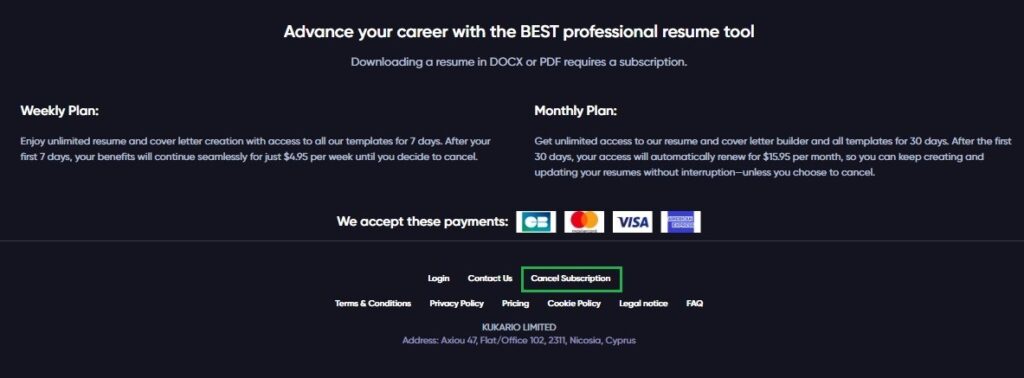
Step 2: Enter Your Registered Email Address
When you click on CV Machine Cancel Subscription, you will be taken to the cancellation page. There, you will find an option to enter your email address. Add the same email that you used to create your CV Machine account to successfully complete the cancellation process.
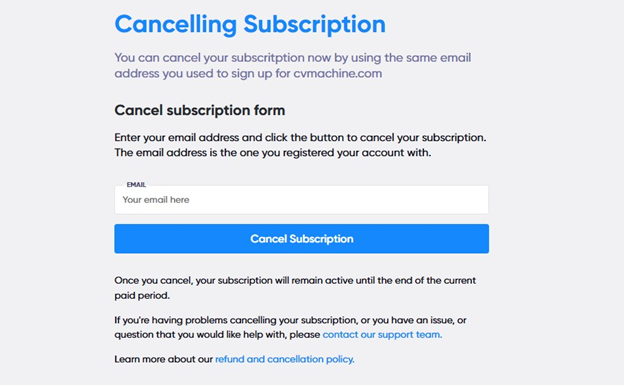
After you enter your email, click on the Cancel Subscription button to further complete the process of cancellation.
Step 3: Confirm the Cancellation
After you click on the Cancel Subscription button, a confirmation dialog box will appear asking, “Are you sure you want to cancel your subscription?”
Click Yes to proceed with the cancellation.
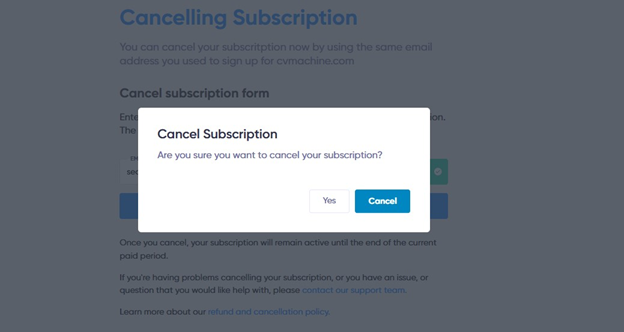
After you click Yes, a confirmation link is sent to the email address. Until you complete the confirmation via email, the account will not be unsubscribed.

And this will appear when confirmed.
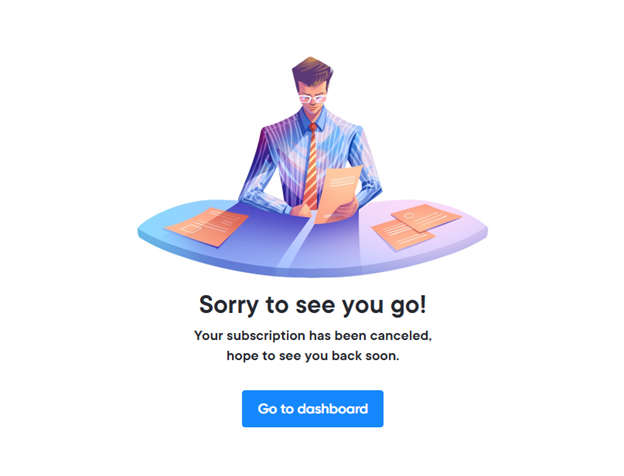
Alternative Method: Cancel CV Machine Subscription via Account Page (login required)
If you prefer canceling your membership from inside your CV Machine account, you can follow this internal account method. This method asks you to log in and provides you direct access to your subscription controls.
Step 1: Log In to Your CV Machine Account
Open the CV Machine website. Log in with your registered email address and password.
Step 2: Go to Account Settings
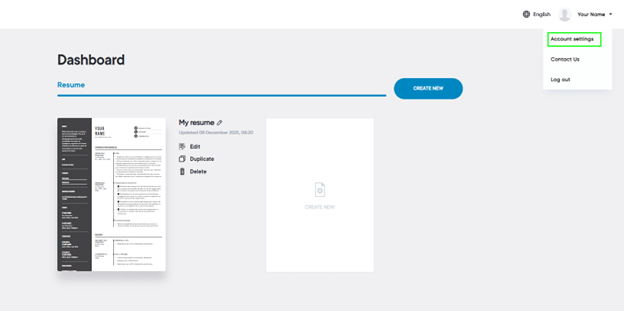
In the top-right corner, click on your profile.
Select Account Settings, from the dropdown menu.
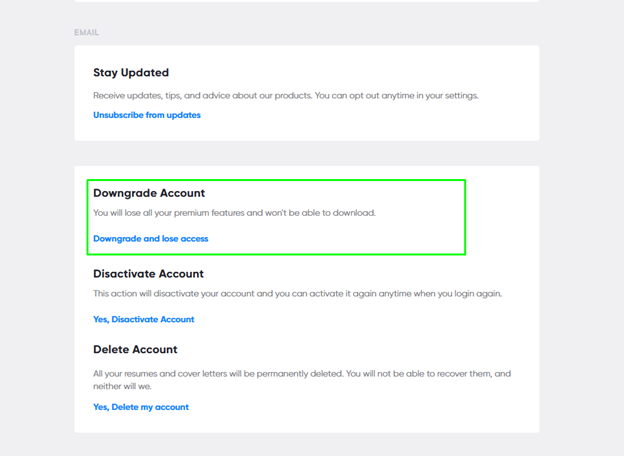
Step 3: Scroll Down to the “Downgrade” Section
Inside Account Settings, scroll down to find the downgrade section. Click on "Downgrade and lose access"
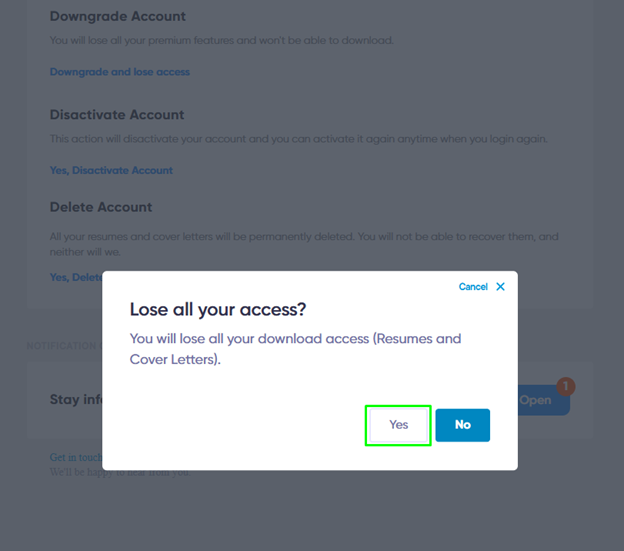
Step 4: Confirm the Pop-up Message
A confirmation pop-up will appear.
To continue with the cancellation process, Click on Yes.
Step 5: You Will Be Redirected to the Cancellation Page
Once it is confirmed, you will automatically be redirected to the official cancellation page.
From this point onward, follow these process steps:
- Type your registered email address (usually this field is pre-filled)
- Click Cancel Subscription
- To confirm your decision, a pop-up will appear.
Tips to Manage Subscriptions Better
Canceling one subscription is a good reminder to manage others too. Here are some helpful tips:
- First, make a list of all active subscriptions that you currently have.
- Remember to note their renewal dates and monthly charges accordingly.
- Set reminders a few days before renewal so that you don’t miss them.
- Keep reviewing subscriptions regularly and cancel the ones that you do not use anymore.
To stay organized and reduce chaos, you can also use subscription tracking apps. They make it easy to manage and track all subscriptions.
What Happens After You Have Cancelled?
Once you have cancelled your subscription to CV Machine, here's what you should know:
- Your account stays active up to the end of the current billing period.
- You will still have all features until it expires
- There will be no charges will be made to your payment method
- Your CV data and templates remain saved in your account
- You can reactivate your subscription anytime by logging back in.
Just log back into your account and resubscribe before your current period expires if you accidentally cancel or decide to change your mind. Your work is secure even after cancellation because CV Machine does not immediately delete your account.
If you're exploring other options after canceling, consider checking out AI resume writing tools that can help you create ATS-friendly resumes with optimized keywords and professional formatting. These tools offer various features that might better suit your current needs.
Conclusion
Cancelling your subscription to the CV Machine is fast and efficient if one does everything correctly. Timely cancellation will prevent extra charges from occurring and give you more control over your money outflow.
Always audit your subscriptions and keep only those that you really use. These few minutes of checking will help you keep a lot of money and also reduce a lot of stress later on.
%201.png)

%201.png)

%201.png)