

Many modern businesses adopt cloud migration to improve their operational speed and flexibility. This activity can offer you better security and higher availability. Plus, you can boost your market position and provide a smoother experience for clients.
It's essential to pick a migration strategy that matches your needs. Keep reading and learn about some popular methods!
What Is Cloud Migration?
Cloud migration is the relocation of your digital assets from on-site infrastructure to the cloud. This activity allows you to modernize your IT environment and reduce routine management tasks.
This process typically begins with evaluating your existing systems. You have to assess your workloads to see if they can run in a cloud environment. Also, you need to determine your goals, like
- Scalability,
- Performance improvements,
- Security enhancements,
- Cost optimization,
- Remote access to critical systems.
Then, you choose a migration strategy and start transferring workloads.
Cloud migration makes your environment more dynamic. So, you can experiment with new technologies and deliver better digital experiences. Plus, it supports strategic business growth. You can enjoy the benefits of advanced analytics and global availability.
Famous Cloud Migration Strategies
Businesses usually evaluate and choose from multiple standard migration methods for cloud adoption. Each approach offers a different path. So, you can adopt a model that fits your technical requirements and vision.
Rehosting
Rehosting is the simplest cloud migration method. Many companies use it to transition to the cloud faster. Basically, you just move applications without modifying their architecture or code.
This method is especially helpful when you need to migrate quickly, due to data center closures, hardware end-of-life events, and urgent cost cuts.
It works well for large systems that would take too long to modernize immediately. You can reduce capital expenses and simplify many operations.
Plus, you can use this approach as a first step in a multi-phase modernization.
Replatforming
Replatforming blends stability with cumulative modernization. You migrate applications to the cloud with moderate adjustments that improve performance and reliability. These adjustments might include
- Managed database services integration,
- Middleware updates,
- Configurations tuning.
This strategy is great if you don't want to do a complete code overhaul. You can simply shift management of some infrastructure components to the cloud. Many organizations use replatforming when transitioning their analytics infrastructure, such as moving traditional databases to a modern Data Warehouse solution. This approach maintains data accessibility while leveraging cloud-native performance benefits.
The replatforming approach also facilitates a phased modernization. You can adopt it gradually and prepare your systems for further upgrades.
Refactoring
This strategy is pretty technically intensive. You will have to redesign or rewrite parts, or sometimes all of an application. Refactoring usually includes
- Event-driven workflows,
- Microservices,
- Containers usage,
- Serverless computing.
Businesses choose this method if they need a high level of modernization. It's particularly valuable for systems that need to support unpredictable traffic or should integrate with new technologies.
Your applications will be more adaptable and resilient. They can scale automatically and integrate with modern development pipelines.
Repurchasing
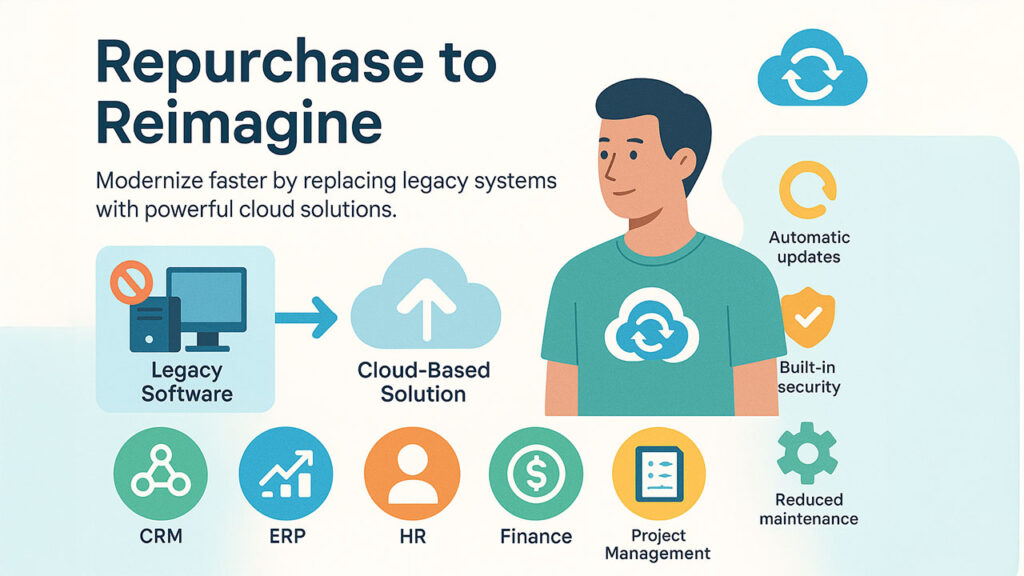
Repurchasing is a strategy focused on modernization. You need to retire your existing software and replace it with a cloud-based commercial solution. You simply adopt a new system that already runs entirely in the cloud. This method is common for standard business functions, like Cloud-based CRM systems, ERP, HR management, Finance systems, Project management tools.
This method is common for standard business functions, like
- CRM,
- ERP,
- HR management,
- Finance systems,
- Project management tools.
New solutions offer regular updates and built-in security features. You can focus on business processes instead of software administration.
Repurchasing is especially useful if your current systems are outdated or difficult to maintain. It offers access to advanced features that would take years to develop internally.
Retiring and Retaining
You don't have to move every application to the cloud. You have to identify outdated or rarely used workloads that can be retired. It will help you decrease
- Licensing payments,
- Maintenance expenses,
- Operational complexity.
Also, you can retain certain workloads in their current environment. It's a good option for processes sensitive to latency and dependencies on specialized on-premises hardware. They will continue to run locally or in private data centers.
This dual approach ensures that your migration efforts are more efficient and match your organizational priorities.
Role of Automation and Operational Practices
Automation and mature operational practices are critical components of a successful migration. You risk dealing with inconsistent deployments and slow release cycles without them. So, here are some aspects to concentrate on.
DevOps Services for Faster Deployments
Cloud migration is not just a technical transition. It requires reorganizing how your teams work. So, many businesses use devops services to standardize deployments and deliver updates faster.
During migration, these practices can offer you
- Automated deployments,
- Continuous monitoring,
- Better collaboration,
- Scalability management.
This automation-driven workflow allows you to maintain more control during the migration process.
CI/CD Pipelines During Migration
CI/CD pipelines are another important element of successful cloud migration. They offer an organized framework for developing and releasing applications.
These pipelines offer automated testing. It validates compatibility with cloud environments before updates are released. Also, they can help you detect errors early in the development cycle.
Also, CI/CD supports frequent iteration. So, your teams can migrate in smaller and more controlled phases. Plus, every change is tracked, and you can easily make rollbacks if issues arise in new cloud environments.
Overall, CI/CD pipelines create a predictable process that simplifies the migration and ongoing operations afterwards.
IaC for Consistency and Speed
Infrastructure as Code is another transformative practice in cloud operations. You don't have to configure servers and resources manually. You can use machine-readable templates to define the infrastructure.
This approach allows you to ensure identical setups across development and production. Also, IaC automates the creation of new resources during demand spikes or new application releases.
Plus, it can help you improve disaster recovery. You can recreate entire environments from code if a failure occurs. Not to mention that IaC templates enforce security standards and organizational policies automatically.
Common Challenges
Cloud migration offers significant long-term benefits. Yet, the transition process can be pretty difficult. You might experience different complications that will slow your progress.
Legacy System Complexity
Many organizations use legacy applications in their work. They operate on monolithic systems and use older programming languages.
These systems were never designed for distributed cloud environments. Some lack documentation or require specialized hardware. So, you'll have to spend a lot of time managing them properly.
Data Transfer Limitations
Moving large volumes of data is a technically demanding aspect. Data transfer can be slow. The process is especially tricky if you have to handle strict uptime requirements.
You should also guarantee data consistency and follow relevant security regulations. There is a possibility of data breaches or integrity issues. So, you'll have to implement strong encryption and access controls.
Application Downtime
You might experience reduced service availability or full downtime even with a proper migration plan.
Some of your applications can be tightly integrated with other systems. Transferring them might negatively impact regular business activities. These downtimes may lead to revenue loss and client dissatisfaction.
So, careful planning and phased execution are necessary to limit these operational disruptions.
Cost Management
Cloud adoption usually reduces operational expenses in the long term. However, the migration process can be costly. You'll have to invest in
- Code refactoring,
- Staff training,
- Running dual environments,
- New tools.
Plus, it's difficult to predict cloud pricing models. They might change during high-demand periods.
Security Challenges
Cloud environments introduce new security models and governance requirements. They differ a lot from traditional data centers.
Weak identity management and unprotected APIs may lead to vulnerabilities. So, you have to implement strong governance policies. They will help you protect sensitive information and satisfy compliance requirements.
Testing
Your application may perform differently from their behavior on traditional servers. Network latency and resource allocation can impact your performance.
So, you should do thorough testing to ensure applications behave correctly. Your team may also need to reconfigure resource usage and adopt new monitoring tools.
Conclusion
Cloud transition allows you to move away from outdated on-premises systems. Also, you will get more advanced tools and automation capabilities.
You just need to pick a model that meets your technical needs. Some popular strategies are
- Rehosting,
- Replatforming,
- Refactoring,
- Repurchasing.
Make sure to analyze your current systems to decide which option will be the best fit. Also, we recommend you use professional devops services to make this process smoother.
%201.png)

%201.png)

%201.png)