
Most teams lose customers because messages end up scattered across phones, inboxes, and sticky notes. SMS is fast and personal, but the problem is that texting often lives outside your CRM, creating blind spots.
One rep texts a lead, another rep calls them, and support has no clue what was promised. The customer ends up repeating themselves, and your team wastes time chasing context. That is exactly why CRM with SMS Integration has become a non-negotiable setup for teams that want faster, more organized customer communication.
To make it simple, keep texting connected to the same system where you track leads, deals, and customer history. Platforms such as TrueDialog are designed for business texting and are integrated with workflows, so your team can move quickly without losing sight.
In this guide, you will learn what CRM texting integration really means, what workflows are most important, and how to implement it in a way that your team will use.
What CRM and SMS Integration Means
The integration of CRM and SMS functionality allows your team to send and receive text messages while working within the CRM, and these messages are stored in the appropriate contact or account record.
A good integration should have the following:
- Two-way texting, so customers can respond, and your team can respond back.
- Message logging, so messages are logged on the contact timeline, just like calls and emails.
- Shared visibility, so sales, support, and ops can view the same conversation.
- Automation options, such as reminders, follow-ups, and alerts based on CRM changes.
People often say “CRM texting” as if it were one feature. In reality, it is a group of features working together. The goal is not just sending texts. The goal is to keep customer communication organized and easy to act on.
If you are searching for a CRM with SMS integration, focus less on buzzwords and more on whether texting becomes part of your daily workflow, not an extra tab your team forgets to open.
Benefits You Can Measure
"Better communication" sounds nice, but your team needs results you can see. Businesses that have implemented CRM with SMS Integration consistently report improvements that show up directly in their numbers — not just in team satisfaction.
Here are the measurable wins many businesses get from an SMS-enabled CRM:
Faster Lead Response
Speed matters. When a lead asks for pricing or availability, texting helps you reply while they are still paying attention. Track this by measuring time-to-first-reply.
Fewer Dropped Follow-Ups
When texting is tied to the CRM, it is easier to set tasks, reminders, and sequences. You can measure this by tracking follow-up completion and stage movement.
Cleaner Customer History
When texts stay on the contact record, anyone can jump in and help without guessing. Measure this by fewer issues with internal handoffs and less “Can you forward me that text?” chatter.
Greater Appointment Show Rates
Reminders and confirmations via SMS can help reduce no-shows in various sectors. Measure this by comparing the number of appointments scheduled versus completed.
Better Service Experience
Customers like quick updates. Texting makes it easier to share ETAs, job status, and simple troubleshooting steps. Measure this by faster ticket resolution and higher satisfaction scores.
High-Value Use Cases by Team

CRM texting works best when you start with a few high-impact use cases. Do not try to automate everything in week one. Pick the moments where speed and clarity matter most.
Sales
- Speed-to-lead texting: A quick, friendly first message after a form fill.
- Quote follow-ups: “Just sent the estimate. Want me to walk you through it?”
- Next-step nudges: After a call, send a short recap and a clear action.
Sales texting should feel helpful, not pushy. Short messages win.
Customer Support
- Status updates: “Your issue is fixed” or “We are still working on it.”
- Simple troubleshooting: One or two steps the customer can try right away.
- Scheduling: Quick appointment changes without phone tag.
Support loves SMS when the conversation is saved to the customer record, so the next agent can pick up smoothly.
Operations And Field Teams
- Arrival notifications: “Tech is on the way, ETA 20 minutes.”
- Delay alerts: Clear updates before the customer has to ask.
- Job confirmations: “You are scheduled for Thursday at 2 PM. Reply YES to confirm.”
Ops teams usually care most about reliability and timing. SMS is a natural fit.
Marketing
- Targeted offers: Only to people who opted in and match the segment.
- Reactivation: “Need help with your next service? Reply to book.”
- Review requests: Sent after a completed job or resolved ticket.
Marketing messages need special attention when it comes to consent and how often they’re sent, so make sure campaigns are respectful and provide a simple way to opt out.
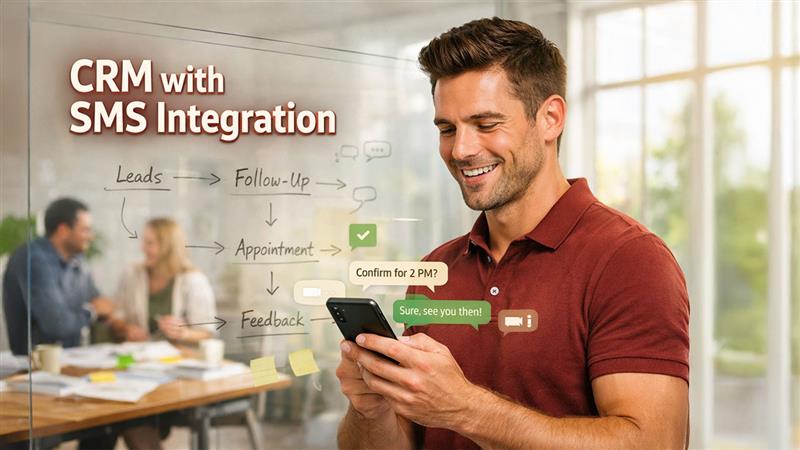
Workflow Blueprint: From Lead to Follow-Up
If you want your CRM texting to stick, create one workflow that your team can follow without thinking. Here is a simple blueprint that works in many industries.
Step 1: Capture The Lead
A lead comes in from a form, call, chat, or referral. The CRM creates a record and assigns an owner.
Step 2: Send A Fast First Text
Send a quick text message that answers the lead’s primary question and asks for a response.
Example:
“Hi Sam, this is Alex with Acme Services. Thanks for reaching out. What day works best for a quick quote call?”
Step 3: Qualify With Two Questions
Keep it light. Ask what you need to book the right job or route the lead.
Example:
“Got it. Is this for a home or business?”
“And what zip code are you in?”
Step 4: Confirm The Appointment
Once booked, send confirmation details. Include the time window, address, and what to expect.
Example:
“You are set for Tue 10 to 12. Reply YES to confirm, or reply RESCHEDULE if you need a change.”
Step 5: Send A Reminder
A reminder the day before, and another a few hours before, can reduce no-shows. Keep it short.
Step 6: Post-Visit Follow-Up
After the job or appointment, send a thank-you message and next steps.
Example:
“Thanks for having us today. If anything comes up, just reply here.”
Step 7: Ask For Feedback
If it makes sense, send a review or survey request after a positive outcome. Do not spam. One request is usually enough.
The big advantage here is that each message becomes part of the customer record. That means fewer dropped balls and less confusion when someone is out sick or a customer calls back weeks later.
Integration Options: Native, API, or Middleware

There are three common ways to connect SMS with a CRM. What to choose depends on your team, your tech comfort level, and how customized your workflow needs to be.
Native Integration
This is typically the simplest option. A native integration is designed to integrate with the CRM.
Best for:
- Teams that want a quick setup
- Standard workflows like logging, templates, and routing
- Lower maintenance over time
SMS API Connection
An API connection provides you with more control. You can create your own actions, triggers, and routing rules.
Best for:
- Teams with developer support
- Custom workflows
- Special needs like unique routing, advanced automation, or custom UI
Middleware Tools
These are connectors that link apps through simple triggers. They can be useful for basic use cases.
Best for:
- Quick experiments
- Simple alerts or one-way messages
- Teams that do not want to build code
Not sure which path fits your business? The answer often depends on how standardized or unique your sales and support processes are. Teams with highly specific workflows tend to outgrow native integrations quickly — and that's exactly the case where investing in a Custom CRM Solution makes more sense than forcing a generic tool to fit. A tailored CRM can be built with SMS workflows baked in from the start, so texting becomes part of the system rather than an afterthought.
Before you choose a path, use this checklist:
- Does it log messages to the right contact record?
- Can it handle two-way replies and assign them correctly?
- Can you set up templates and message rules?
- Does it support automation triggers from CRM events?
- Can you manage opt-outs and message preferences?
If you cannot answer “yes” to most of these, the integration will feel messy fast.
Compliance and Deliverability Basics
Business texting is powerful, but it has rules. You do not need to be a lawyer to do the basics right, but you do need a plan.
Start with these practical guidelines:
- Get consent before sending marketing texts. Make it clear what people are signing up for.
- Make opt-out easy for campaigns. A simple “Reply STOP to opt out” is common.
- Respect timing and frequency. Do not text people late at night, and do not overload them.
- Keep messages clear and honest. Say who you are and why you are texting.
- Handle opt-outs correctly. If someone opts out, stop sending them campaigns unless they opt back in.
Also, deliverability matters. Spammy content, too many messages, and poor list quality can hurt results. The best way to stay out of trouble is to send texts people actually want and expect.
Make Texting Work Inside Your CRM
CRM texting is not about blasting messages. It is about building a smoother, faster customer experience that your team can repeat every day.
Start small:
- Pick one workflow, like lead follow-up or appointment reminders.
- Make sure texts log to the contact record.
- Train your team on simple templates and response rules.
- Track results for a month, then expand.
If you want to build or customize texting workflows with more control, explore an integration option like an SMS API to connect messaging to your CRM process and automation.
Conclusion
Getting CRM with SMS Integration right is not about adding texting as a feature — it is about making communication a structured, trackable, and repeatable part of how your team operates every day. When messages live inside the same system as your leads, deals, and customer history, nothing gets lost, no one repeats themselves, and your team moves faster with full context. Start with one workflow, measure it, and build from there.
%201.png)

%201.png)

%201.png)