

DomainKeys Identified Mail (DKIM) is a protocol for email authentication that allows a domain to attach a cryptographic signature to each outbound email. It helps recipients to verify whether the message is authorized and unaltered. In a more practical sense, DomainKeys Identified Mail or DKIM uses a private key at the transmitting server to generate a signature. It also publishes the matching public key in DNS, which can be validated by the recipient server. As per the defined security standard by the Internet Engineering Task Force, DomainKeys Identified Mail links a message to its verifiable sender identity to strengthen email security.
- How it fights abuse: It ties a verifiable cryptographic signature to the email headers and message body. DKIM doesn’t leave any room for email spoofing and tampering. Malicious email or phishing attempts sent by attackers cannot produce a valid DKIM signature for your domain without your private key.
- Core benefits: The DKIM also helps in keeping your emails safe and trustworthy. It helps in making sure that the message does not change and also confirms who sent it. When DKIM, DMARC, and DMARC or SPF work together, various major email providers, like Google, Microsoft, and Yahoo, trust the email, which means your mail is more likely to get delivered, rather than ending up in the spam folder. Without it, you risk email delivery failures that silently damage campaigns and sender reputation. The DomainKey also helps in enabling policy enforcement and supports downstream initiatives such as BIMI for brand presence.
In summary, DKIM complements both SPF and DMARC to protect outbound and inbound email ecosystems. It significantly advances Phishing protection and improves overall email security. “In this guide, DKIM explained helps readers understand how email signatures protect messages from tampering.”
How DKIM Works Under the Hood: Keys, DNS Records, Signing, and Verification Flow
The key pair and DKIM selector
You generate a key pair (private key and public key) for each sending domain or subdomain. Many email providers such as Amazon SES, Mailchimp, Zoho Mail, Mimecast, ProtonMail) provides assistance with setup, rotation, and configuration. Privacy-focused providers like Typewire also handle DKIM configuration on their end, which is particularly valuable for organizations that prioritize keeping email infrastructure secure and data stored on privately owned servers rather than shared cloud environments.
A DKIM selector puts a label on which key to use (for example, s2026). Multiple selectors support staged deployment and key rotation.
Publishing the DKIM record in DNS
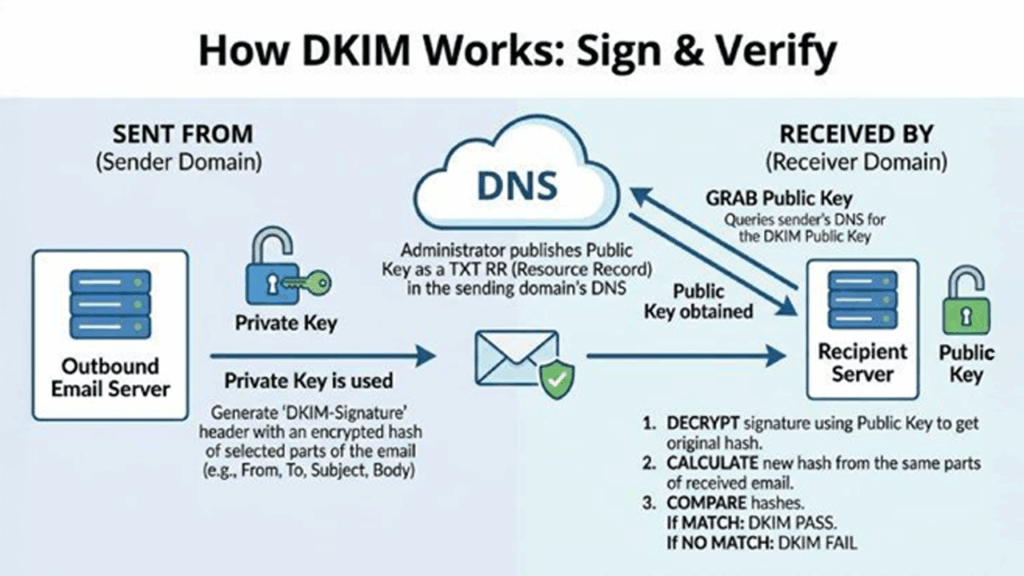
- The public key is published as a DNS TXT record at selector _domainkey.your-domain. This DomainKeys Identified Mail record is a DNS TXT, that advertises the public key and related parameters to public DNS resolvers.
- As DKIM relies on DNS records, ensuring that the DNS hosting, like Cloudflare, is authoritative and healthy. Use adequate TTL and verify no line breaks or quote issues in the TXT record.
Message signing and server verification
- Outbound path: Your mail server or Mail Transfer Agent (MTA) computes a cryptographic hash over defined email headers. Then the message body signs it with the private key to generate the DKIM signature. It is a cryptographic signature which is a type of digital signature. Finally, the signature is inserted as a DKIM-Signature header, which results in a signed email.
- Inbound path: In the inbound path, the recipient server tries to retrieve the public key via Domain Name System (DNS), which locates the DKIM record using the DKIM Selector. It also validates the cryptographic signature and confirms the verification of message integrity along with authenticating the sender's identity associated with the domain.
This validation doesn’t encrypt content. DKIM only authenticates and ensures message integrity. It is not about confidentiality. Encryption layers such as SMTP transport security (e.g., TLS) address different parts of the email system.
Anatomy of a DKIM Signature: Tags, Selectors, Canonicalization, and Algorithms
Key DKIM-Signature header tags
A DKIM signature lives in the email headers under DKIM-Signature: and includes tags such as:
- v: version (e.g., 1)
- a: algorithm (e.g., rsa-sha256 or ed25519-sha256)
- c: canonicalization (e.g., relaxed/relaxed)
- d: signing domain
- s: DKIM selector
- h: list of signed header fields
- bh: body hash (cryptographic hash of the canonicalized message body)
- b: the cryptographic signature itself
- t: timestamp
Canonicalization choices (c=)
Canonicalization defines how headers and the message body are normalized before hashing, increasing resilience to minor formatting changes. Common choices:
- relaxed/relaxed: normalizes whitespace and header capitalization.
- relaxed/simple or simple/relaxed: rarely used today; relaxed/relaxed is widely recommended to preserve validation under benign transformations.
Algorithms (a=)
Modern deployments should use a= rsa-sha256 or ed25519-sha256. RSA with 2048-bit keys is the current baseline, while Ed25519 offers shorter keys and strong security. Both produce a robust cryptographic signature consumers can validate against the published public key.
- Example DKIM-Signature snapshot
- DKIM-Signature: v=1; a=rsa-sha256; d=example.com; s=s2026; c=relaxed/relaxed; h=from:to:subject:date:mime-version; bh=…; b=…
DKIM vs. SPF vs. DMARC (and BIMI): Complementary Roles and Alignment
Roles at a glance
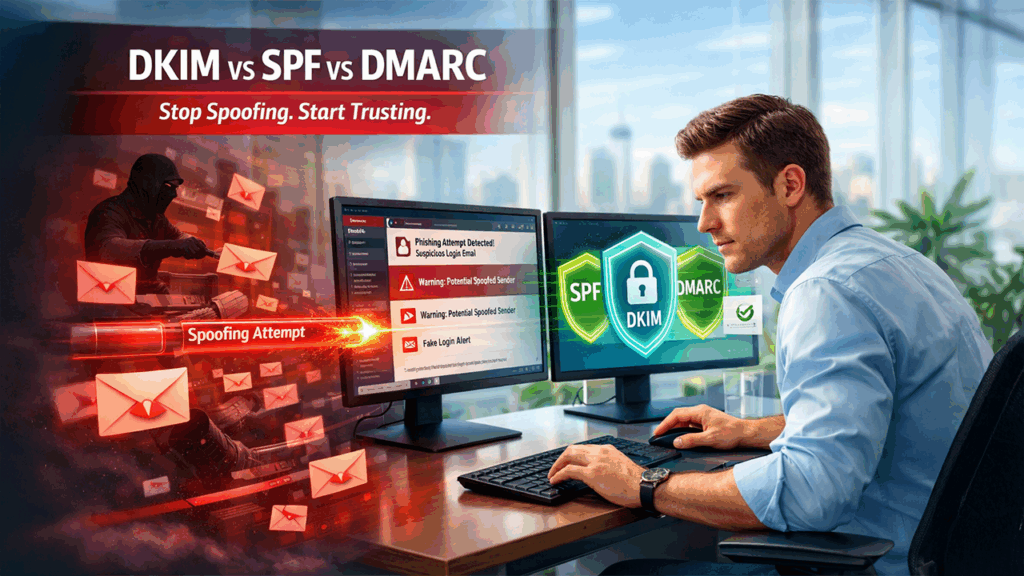
- SPF (Sender Policy Framework): It is a sender policy that maintains a list of all IPs or hosts that may send mail to a domain. It does not sign the content, rather checks the transmitting server path.
- DKIM (DomainKeys Identified Mail): In order to create a DKIM signature, it uses a private key. With this, recipients can verify with the public key which is published in DNS records. It authenticates the domain in email headers while ensuring message integrity.
- DMARC (Domain-based Message Authentication Reporting and Conformance): DMARC adds key policy enforcement and alignment, which tells the receivers how to treat failures, i.e., none/quarantine/reject, and aligns the domain in the visible From: header with either SPF or DKIM results.
Alignment and why it matters
Under DMARC, alignment ties the From: domain to the domain in the DKIM d= tag or the SPF-validated domain. This alignment gives mailbox providers like Gmail, Outlook, and Yahoo strong identity verification, boosting trust and helping prevent forgery. Many receivers use DMARC reports to inform ongoing validation and tuning.
BIMI’s place
BIMI (Brand Indicators for Message Identification) displays brand logos when strict DMARC policy enforcement is in place and domain identity is authenticated. While BIMI is not an authentication protocol, it builds on DKIM, SPF, and DMARC outcomes to elevate brand trust in clients like Gmail and Yahoo.
Strengths and limitations
- SPF shows resistance when forwarding. On the other hand, DKIM allows most forwards because cryptographic signature rides with the message.
- SPF indicates sending IP authentication; not DKIM.
- DMARC unifies signals with policy enforcement and reporting, guiding protection decisions across the email ecosystem.
Planning Your Deployment: Domain/Selector Strategy, Key Management, and DNS Considerations
Map your domain footprint and sending sources
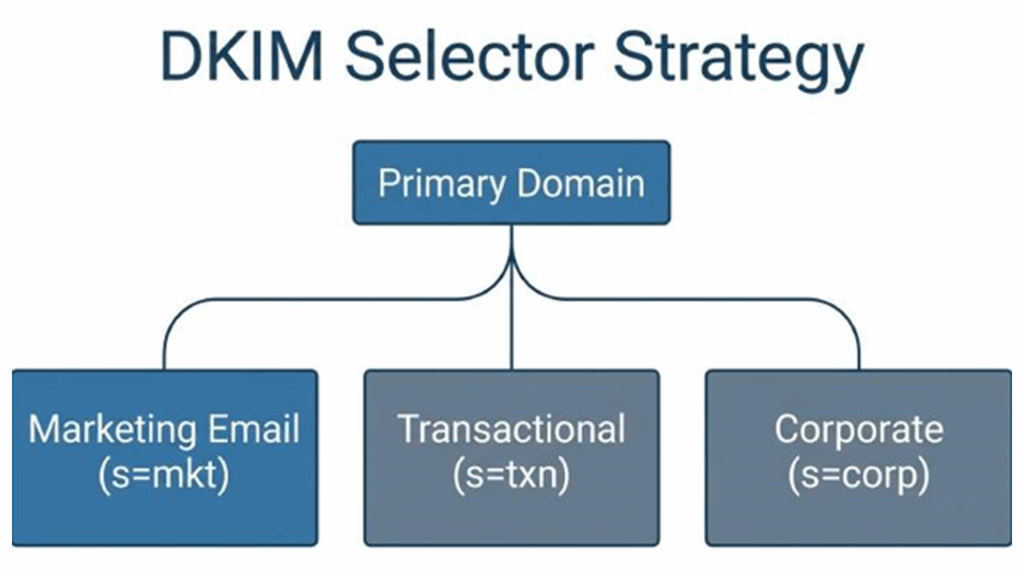
Recording every domain and subdomain that sends email, corporate mail server, marketing platforms, transactional providers, security gateways, and mailboxes. These sending services sign outbound email with its own DKIM selector and private key. These also publish a matching DKIM record in your DNS. Coordinate with each email provider to ensure consistent setup and configuration.
Selector strategy and key management
- Use different DKIM selectors for each platform (e.g., s=ses1, s=mc1) to isolate keys and enable staged rotation without disrupting authenticated email.
- For stronger protection, prefer 2048-bit RSA keys or Ed25519. Rotate different keys regularly and revoke unused selectors. Maintain a documented key lifecycle for deployment, renewal, and retirement.
- Treat private key as a sensitive component and keep it stored securely on the mail server or within the provider’s console. The public key belongs to the public DNS only.
DNS hygiene and record publishing
- Publish one DKIM record per selector as a DNS TXT record under selector._domainkey.your-domain. If your DNS platform (e.g., Cloudflare) enforces character limits, split long TXT data into quoted strings. Always verify the resulting DNS TXT record via public DNS lookups.
- Ensure other DNS records (SPF and DMARC) are present and valid. DMARC reporting (RUA/RUF) provides visibility into verifying sender outcomes and helps with policy enforcement.
- Stray semicolons, extra spaces, or wrapping errors can also break validation. It is essential that users never publish the private key, only the public key belongs in DNS records.
Signing scope and header choices
Choose a consistent set of email headers, like From, Subject, Date, MIME-Version, To, to sign in and use relaxed canonicalization. You can also avoid the l=tag, unless you have a specific need: partial-body signing can weaken validation if intermediaries modify the message body.
Troubleshooting and server verification tips
- In the situation that DKIM fails at the recipient server, the DKIM selector matches the DNS TXT record, and the public key is retrievable. After this the algorithm/length matches your key pair.
- At your Mail Transfer Agent, check the SMTP logs and use domain testing tools from Google, Microsoft, and Yahoo. Clients like Apple Mail and Gmail may show signature details, aiding diagnosis.
- Common pitfalls: publishing CNAME for the DKIM record, instead of TXT, quoting errors in DNS, mismatched d=domain versus from: domain under DMARC, and outdated keys after rotation.
Operational best practices
- Combine DKIM with SPF and a DMARC policy that advances from none to quarantine/reject as confidence grows. This phased setup enables safe policy enforcement.
- Monitor DMARC aggregate reports to track authenticated email, failures, and unexpected sources. Investigate any unauthorized email message sources to stop malicious email at its origin.
- Document processes for setup and configuration changes, especially when adding new platforms or migrating your mail server. Regular audits maintain validation continuity across your email system.
Risk management and compliance
DomainKeys Identified Mail is very critical to maintaining your organization’s email security posture. It is true that DKIM doesn’t encrypt your content. Its cryptographic signature makes sure that your messages remain unaltered and secure. It also supports identity verification. Collaborating with SPF and DMARC, it adds a defense layer to improve email delivery, verify sender identity, and provide strong protection against email spoofing and phishing.
Conclusion
DomainKeys Identified Mail, or DKIM, in simple terms, is an email authentication protocol that allows a domain to attach a cryptographic signature to each of the outbound emails. DomainKeys Identified Mail uses public-key configuration to sign emails and ensure that the email content and specific headers have not been tempered. DKIM also helps in improving email deliverability, as a valid DKIM signature is less likely to be marked as spam by the receiving email server. DKIM is also utilized alongside SPF and DMARC, which further improves the security of an email.
%201.png)

%201.png)

%201.png)