

AI mode forms the foundation of an enhanced experience that Google now ensures for its users. Here, AI creates complete answers and finds information with respect to users’ queries. It is quite different from the conventional pages of links that Google showcases as a result of a query. It is also different from the snippets or summaries that show up in the search results. This mode provides a lot more comprehensive AI responses, where answers are synthesized by collecting information from diverse sources within the search interface.
The primary purpose of AI mode is to provide users with more interactive and richer search experiences. In AI mode, Gemini answers complex and multi-layered questions. It also provides follow-up prompts for in-depth exploration and represents data in dynamic formats that are personalized to the query of the users.
How Good Is Google’s AI Mode? Is It a Direct Competitor of ChatGPT?
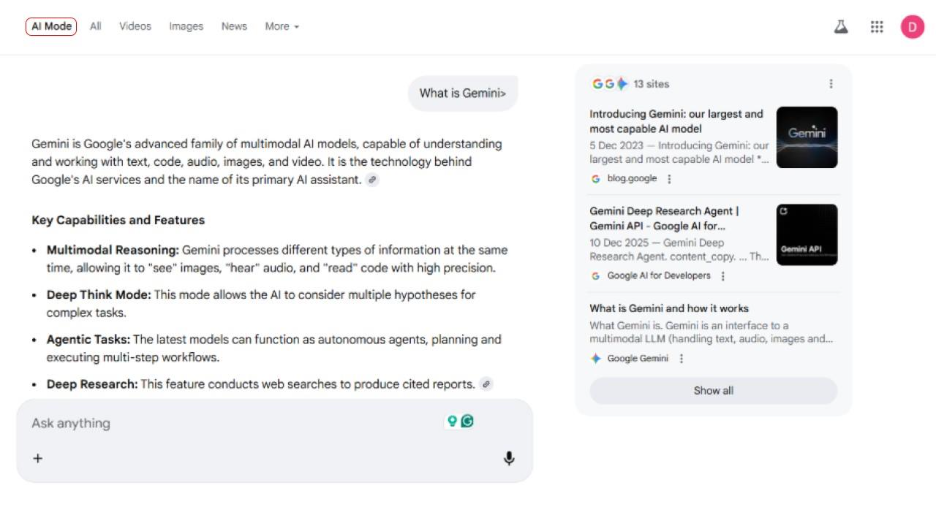
AI mode has made its name as a direct competitor of ChatGPT. Just like ChatGPT, it has been created to offer an interactive experience to users instead of just a search and result experience that shows hundreds of web pages. AI mode can work as a knowledgeable assistant where you can explore your search query in detail and explore follow-up questions to explore the topic in depth. While AI overviews are also designed in a way to provide AI responses to certain queries, AI mode is a more advanced option. It is deeply integrated into Google’s search query, offering a personalized experience to users. In AI mode, the AI helps users throughout the search session. In conventional search, users had to rummage through various sources to find what they were looking for. This is not required now.
How AI Mode Works?
Essentially, when you are performing a Google search in an AI mode, you are basically conversing with an advanced system purpose-built to understand and respond to search queries more comprehensively. Instead of depending on conventional ranking algorithms or keywords to find relevant pages, Google AI mode uses an advanced algorithm to understand the intent and nuances of your search query. It synthesizes accurate answers by collecting data from a broad range of reliable sources across the web.
It generates a contextually aware response within the search interface. It is unlike the single snippet that shows up at the top of a conventional search query. It can offer an elaborate explanation, a detailed guide, or a comparison as per the query. AI mode also offers links to various web pages, enabling users to delve deep into their research and explore the topic further. In AI mode, the focus remains on understanding the context clearly, offering direct answers, and ensuring opportunities to learn more.
How AI Mode Differs from AI Overviews?
While both AI overviews and AI mode utilize Google’s Gemini to find relevant information and answer users’ questions, they work differently.
AI Overviews: They are often the AI-created summaries or snapshots that show up at the top of search results for specific queries. They provide a fast and digestible response or summary created by collating information from various web sources. These are then followed by links to these sources, and are followed by the usual search results. You can consider AI overviews to be an embedded feature within the search interface that is called automatically as per your search query.
AI Mode: On the other hand, AI mode provides a complete and more immersive AI-driven search experience. In the first response, AI mode provides just a general overview of the topic, inviting more complex conversations. It manages follow-up questions quite easily and possibly organizes results in a customizable and unique way. You get a deep dive in AI mode, where AI proves to be a consistent partner in the process of information discovery.
The key difference is the extent and focus on AI interaction. AI overviews are generally succinct; a short summary automatically triggered with a specific search query. On the other hand, AI mode provides a dedicated environment for searching where the complete user experience is driven by generative AI.
What Is the Importance of AI Mode?
AI mode is quite significant because Google has completely transformed how users find information and interact with your brand digitally. By going beyond a traditional list of links and incorporating dynamic and AI-created responses, this feature allows a lot more direct and customized answers to unique queries of the users. It marks a great shift in Google as it starts to invest a lot more in AI and provides a variety of AI search experiences to compete well in the evolving AI-driven landscape. For digital marketers and SEO professionals, this shift also implies a need for change in how they approach content optimization. The advent of AEO and GEO is due to the increasing prominence of AI search results. It is significant for digital marketers to now understand how AI understands search intent and the relevance of content.
Who Can Utilize AI Mode?
The availability of AI mode is determined by geographic location and language. Google has widened its rollout to 200+ countries and territories. However, it must be clear that comprehensive and integrated AI responses, as well as conversational follow-ups, are Google’s plan to make online search more and more AI-driven. Thus, we can expect AI mode to be available soon for all users across all countries. Initially, it was launched in the United States before expanding its reach to India, the United Kingdom, and other countries. Some countries, such as France,e remained excluded because of regulatory challenges. Furthermore, initially, it was released only in the English language. Now, it provides multilingual support,t including languages such as Hindi, Korean, Japanese, Spanish, German, and French.
How to Access Google’s AI Mode?
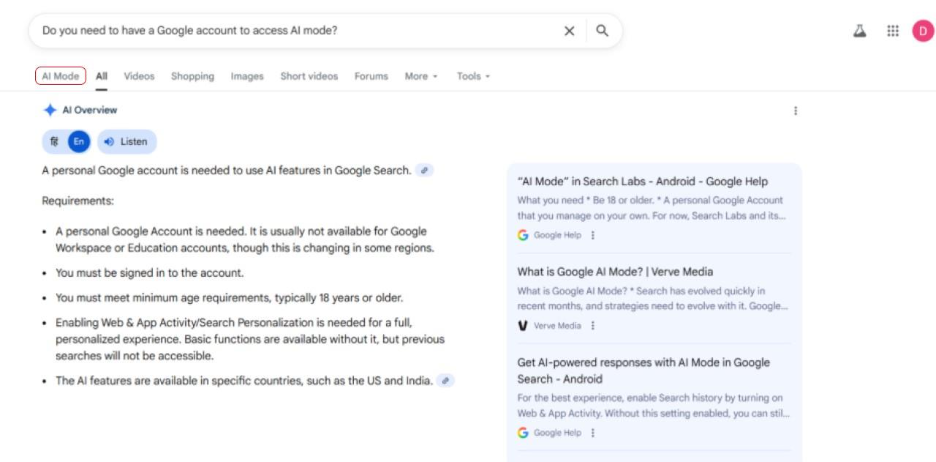
Prerequisites:
- You must access Google from the countries where AI mode is available.
- You must have a Google account and be signed in.
- Users must also meet the minimum age criteria of 18 years.
- For a complete personalized experience, you must enable Web & App Activity/Search Personalization.
Ways to Access:
1. You can access it from the homepage as the option “AI mode” will be visible directly beside the search bar.

2. You can also find the option on the search page in the top search menu bar.
Endnote- Google AI Mode Review
Google’s AI mode marks a shift toward greater AI integration in online search. It has transformed how users approach online search, moving from static results with blue links to AI-powered answers that understand context and nuances of search queries and provide direct answers to complex queries. The advent of AI-driven searches led by AI mode presents a great challenge for brands and digital marketers. They need to rethink how they approach keyword optimization and online visibility. It is important to delve deep into intent, content relevance, and AEO and GEO best practices.
This is a pivotal moment in digitization as AI’s dominance continues to increase in search engines. Brands need to rethink their strategies, adjust well, incorporate transparent sources, produce high-quality content, and integrate robust optimization strategies for generative AI. Brands that position themselves well in the evolving AI landscape now will dominate the market in the future.
FAQs for AI Mode
Q1. What is Google AI Mode?
A- AI Mode utilizes Gemini to address all queries (both simple and complex) and provide complete and interactive answers instead of just offering links to web pages.
Q2. Is AI mode different from AI overviews?
A- Yes, AI overviews are the brief summaries that appear in specific search results. On the other hand, AI mode is available for all search queries, providing a comprehensive user experience and ensuring in-depth exploration and personalizable responses.
Q3. Can everyone access Google AI mode?
A- Only users in selected 200+ countries where it has been rolled out can access. Furthermore, users must satisfy the minimum age criteria and must be signed into their Google account.
Q4. What is the process of activating AI Mode on Google?
A- You can easily access it from the homepage as it appears beside the search bar. You can also access it from the top search menu bar when you search for something on Google.
Q5. Which is better: AI Mode or ChatGPT?
A- Both have their own strengths. While ChatGPT excels in brainstorming, in-depth reasoning, and creative tasks, Google’s AI mode excels in real-time research.
%201.png)

%201.png)

%201.png)