CRM systems have become the operating hub of many B2B companies. Deals, notes, email threads, pipelines, forecasts – everything lives there. But when it comes to actual money movement, many teams still rely on a patchwork of payment plugins, manual exports, and “temporary” workarounds that have been in place for years. You end up with a clean CRM frontend sitting on top of a fragile payment layer.
The gap shows up as soon as you ask simple questions. Which deals turned into real cash, not just closed-won status? Which customers quietly stopped paying? If your payment stack isn’t designed to talk to your CRM, you’re left stitching answers together from bank statements, gateway dashboards, and spreadsheets – and hoping they line up. At some point it becomes clear you don’t need another “payment button” plugin. You need B2B payment gateway software that sits inside your CRM stack and feeds back structured events, statuses and amounts, so the team sees real revenue and retention, not just intentions.
Why CRM-Alone Can’t Give You a Complete Revenue Picture
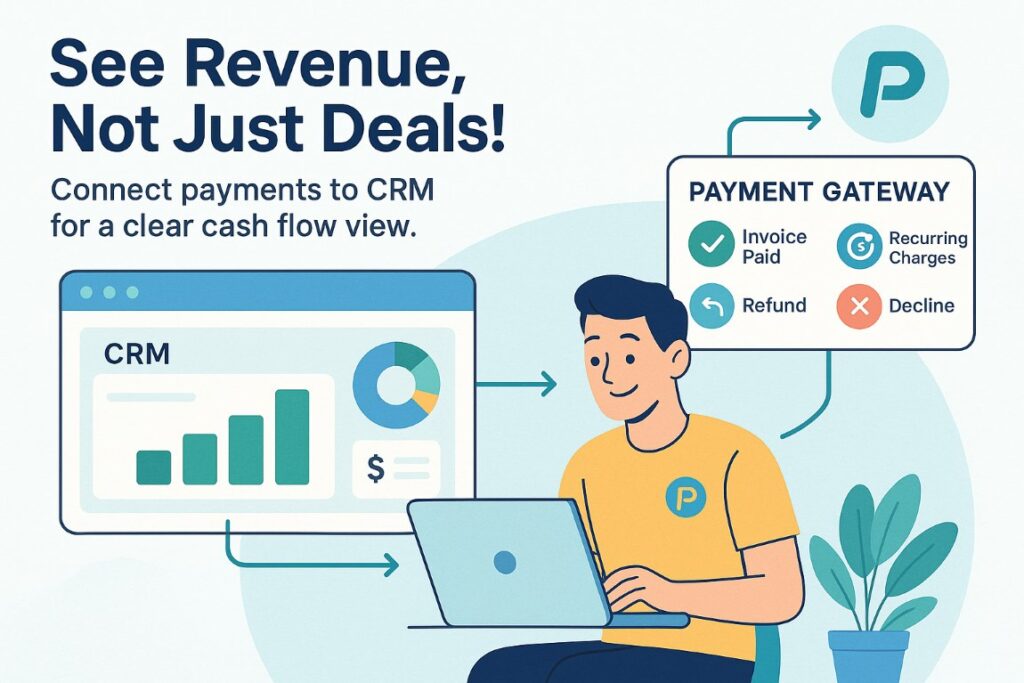
On the surface, it looks as if your CRM knows everything about the customer: who owns the account, which stage the deal is in, when the last call happened. In reality, a payment can go through late in the evening and the account manager only hears about it the next morning when someone forwards a screenshot from online banking. A refund may be processed a week ago, while the CRM still shows the customer as fully active with the original revenue amount.
Without a connected payment layer, your CRM sees only intent, not cash. You can’t clearly separate accounts that pay on time from those where every second invoice is overdue, or see whether the funnel is leaking because of product issues or failed payments. LTV, churn and campaign ROI turn into manual reconciliation exercises. In practice, the CRM remains the “brain” of your go-to-market, but that brain doesn’t have a proper circulatory system for money. Only when the payment gateway becomes a first-class part of your architecture – feeding transaction statuses, declines, refunds and recurring charges back into the CRM see our guide on CRM integration for invoice factoring do you get a revenue picture you can actually manage against.
What Makes Payment Gateway Software Truly “B2B”

Not every payment solution that can process a card transaction qualifies as B2B payment gateway software. Many tools were born in the world of one-off online purchases and then stretched to fit B2B cases. That usually works up to a point – and then breaks when you introduce contracts, multiple decision makers, delayed payment terms or recurring invoices. Truly B2B-oriented gateways assume these realities from day one and are built to reflect them in your CRM and back office without constant patching.
It’s Built for Complex Payment Flows, Not Just One-Click Checkout
Consumer checkout flows are often linear: pick product, enter card, pay. In B2B, money moves in more complex patterns. You may bill in one currency and pay out in another, support cards and local bank transfers, split a single incoming payment across multiple entities, or send payouts to partners and resellers. B2B payment gateway software needs to handle multi-currency pricing and settlement, multiple payment methods, split payments and payouts as first-class features – configurable, reportable and traceable, not a set of custom scripts.
It Plays Nicely With Your CRM and Back Office
In B2B, a payment that happens “somewhere out there” and never shows up in your systems is almost as bad as a payment that never happened. A gateway that fits a CRM-centric stack exposes a clean API, reliable webhooks, and a clear event model for successful payments, declines, chargebacks, refunds, recurring charges, card updates and more. New successful payments can close opportunities, update ARR/MRR fields and trigger renewal tasks; failed charges can start dunning sequences and flag accounts for proactive outreach. On the back-office side, a B2B-ready gateway integrates with accounting, invoicing and reconciliation, so what you see in the CRM matches what finance sees in their reports.
It Respects Roles, Permissions and Long Sales Cycles
In B2B environments, very few people have a “buy now” button. Account managers, sales engineers, finance, legal and partners can all be involved in a single deal. Payment gateway software needs to respect that structure. A B2B-ready gateway lets you align its permission model with your CRM: account managers manage payments for their accounts, finance controls refunds and chargebacks, admins define global policies and limits. It also supports long, contract-driven lifecycles: recurring invoices tied to contract terms, scheduled renewals, mid-term changes in quantity or pricing, and agreed credit limits. Instead of treating every transaction as an isolated event, it keeps the context of the underlying agreement so billing and renewals match what your CRM shows.
What to Look For When You Integrate Payment Gateway and CRM
Once you move past “can it process payments?”, the real question is how well this gateway will work as part of your CRM payment gateway integration. In a CRM-centric stack, the gateway is not just a terminal – it is a stream of events that shapes how you sell, retain and expand accounts. The right choice gives you a single view of the customer, fewer manual touches, and reporting that ties actual revenue back to your pipeline.
Unified Customer Profile With Payment Events
A strong integration starts with a customer profile that combines commercial and financial reality. In practice, that means a contact or account record where you can see not just leads, opportunities and support tickets, but also invoices, successful payments, failed attempts, refunds and renewals. The gateway should push payment events into the CRM in a structured way: “invoice issued”, “payment captured”, “charge failed”, “subscription renewed”, and so on. Those events become part of the activity timeline and can trigger tasks and workflows: a missed payment opens a task for the account manager; a first payment prompts a success manager to schedule onboarding. Instead of juggling separate “billing” and “CRM” views, teams operate from a single profile where money movement is as visible as sales conversations.
Automation of Billing, Dunning and Upsell
If every billing or collection step relies on someone remembering to send a reminder or update a spreadsheet, you will quickly hit a ceiling. When your payment gateway is built for B2B and wired into your CRM, many of those steps are rule-based. Recurring billing and subscription payments are generated on schedule based on contract terms, and outcomes are synced back to the CRM. On top of that, you can define dunning workflows after failed attempts, with tailored email sequences, internal tasks or access changes depending on account tier. The same logic powers expansion: after a certain number of successful payments or usage thresholds, the system can flag accounts for upgrade and open upsell opportunities based on real payment behaviour.
Reporting That Connects Revenue to Pipeline
A CRM-centric gateway should make it easy to answer which parts of your pipeline turn into sustainable revenue. You should be able to follow the chain from campaign → lead → opportunity → first payment → renewals and expansions. In a well-integrated setup, payment data flows back into the CRM and analytics tools with enough detail for serious reporting. You can see which acquisition channels bring customers who pay once and churn, and which channels bring accounts that renew year after year.
For growing fintechs and B2B platforms, this is where using dedicated B2B payment gateway software like Boxopay makes a difference: instead of gluing together plugins and separate dashboards, you get a single payment layer designed to feed clean transaction data back into your CRM and analytics. That foundation makes revenue reports trustworthy enough to guide decisions, not just end-of-month reconciliations.
Implementation Blueprint: From Pilot to Full Rollout
Choosing the right payment gateway is only half of the work. The other half is rolling it out in a way that doesn’t break existing processes and gives you clean data from day one.
1. Map Your Current Payment Touchpoints and Integrations
List every place a customer can pay you and which systems are involved. Note how payment status is tracked today. This surfaces fragile connections – spreadsheets, manual updates, shadow tools – and gives you a concrete scope for the first phase of the project.
2. Select a Gateway With B2B and CRM Integration in Mind
Evaluate gateways against your actual flows, not just a generic feature checklist. Look for B2B payment gateway software that can handle your currencies, methods and contract patterns, with an API, webhooks and sandbox that make CRM use cases realistic. If the main story is “we have a plugin for popular shopping carts”, that’s a red flag for a CRM-centric B2B stack.
3. Run a Pilot on a Limited Segment
Choose a small but representative segment – a region, product line or tier – and route only those flows through the new gateway. Focus less on raw approval rates and more on end-to-end behaviour: do events arrive in the CRM as expected, do account managers see the right context, can finance reconcile gateway and CRM numbers? This is where you catch mismatches before they affect everyone.
4. Configure Events, Fields and Workflows in the CRM
Once the pilot proves the basics, define which payment events create or update which records, and add fields for recurring status, MRR/ARR, renewal dates and risk flags. On top of the data model, configure workflows: tasks for missed payments, alerts for unusual invoices, triggers for onboarding or upsell. The goal is to move from “the data is there” to “the right person gets the right prompt at the right time”.
5. Roll Out Across All Flows With Quality Gates
When you’re confident in the pilot, redirect the rest of your payment streams in controlled waves. For each wave, define quality gates: acceptable webhook error rates, reconciliation tolerance, response times for issues. In the first weeks, treat revenue reporting as a monitoring tool, compare new patterns with historic ones and adjust mappings or workflows before they harden into “how things are done”. The opposite approach – picking a gateway purely on price, wiring it straight into the website and bolting on CRM integration later – usually leaves you fighting the architecture instead of benefiting from it.
Common Pitfalls When Pairing CRM and Payment Gateway
Even with the right intent, CRM–payment gateway projects often stall or quietly underdeliver. The reasons tend to repeat.
1. Choosing “what everyone uses” and ignoring B2B reality
Tools optimised for simple online payments rarely map well to contracts, delayed payment terms, milestone billing or complex payout schemes. You end up forcing B2B processes into a consumer-grade model and recreating the same workarounds you were trying to escape.
2. Skipping a proper sandbox and pilot phase
Going straight from contract signature to full production rollout is a reliable way to discover issues at the worst moment. Without a realistic sandbox and contained pilot, you only see how the gateway behaves when real customers are paying real money – and finance and sales are already depending on the data.
3. Treating security and compliance as an afterthought
PCI DSS, PSD2, SCA and local rules shape how authentication, risk checks and dispute handling work. If you ignore them during selection and integration, your CRM workflows may assume one thing while the gateway is forced to behave differently to stay compliant, breaking customer journeys and slowing incident response.
4. Building a process around CSV exports and manual updates
If your “integration” relies on downloading CSV files from the gateway and importing them into the CRM or accounting system, you haven’t really integrated anything. Manual steps introduce delays, errors and “unknown” states where nobody is sure whether the CRM reflects reality. Over time, teams stop trusting the data and fall back to side spreadsheets.
The companies that avoid these traps start from CRM use cases and reporting needs, and choose B2B payment gateway software that is comfortable living as part of that ecosystem. Platforms like Boxopay are built with that assumption in mind: complex B2B flows, clear event models, and integrations that feed reliable payment data back into the systems teams actually use every day.
Conclusion: Treat Payment Gateway as Part of Your CRM Strategy
If your CRM strategy stops at leads and opportunities, you are only seeing half of the picture. A sophisticated pipeline with a weak payment layer will always leave money on the table: delayed renewals, unnoticed churn and “blind spots” where nobody can explain why a once-healthy segment quietly stopped paying.
When you connect the dots with the right B2B payment gateway software, payments stop being a black box at the edge of your stack. They become a stream of signals: who is adopting, who is at risk, which offers land and expand, and which campaigns bring customers that actually renew. Sales, marketing and customer success work from the same reality, not three different versions of it.
If your current setup looks more like a collection of patches than a coherent system, this is a good moment to revisit it. Map where money flows today, decide what your CRM should know about those flows, and look for solutions that were designed as B2B infrastructure first, not as a quick checkout button with a CRM logo on the integration page. The difference shows up quickly – not just in cleaner dashboards, but in revenue you can see, explain and grow.
%201.png)

%201.png)

%201.png)