
HR automation usually starts with a decent intention. Someone is tired of chasing forms, manually updating spreadsheets, or sending the same reminder for the fifth time that week.
Then the fixes pile up. A candidate gets an auto-reply. A manager gets a calendar reminder. A new hire gets a checklist. Payroll gets a synced report. Each piece looks reasonable on its own.
The trouble starts when the process becomes efficient but strangely cold. Nobody missed a step, yet the employee still feels like they’re being processed instead of welcomed, supported, or heard.
That’s the line HR managers have to manage. A clear HR automation map should clear the clutter around human work, not pretend the human part no longer matters.
Start with the work people already complain about
The best automation roadmap doesn’t begin with software. It begins with the moments HR keeps apologizing for.
Maybe new hires keep asking where to upload documents. Maybe managers forget probation check-ins until the week they’re due. Maybe leave balances live in one sheet, time records in another, and payroll has to message HR every Friday to confirm what changed. None of this feels dramatic at first. It just quietly eats the week.
That’s where automation earns its place. Not in the sensitive moments where judgment matters, but in the repetitive handoffs that make everyone slower than they need to be.
A good first pass is to list the tasks that are frequent, predictable, and easy to get wrong when people are busy. Employee record updates. Leave requests. Time approvals. Policy acknowledgments. Interview scheduling. Onboarding reminders. Certification renewals. Review-cycle dates. These are not the parts of HR where someone needs to be especially wise. They’re the parts where someone needs the right information at the right time.
Centralized workflows for employee records, recruitment, time, leave, and performance are where people management software can reduce admin noise, but the useful part isn’t sending more automated messages; it’s giving managers cleaner context before they act.
That difference matters. If a manager gets a reminder to hold a 30-day check-in with a new hire, that’s helpful. If the system also shows whether the person has completed training, received equipment, met their team, and had their first workload conversation, the check-in becomes more useful. The manager can stop asking vague questions and start paying attention to what’s actually happening.
A weak roadmap automates whatever looks easiest. A stronger one looks for the friction people have learned to work around. The spreadsheet nobody trusts. The email chain that always gets missed. The approval that depends on one person remembering to nudge three others.
That’s not glamorous work. But it’s where HR automation usually has the fastest practical impact.
Sort tasks by judgment, not by department
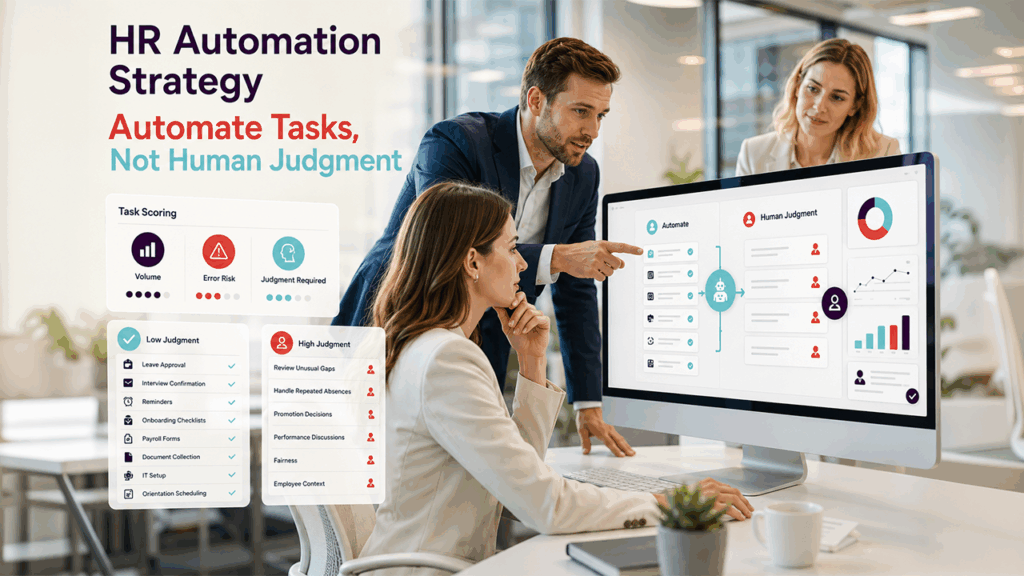
A lot of HR automation plans get grouped by department function: recruitment, onboarding, payroll, performance, compliance, and learning. A stronger HR automation map sorts tasks by how much judgment they actually require; not just by which team owns them."
The better question is: how much judgment does this task need?
Approving a standard leave request with enough balance available may not need much judgment. Handling a pattern of last-minute absences does. Sending candidates an interview confirmation is simple. Deciding whether an unusual employment gap matters is not. Reminding managers to complete performance notes is useful. Turning those notes into a promotion decision still needs context, fairness, and a real conversation.
This is where HR teams can avoid the robotic feel before it starts. Don’t ask, “Can this be automated?” Ask, “Which part of this can be automated safely?”
Take onboarding. It’s tempting to automate the whole journey because the steps are predictable: signed offer, forms, equipment, account setup, orientation, first-week tasks, manager check-ins. But the employee doesn’t experience onboarding as a workflow diagram. They experience it as a few very human signals. Was anyone ready for me? Does my manager know what I’m supposed to do? Do I know who to ask when something is unclear?
The workflow can carry the basics. It can trigger IT requests, collect documents, remind payroll, schedule orientation, and prompt the manager before day one. But it shouldn’t replace the first real conversation about expectations. A new hire can tell the difference between “the system says welcome” and “my manager actually knows I’m here.”
OutRightCRM has written about the role of custom apps in human resources, especially around tracking, reporting, and reducing manual errors. That same logic applies to an automation roadmap: the workflow has to be specific enough to solve the operational problem, but not so rigid that it flattens every employee situation into the same path.
A simple scoring method helps. Give each task a rough score for volume, error risk, and judgment required. High-volume, high-error, low-judgment tasks should move up the list. Low-volume, high-judgment tasks may still need templates or reminders, but they shouldn’t be handed over to automation without review.
For example, HR might automate reminders for managers to document quarterly performance notes. That’s smart. People forget details, and the review season becomes sloppy when everyone works from memory. But HR should be careful about automating performance conclusions from those notes. A person’s development, workload, manager relationship, and team context are too messy for a clean system-generated answer.
The goal is not to slow everything down. It’s to keep judgment in the places where judgment actually matters.
Make the boring guardrails visible
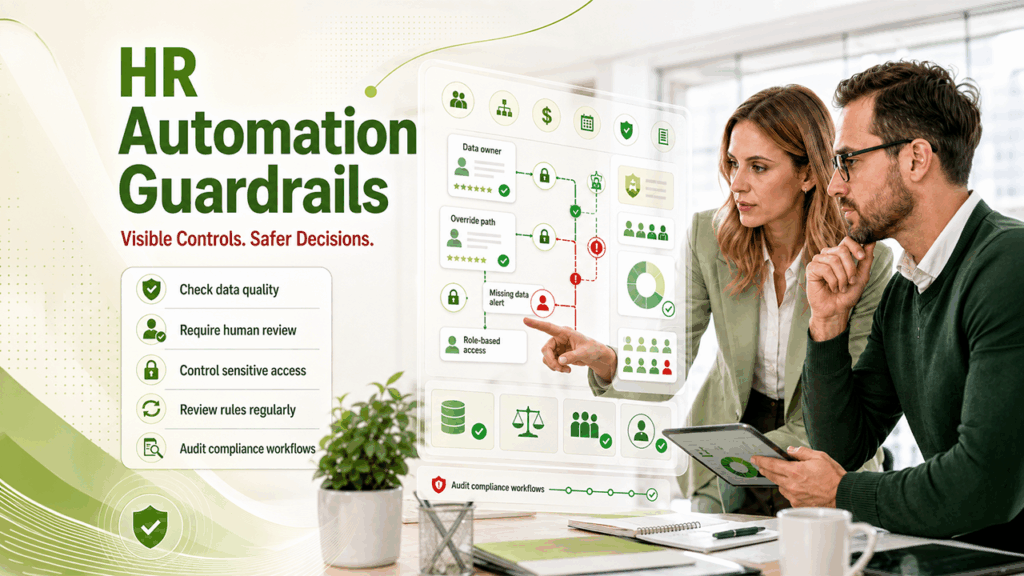
HR automation gets risky when the system starts looking more reliable than it really is.
A dashboard looks clean. A status label looks official. A candidate's score looks objective. A compliance report looks finished. But if the data underneath is patchy, outdated, biased, or entered differently by different managers, automation can create a very polished version of a bad process.
This is especially important when automation touches hiring or employee decisions. The U.S. Department of Labor’s AI and inclusive hiring framework is a useful reminder that technology used in recruitment needs more than convenience behind it. Employers have to think about accessibility, fairness, and the risk of excluding qualified people because a tool was poorly designed or poorly monitored.
That doesn’t mean HR managers should avoid automation. It means the roadmap needs guardrails that people can actually understand.
Before automating a workflow, define a few basics. What data triggers the action? Who owns that data? What happens if the data is missing? Who can override the workflow? Which steps affect an employee or candidate directly? Which steps require a human review before anything final happens?
These questions sound dull, but they prevent the worst problems. The candidate who gets screened out because of a bad keyword rule. The employee whose leave request gets delayed because their balance wasn’t updated. The manager who assumes a performance alert is a fact instead of a prompt to look closer.
Compliance workflows need the same discipline. Automating policy acknowledgments, right-to-work checks, certification renewals, payroll handoffs, or time records can save hours. It can also create false confidence if nobody checks whether the rules, forms, or approval paths are still current.
OutRightCRM’s piece on payroll system integration with Microsoft Dynamics 365 makes a practical point that HR teams sometimes overlook: moving information between systems is only useful when the information is accurate, timely, and handled with the right controls. Payroll is unforgiving because mistakes show up quickly. HR data can be less obvious, but the damage is still real.
Access is another boring detail that deserves attention. Not every manager needs every employee field. Not every HR assistant needs a full compensation history. Not every automated notification should reveal the reason behind an absence, accommodation, or sensitive case. If automation makes information travel faster, permissions have to be tighter, not looser.
The roadmap should also include a review date. Automated rules age quietly. A workflow that made sense when the company had 40 employees may be clumsy at 120. A leave approval route may break after a restructure. A hiring template may become outdated after a policy change. If nobody owns the review, the system keeps running because systems are very good at continuing.
That’s not governance for the sake of governance. It’s basic care.
Keep managers responsible for the human follow-up

Managers are often where HR automation either works or falls apart.
HR can build a clean workflow. The system can send reminders. Employees can complete forms. Dashboards can update on time. But if managers treat those prompts as the work itself, the employee experience will still feel thin.
A reminder to hold a check-in is not a check-in. A performance form is not performance management. A pulse survey is not a relationship with the team. Automation can make it easier for managers to show up prepared, but it can’t do the showing up for them.
Every HR automation map should pair each automated workflow with a matching human action because a reminder is only useful if someone does something thoughtful with it. When a new hire completes their first-week checklist, the manager confirms priorities for the next two weeks. When an employee misses a required training deadline, the manager checks whether workload or access got in the way. When time-tracking data shows repeated late submissions, the first move is not a warning. It’s a quick look at whether the process is confusing, the schedule is unrealistic, or the manager has been unclear.
HR managers should be direct with managers about what automation is for. It is there to reduce missed steps, improve timing, and make information easier to use. It is not there to remove accountability. If anything, automation makes weak management more visible because the excuses get thinner. The reminder was sent. The note was available. The check-in was scheduled. The manager still has to do the work.
Employee communication needs the same care. People are more comfortable with automation when they understand what is happening. If time tracking is used, say what it is used for. If onboarding tasks are monitored, explain who sees the progress. If survey responses are aggregated, be clear about confidentiality. Mystery makes employees suspicious, even when the intention is harmless.
OutRightCRM’s article on apps for time tracking touches on productivity and visibility, and HR should treat that visibility carefully. The fastest way to make automation feel robotic is to make employees feel watched instead of supported. The better version is more practical: fewer missing details, fewer awkward follow-ups, fewer managers guessing from memory.
A good roadmap leaves room for feedback as well. After a workflow runs for a month, ask the people using it what changed. Did it save time? Did it create noise? Did reminders go to the right person? Did employees understand the process? Did managers act sooner, or did they just get more notifications?
The answers will tell HR whether the automation is doing useful work or just producing cleaner-looking admin.
Wrap-up takeaway
HR automation works best when it takes pressure off people without taking people out of the moments that need them. Start with the tasks that keep breaking, then separate routine routing from real judgment. Put guardrails around data, access, and review before the workflow scales across the company. Make managers responsible for the human follow-up, because a reminder is only useful if someone does something thoughtful with it. The practical next move is simple: build your HR automation map by choosing one workflow today, writing down the trigger, owner, handoff, risk, and required human follow-up, then automating only the parts that make that moment clearer instead of colder."
%201.png)

%201.png)

%201.png)