

Using the Salesforce integration with Jira, organizations enhance their workflows while collaborating between the sales and development teams. However, no integration comes without challenges. This integration is no different. While it offers several benefits, it also poses some common challenges. For a hassle-free and smooth connection, these issues need to be resolved strategically and immediately. Whether you're just starting with Jira integration with Salesforce or optimizing an existing setup, understanding these challenges is crucial. This blog will explore some commonly faced integration issues and offers actionable solutions for each.
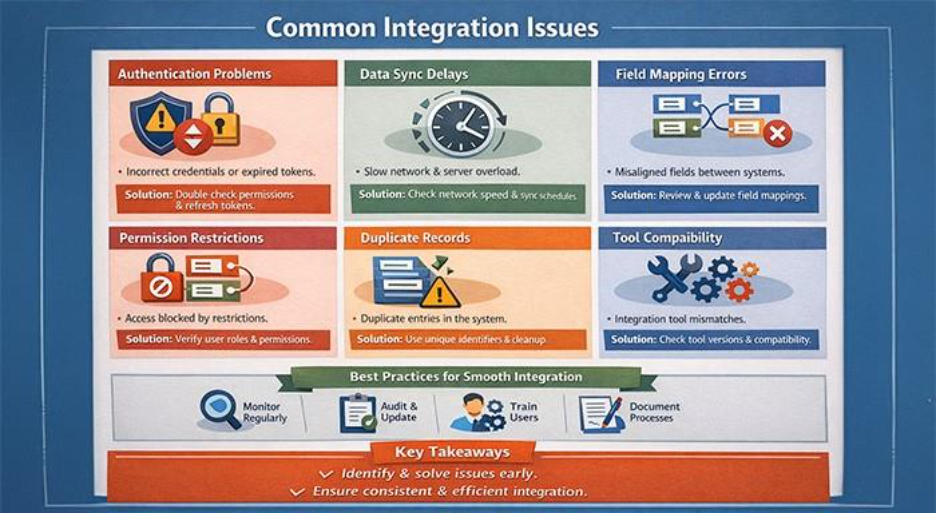
Authentication Problems
Often, errors occur due to authentication issues, which stop systems from connecting. These issues are typically due to incorrect credentials or expired tokens. To resolve this, teams should double-check access permissions and refresh tokens. If the problem still occurs, try to reset the password or obtain a new token. This should be enough to rectify failure. To prevent these issues from occurring in the near future during, Jira integration with Salesforce, safeguard and store required credentials.
Data Synchronization Delays
Another commonly encountered issue is delay in data synchronization. Outdated or incomplete data leads to confusion and low efficiency. Factors like network slowdowns, server overload, or errors in configuration can cause sync lags. To avoid this, it is best to verify the speed of your network and ensure that server state is correct. Checking synchronization schedules is vital to allow for timely data flow. Changing these options can minimize unnecessary queue times. Implementing best practices for scalable real-time integration helps maintain data accuracy across both platforms, especially as transaction volumes grow.
Field Mapping Errors
Field mapping errors result in data formatting mismatches between the platforms. There are times when fields in Jira or Salesforce do not plug into each other correctly, leaving some information not ported or incorrect. Mapping each field correctly ensures consistency. It is necessary to identify alignment gaps by analyzing both the system’s data structures. Configurations in teams should be updated whenever a change occurs in the field structure in either of the systems.
Permission and Access Restrictions
Access restrictions may block data from being transferred. Without having required permissions, integration tools cannot transfer the information wanted. The first step is assessing user permissions and access roles. Administrators should periodically verify that integration accounts have the necessary permissions on both ends.
Duplicate Records
If integration rules cannot account for existing system data, they might duplicate entries. Duplicate records can be confusing and take a lot of time during data reconciliation. Assigning a unique identifier to each jira task before syncing with Salesforce helps prevent duplication and keeps records aligned across systems. Defining business rules helps avoid repetition while entering data, enhancing data quality. To avoid clutter, perform database cleanups regularly.
Integration Tool Compatibility
Not every system integration tool fully supports system features on both ends of the integration. Compatibility problems can be caused by data loss or incomplete sync. Check the tool version compatibility before starting on integration. Without updating integration tools, support will not be possible. This happens because apps release newer updated versions regularly. Carefully read the documentation to avoid unexpected disruptions before applying updates.
Custom Object and Field Issues
Unless explicitly configured, custom objects or fields may not automatically be synchronized between both platforms. These items demand more attention when setting things up. For customizations, check both systems so that nothing slips through. Integrating custom fields helps transfer data through the configuration of integration rules. After introducing new customized objects, periodic checks help maintain the data flow correctly.
Error Handling and Logging Gaps
Without enabling proper logging, the integration errors may go unnoticed. In the absence of visible error reports, solving the problem becomes challenging. Enabling verbose logs on both systems provides you with visibility into what is failing. These recurring challenges can be brought into focus by reviewing logs regularly. Set up notifications of errors that can be reviewed instantly.
Communication Gaps Between Teams
Communication gaps between sales and development teams can cause integration troubleshooting to take longer. Effective and open communication leads to productive collaborations. Conducting regular meetings to discuss integration problems will keep everybody in the loop. The best way to ensure responsiveness to issues quickly is to clearly define roles and responsibilities to teams.
Version Updates and Compatibility
If software updates are not tested in advance, they can disrupt existing connections. Integration tools may lose compatibility with new software releases. Testing updates in a controlled setting before applying them to production reduces risk. Teams can address updates without affecting daily operations by scheduling regular maintenance windows. Staying informed about upcoming changes helps teams prepare accordingly.
Jira Integration With Salesforce: Best Practices
A regular monitoring process for reviewing your integration health will help prevent many problems from occurring in the first place. Often audits, promptly updates and keeping documents of everything build a solid foundation. Training users in both systems is required, as they must know how to use the integration features properly. Small issues are nipped in the bud before they grow into larger disruptions.
Key Takeaways
Jira integration with Salesforce simplifies workflows but also brings with it various challenges. Identifying and solving the most common problems helps the teams to have consistent integration. Enterprise architecture enables business technology ecosystems when the right people work together to make that connection happen. Regular check-ins and good communication ensure that the connection is effective in supporting your business needs.
%201.png)

%201.png)

%201.png)