

Ensuring reliable email delivery and protecting your domain from spoofing starts with a well-configured Sender Policy Framework (SPF), and using an SPF checker is essential to maintain its accuracy as email infrastructures grow more complex. This article explains how to effectively use an SPF checker to validate your DNS configuration, identify errors, and optimize authentication outcomes.
By understanding how SPF works, interpreting policy results, and leveraging modern diagnostic tools, organizations can strengthen email security, improve inbox placement, and reduce the risk of phishing and impersonation. It also walks through common issues like excessive DNS lookups, misconfigured includes, and alignment gaps, offering practical steps to fix them while reinforcing a layered approach with DKIM and DMARC for comprehensive email protection.
Why SPF matters: deliverability basics, spoofing risks, and policy outcomes
How the Sender Policy Framework underpins email authentication and delivery
Sender Policy Framework (SPF) is a DNS-based email authentication standard that tells receiving mail servers which hosts are allowed to send on behalf of your domain name. By publishing a correct SPF record and maintaining authorized IP addresses for every sending source, you improve email delivery, reduce authentication issues, and strengthen email security across your ecosystem. An accurate SPF check—performed with a reliable SPF record checker—confirms that your DNS policy resolves properly, references the right mail hosts or subnets, and enforces the intended outcome for messages in transit.
Because SPF is processed before content filtering, consistent SPF validation protects against spoofing while boosting email deliverability signals. When receivers can verify an authorized sender through SPF lookup, your domain reputation benefits, helping transactional and marketing traffic reach inboxes.
Spoofing risks, domain reputation, and broader email threats
Without valid SPF records, your brand is exposed to email spoofing, phishing, and impersonation, increasing security risk to customers and employees. Attackers exploit weak policies and missing authorized IP addresses to pass as you, damaging domain reputation and undermining email protection measures. A comprehensive diagnostic tool that can scan domain settings and check SPF records should be part of every organization's layered defense alongside web application security tools that protect the broader infrastructure from exploitation.
Understanding SPF policy outcomes and their impact on email delivery
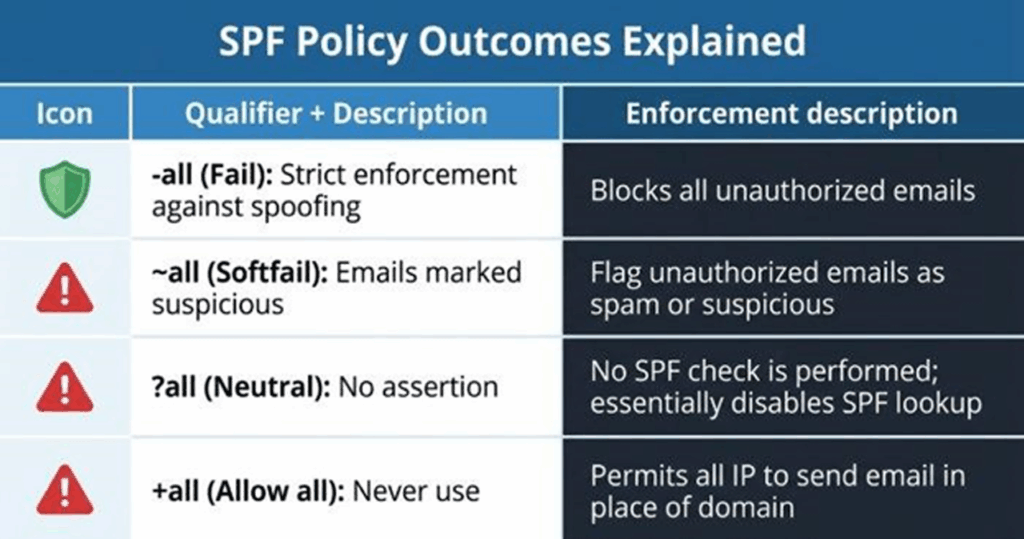
Your SPF record ends with a qualifier that guides receivers:
- -all (fail): Only listed hosts are allowed; everything else should fail.
- ~all (softfail): Unlisted hosts are suspicious; many receivers mark or quarantine.
- ?all (neutral): No assertion; poor for email authentication.
- +all (allow all): Never use; it invites abuse.
Receivers interpret these results alongside DMARC policy, content, and IP reputation. For critical domains, stricter enforcement with the right authorized IP addresses improves compliance while preventing spoofing, but you must confirm correctness with an SPF validator before tightening to -all.
Choosing an SPF record checker: features, accuracy, and safe testing practices
Must-have features in a modern diagnostic tool
Select an SPF record checker that goes beyond a simple SPF check. Look for:
- Full SPF Record Lookup and SPF Record Check capabilities with recursive DNS lookup tracing.
- An SPF raw checker view to see the exact TXT value and any chained records.
- Mechanism parsing (ip4, ip6, a, mx, include, exists, redirect) and qualifier resolution.
- DNS lookup count calculation (enforcing the 10-lookup limit).
- SPF validation for syntax, unsupported macros, and common SPF errors.
- A built-in SPF validator to simulate receiver logic, analyze headers from sample emails, and surface authentication issues.
Extras like a domain scanner to scan domain configurations, risk assessment, and reporting for SPF compliance.
Tools from providers such as MxToolBox (including SuperTool), EasyDMARC, and WhatIsMyIP offer robust record checker functions. Many bundle an Email Header Analyzer to help analyze headers from test messages.
Evaluating accuracy, vendor reputation, and interoperability
Accuracy matters. Cross-check results across at least two platforms (for example, MxToolBox and EasyDMARC) and review community feedback on G2 Crowd, SourceForge, and Expert Insights. Recognition such as a Channel Program Award can indicate maturity, but prioritize technical depth, clear guidance, and timely data. Interoperability with DMARC reporting, a delivery center dashboard, or a Delivery Center-branded console improves visibility. Some suites add Alert Manager, Reputation Monitoring, Email Health, and Phishing Link Checker utilities—useful adjuncts for ongoing monitoring and risk reduction.
Safe testing practices that reduce security risk
- Use a staging or subdomain for early SPF test changes where possible.
- Confirm sending hosts’ public addresses (ip4 and ip6) with WhatIsMyIP; document subnets precisely.
- Avoid publishing experimental includes from untrusted providers; scrutinize every include for hidden DNS lookup chains.
- If you’re an MSP standardizing operations, maintain a repeatable Touchpoint checklist for each client domain name, and educate teams via an Academy or internal runbooks.
- Keep email protection layered: align SPF with DKIM and DMARC, and maintain TLS-RPT and MTA-STS for transport integrity.
Run an SPF lookup and diagnose/fix failures

Step-by-step: perform the SPF lookup, SPF check, and SPF validation
- Enter the domain name in your chosen SPF record checker. Run SPF Record Lookup and SPF Record Check in tandem to confirm both parsed results and raw TXT records.
- Verify that a single SPF record exists and that it begins with v=spf1.
- Review authorized IP addresses, mx/a expansions, and include chains. Ensure they reflect every outbound system: primary MTA, relay, marketing platform, ticketing tool, CRM, or EasySender-type service.
- Confirm DNS lookup counts stay below 10. The diagnostic tool should enumerate each DNS lookup.
- Run an SPF test by sending a message to a mailbox you control. Analyze headers with an Email Header Analyzer to validate the receiver’s SPF results and discover unexpected hops.
Read mechanisms and qualifiers to confirm authorized senders
Mechanisms define who can send:
- ip4/ip6: Add exact addresses or subnets for authorized IP addresses.
- a/mx: Expand your domain name’s A and MX records; ensure they actually point to authorized sender infrastructure.
- include: Delegate trust to a third party’s SPF record—examine its depth and DNS lookup impact.
- exists/redirect: Advanced routing; use sparingly.
- Modifiers and qualifiers (+, -, ~, ?): Set the disposition; pair with DMARC for policy enforcement.
A thorough SPF validation will highlight ambiguous includes, redundant mechanisms, and misaligned authorized IP addresses that can degrade email delivery.
Diagnose failures, SPF errors, and authentication issues
If your SPF check shows fail or softfail:
- Look for multiple TXT records starting with v=spf1; there must be exactly one SPF record.
- Resolve include chains to find dead links, deprecated vendors, or too many DNS lookup operations.
- Compare the sending server’s IP (from received headers) against authorized IP addresses listed by the diagnostic tool.
- Identify syntax-related SPF errors: unrecognized mechanisms, missing spaces, or misplaced qualifiers.
- Confirm that redirect and include aren’t used together in ways that cause logic conflicts.
Common failure patterns to recognize
- Flattened lists that missed a new vendor IP range, causing legitimate traffic to fail.
- Expansive a or mx mechanisms that pull in unintended hosts, diluting SPF compliance and creating a security risk.
- Nested includes that push total DNS lookup counts over 10, triggering permerror at receivers.
Quick risk assessment checklist
- Do all sources appear as an authorized sender in your SPF validator output?
- Is the total DNS lookup count under 10 across includes?
- Are deprecated services removed, and is the -all or ~all choice appropriate for current mailflows?
- Are DMARC alignment and DKIM signatures passing for primary streams?
- Is Reputation Monitoring configured with thresholds and Alert Manager notifications?
Delivery center field notes
If you maintain a delivery center workflow, integrate SPF validation checks with DMARC aggregate reports, bounce analytics, and postmaster metrics. Many suites brand this as a Delivery Center module; pair with Bettertracker or similar tools to correlate complaint rates and domain reputation trends.
Fix common SPF issues: syntax errors, excessive DNS lookups, includes, and alignment
- Syntax repairs: Keep one v=spf1 record, space-separate mechanisms, and end with a clear -all or ~all. Use a record checker to confirm no parsing warnings.
- DNS lookup control: Replace broad a/mx where possible with explicit ip4/ip6 blocks; collapse redundant includes; consider selective flattening with a reputable SPF record generator that respects provider-published ranges.
- Include hygiene: Validate each provider’s published SPF; remove stale services; audit subcontractor mail gateways and CRM add-ons.
- Alignment: Ensure From domain alignment under DMARC. If your marketing platform uses a different envelope sender, configure custom return-paths and DKIM to keep alignment while retaining inbox placement and BIMI eligibility.
Example update and rollout plan
- Draft changes in a staging TXT record; peer review with your security and deliverability teams.
- Publish to DNS with ~all for observation; expand authorized IP addresses as needed.
- After stable results, tighten to -all and document in your change log.
Validate and monitor: DNS propagation, test sends, DMARC reports, and ongoing maintenance
Confirm DNS propagation and run test sends
After publishing, allow DNS to propagate and rerun your SPF lookup and SPF check. Send test emails from every system, then analyze headers to verify SPF validation and DMARC results at receivers. then run an email deliverability test to confirm inbox placement across providers. If issues persist, use SuperTool on MxToolBox or EasyDMARC’s Email Header Analyzer to isolate hops and confirm which host failed. Re-check SPF records after each edit to ensure compliance.
Use DMARC reports, monitoring, and periodic reviews
DMARC aggregate reports show which sources pass or fail SPF; they’re essential for continuous monitoring and periodic monitoring of changes in infrastructure.
Set up automated alerts—via an Alert Manager or SIEM—to detect sudden changes in authentication issues or spikes in email threats.
Add TLS-RPT and MTA-STS telemetry to the same dashboard for comprehensive email health visibility.
Ongoing maintenance and operations
Maintain an inventory of sending platforms, IPs, and subnets; retire unused includes promptly.
Review vendor documentation quarterly; providers frequently update ranges that affect DNS lookup depth.
Train operations teams (via an Academy or internal guide) to scan domain settings after onboarding new tools, and perform a quick SPF test before go-live.
For MSP environments, standardize a Touchpoint checklist that includes SPF Record Lookup, SPF Record Check, and DKIM/DMARC verification for every client domain name.
By institutionalizing a disciplined process—selecting a precise diagnostic tool, running thorough SPF validation, keeping authorized IP addresses current, and correlating results with DMARC telemetry—you safeguard email delivery, uphold SPF compliance, and materially reduce spoofing risk.
%201.png)

%201.png)

%201.png)