
Operating an online business needs an online host that can scale with business to handle the number of products, payment pages, and traffic without faltering during peak times.
WooCommerce powers millions of stores worldwide, and each one depends on server response times, uptime reliability, and the ability to handle multiple shoppers browsing and buying simultaneously. A slow checkout page loses customers. A crashed site during a sale loses revenue.
Below, you will find 9 hosting providers fitted for WooCommerce stores compared in detail for what each of them offers in terms of speed, pricing, and features that matter when one runs an ecommerce operation.
Comparing WooCommerce Hosting Providers
| Host | Starting Price | Avg. Response Time | Uptime | Free CDN | Free SSL | Daily Backups |
| GreenGeeks | $2.95/mo | 395ms TTFB | 99.99%+ | Yes | Yes | Yes |
| SiteGround | $2.99/mo | 450-550ms | 99.9% | Yes | Yes | Yes |
| Cloudways | $14/mo | 400-500ms | 99.9% | Add-on | Yes | Yes |
| Kinsta | $35/mo | 350-450ms | 99.9% | Yes | Yes | Yes |
| WP Engine | $20/mo | 400-500ms | 99.9% | Yes | Yes | Yes |
| Bluehost | $2.95/mo | 600-700ms | 99.9% | Yes | Yes | No |
| Nexcess | $21/mo | 450-550ms | 99.9% | Yes | Yes | Yes |
| Pressable | $25/mo | 400-500ms | 99.9% | Yes | Yes | Yes |
| DreamHost | $2.59/mo | 550-650ms | 99.9% | No | Yes | Weekly |
GreenGeeks: The Fastest Shared Hosting Option
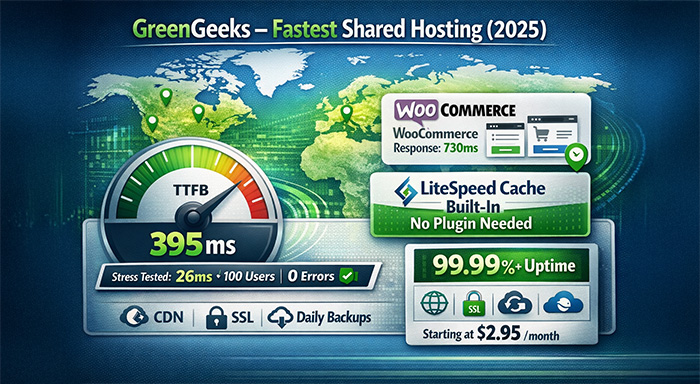
GreenGeeks earns the top position based on raw performance data. Hostingstep's 365-day continuous testing throughout 2025 recorded a 395ms average Time to First Byte, placing it among the fastest shared hosting companies available. For WooCommerce stores specifically, their servers achieved 730ms response times in 2023 benchmarks and ranked fastest in 4 out of 12 global testing locations.
The load handling capacity matters for store owners expecting traffic spikes. Under stress testing with 100 concurrent users, GreenGeeks maintained 26 millisecond response times while recording zero errors. Uptime hovered at 99.99% or higher throughout testing periods.
LiteSpeed Cache comes built into all plans, and this technology includes automatic WooCommerce logic that recognizes which pages should be cached and which should remain dynamic. Cart pages, checkout flows, and account areas stay fresh while product listings and category pages load from cache. This happens without requiring additional plugins or manual configuration.
Pricing begins at $2.95 monthly for the Lite plan with renewal rates at $12.95 monthly. The Pro plan starts at $4.95 promotional with $17.95 renewals, and Premium costs $8.95 initially with $29.95 renewals. All tiers include free CDN integration, SSL certificates, and daily backups.
Support operates around the clock through live chat, phone, and ticket systems.
SiteGround: Reliable with Strong Support
SiteGround has an established reputation for customer service quality. Their customer service staff are knowledgeable about WordPress and WooCommerce, and their response time over live chat is always very short.
Their hosting infrastructure is built using Google Cloud Platform along with SSD storage and SuperCacher caching. They also have staging environments that allow for testing updates before deployment and ensure that updates do not interfere with checkout when it comes to plugins and themes.
The initial pricing starts at $2.99 a month, although the rate increases substantially during the time for a renewable year. Data center locations are established on a number of continents, and this enables store owners to choose a data center that is nearer to their core customer base.
Cloudways: Managed Cloud Infrastructure
Cloudways operates differently from traditional shared hosting. The platform provides a management layer on top of cloud providers including DigitalOcean, Vultr, AWS, and Google Cloud. Store owners select their preferred cloud provider, server size, and data center location.
This approach offers scalability during traffic spikes. Servers can be resized without migration, and you pay based on actual resource usage. The control panel simplifies server management tasks that would otherwise require command-line access.
With prices beginning at just $14 per month for hosting on DigitalOcean servers, Cloudways is an ideal solution for those stores which have surpassed shared hosting but do not want to handle complex cloud infrastructure.
Kinsta: Premium Managed WordPress
Kinsta hosts exclusively on Google Cloud Platform's premium tier network. Their infrastructure includes automatic scaling, and all plans come with a staging environment plus the Kinsta CDN.
The MyKinsta interface contains analytics information related to PHP workers, network data, and visitor statistics. DevKinsta includes a development facility to develop before deployment.
Kinsta's starting plan is aimed at established stores that generate steady income to afford $35 per month hosting charges in order to leave the management of servers alone.
WP Engine: Enterprise-Focused Hosting
WP Engine focuses on hosting for the scale of WordPress. Their solution incorporates proprietary caching, threat detection, as well as a Genesis framework for theme creation.
A feature known as transferable installs enables agencies to set up client sites on their own account prior to making the transfer to the client's hosting service. Global CDN and PHP version choices are included.
Price plans start from $20 per month, with the ‘Startup’ plan capable of handling 25,000 visits per month. There are ‘Growth’ and ‘Scale’ plans suitable for larger stores.
Bluehost: Budget Entry Point
Bluehost has plans specifically for WooCommerce that come with installed storefront themes and the WooCommerce plugin set up and ready to configure. Basic store setup, including payment gateway connections, is guided by the onboarding wizard. Store owners will still need to add essential plugins like the best WordPress gallery plugins for product displays and image optimizers for performance.
Benchmarks for performance rank Bluehost behind several competitors, when it comes to speed, with response times averaging 600to 700ms. For smaller online businesses with limited traffic, an affordable entry point with its $2.95 launch plan may seem ideal.
Higher-tier plans are needed for daily backups, and subscription levels affect CDN access.
Nexcess: StoreBuilder Integration
Nexcess which is a part of the Liquid Web family groups in their StoreBuilder tool with hosting plans. This drag-and-drop interface helps simplify the creation of product page and store layout customization.
Traffic surges are handled automatically through auto-scaling. After that, visual testing compares your site before and after updates to detect visual bugs. Plugin performance monitoring helps identify slow plugins that are affecting load times.
The pricing plan starts at $21 per month. Nexcess places itself between budget shared hosting and premium managed providers.
Pressable: Automattic-Owned Managed Hosting
Pressable operates under Automattic, the company behind WordPress.com and WooCommerce itself. This collaboration provides early access to WordPress updates and direct integration with Jetpack features.
These plans include a Jetpack Security Daily subscription, along with scanning malware and automated backups. The staging sync feature enables bidirectional pushing between staging and production environments.
Pricing starts at $25 monthly for single-site plans including 30,000 monthly visits.
DreamHost: Long-Standing WordPress Host
DreamHost is one of the oldest web hosting companies that has been operating since 1996. Their shared hosting plans support WordPress with one-click installation and automatic updates.
WP Website Builder provides a block-based editor for creating pages. However, advanced store customization still needs standard WordPress tools. SSD storage comes standard across plans.
At $2.59 monthly for the Shared Starter plan, DreamHost offers competitive pricing. However, backups run weekly rather than daily, and CDN integration requires additional configuration.
What Matters for WooCommerce Performance
With every product view, cart update, and checkout step, WooCommerce stores generate database queries. Good hosting infrastructure demonstrates how fast these queries execute and return data back to shoppers.
Time to First Byte measures how long does it take for a server to begin sending data after receiving a request. Lower numbers signal faster initial page rendering. GreenGeeks' 395ms TTFB, recorded across an entire year of testing, demonstrates server response that is consistent rather than cherry-picked results from ideal conditions.
Concurrent user handling reveals how servers behave under pressure. A hosting provider might deliver fast responses for a single visitor but slow dramatically when 50 or 100 people shop simultaneously. Stress testing data showing response times under load provides more useful information than single-user benchmarks.
Caching technology determines how much processing servers can skip for repeat visitors. LiteSpeed Cache with built-in WooCommerce logic handles the caching complexity of a store where some pages should refresh, and others should serve from cache. This distinction is important because caching a checkout page causes failures in orders, while improving speed for caching product pages. Beyond server-level caching, implementing the best WordPress image optimizer ensures product photos load quickly without sacrificing visual quality.
Final Thoughts
After comparing performance data, pricing structures, and included features across these 9 providers, GreenGeeks delivers the strongest combination for WooCommerce stores focused on speed and reliability.
The 395ms average Time to First Byte across 365 days of continuous testing represents documented, long-term performance rather than promotional claims. The 26 millisecond response times under 100 concurrent users demonstrate the ability to handle real shopping traffic. Zero errors during stress testing confirm stability when it matters most.
Pricing remains competitive with other shared hosting options, starting at $2.95 monthly with all plans including CDN, SSL, and daily backups. LiteSpeed Cache with automatic WooCommerce handling removes the need for cache configuration, letting store owners focus on products and marketing rather than server optimization.
For store owners who need their pages to load quickly, their checkout to function reliably, and their hosting costs to stay reasonable, GreenGeeks provides the performance metrics to back up those requirements.
%201.png)

%201.png)

%201.png)