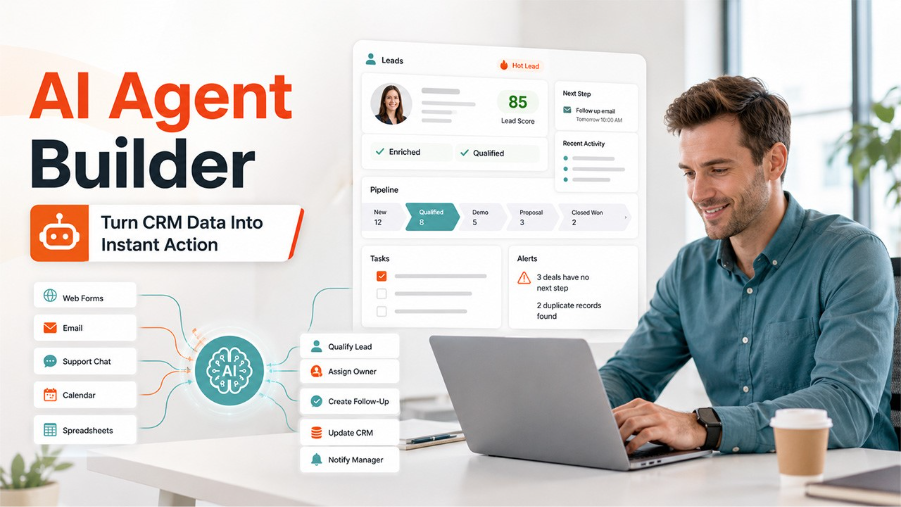

CRM systems are supposed to make sales work more organized. They store customer data, track conversations, manage pipeline stages, and help teams understand what should happen next.
But in many companies, the CRM becomes another place where people do manual work.
Sales reps copy data from forms into contact records. Managers check whether fields are updated. Marketing teams wait for sales feedback. Support teams pass customer context to account managers. Someone needs to enrich a lead, assign an owner, create a follow-up task, write a summary, or remind a rep that a deal has gone quiet.
The CRM contains the data, but the workflow still depends on humans remembering every step.
That is a big productivity issue. Salesforce’s State of Sales research has reported that sales reps spend only 30% of their time actually selling, while 70% of their time goes to non-selling work such as admin, preparation, manual updates, and internal coordination.
This is one reason AI agents are becoming interesting for CRM teams. They can help turn CRM data into action.
CRM automation has moved beyond simple triggers
Traditional CRM automation usually works with fixed rules:
- If a lead fills out a form, create a contact;
- If a deal moves to a new stage, notify the manager;
- If a task is overdue, send a reminder;
- If a customer submits a ticket, assign it to support.
These rules are useful. But real CRM workflows are rarely that simple.
A lead might come from a webinar, paid ad, referral, demo request, support conversation, partner campaign, or outbound sequence. Each source can require a different qualification path. A high-value enterprise lead should not be handled the same way as a student using a free plan. A customer asking about pricing should not be routed the same way as someone downloading a whitepaper.
CRM workflows need context.
AI agents can read incoming data, understand intent, compare it with previous records, and decide what should happen next. CRM automation with AI sentiment analysis makes this even sharper, routing the right lead to the right place based on tone, not just topic. They can work across the CRM, email, calendar, enrichment tools, messaging apps, spreadsheets, support systems, and internal databases.
What can AI agents do inside CRM workflows?

An AI agent can support many CRM tasks without replacing the sales team.
For example, it can:
- classify inbound leads by intent;
- enrich company and contact data;
- detect duplicate records;
- summarize recent interactions;
- assign leads based on territory or deal size;
- create tasks for sales reps;
- prepare follow-up email drafts;
- notify managers about high-value opportunities;
- update CRM fields after meetings;
- route support-to-sales handoffs;
- Flag deals with missing next steps.
The main value is not that the agent “uses AI.” The value is that it reduces the amount of repetitive coordination around CRM data.
PwC’s 2025 AI Agent Survey found that 79% of senior executives say AI agents are already being adopted in their companies. Among those adopting them, 66% report measurable value through increased productivity.
For sales teams, this kind of productivity gain usually comes from removing admin work, improving response speed, and reducing missed follow-ups.
AI should prepare sales work, not blindly send messages
CRM automation needs control. A company should not allow an AI system to send random customer-facing messages without context, approval, or rules.
The better approach is to use AI agents in layers.
Low-risk actions can be automated. For example, an agent can update a field, assign a task, or send an internal notification. Higher-risk actions can require human review. For example, an agent can draft a follow-up email, but the sales rep approves and sends it.
This human-in-the-loop model gives teams the benefits of AI without losing control over customer relationships.
An AI agent builder can help teams design these workflows by connecting CRM data, apps, APIs, logic, and approval steps. Instead of building one-off scripts for every process, teams can define how the agent should handle different scenarios.
Good CRM workflows to automate first
The best first CRM workflows are repetitive, measurable, and easy to review.
Good examples include:
Inbound lead qualification
When a new lead enters the CRM, the agent can check the source, company size, job title, region, message content, and previous activity. Then it can classify the lead, assign a score, enrich missing data, and notify the right person.
Demo request routing
A demo request should not sit in a queue. An agent can check routing rules, assign the lead to the right sales rep, create a calendar task, and prepare a short summary.
Abandoned deal follow-ups
Deals often stall because no one creates the next task. An agent can detect inactive opportunities, summarize the situation, and create a follow-up reminder.
Support-to-sales handoffs
Support conversations often reveal expansion opportunities. An agent can detect buying signals, summarize the support context, and notify the account owner.
Pipeline hygiene
Managers need accurate CRM data. An agent can flag missing fields, outdated stages, duplicate records, or deals without next steps.
CRM data becomes useful when workflows act on it
Most companies already have enough CRM data to improve sales operations. The problem is that the data often sits passively inside records.
AI agents help make CRM systems more active. They read context, trigger the next step, update connected tools, and keep the team informed.
For sales and revenue teams, the goal is not to replace the CRM. The goal is to make the CRM less dependent on manual admin work.
A good CRM workflow should help reps spend more time selling, managers spend less time chasing updates, and customers receive faster, more relevant responses.
That is where AI agents can create real operational value.
Conclusion
AI agents are transforming the way businesses operate CRM workflows. It significantly reduces manual effort and helps teams to act on customer data more efficiently. These systems can automate repetitive tasks such as lead qualification, data enrichment, follow-up reminders, and pipeline management. They are not meant to replace humans; rather, they keep human oversight where it is important. This results in more responsive and organized sales processes with fewer missed or delayed opportunities. It greatly reduces the administrative burden. As AI agent builders become more accessible, businesses can create intelligent CRM workflows that improve productivity, accelerate response times, and help sales teams focus on building relationships and closing deals rather than managing repetitive tasks.
%201.png)

%201.png)

%201.png)