
Choosing the right Customer Relationship Management (CRM) system is an important decision for any growing business. A CRM helps organizations manage customer interactions, organize sales activities, track leads, improve communication, and build stronger customer relationships. However, selecting the right technology is only one part of the process. Businesses must also decide how their CRM should be developed to support their specific goals.
This is where choosing the right CRM development approach becomes important. Some businesses can work effectively with ready-made CRM platforms, while others need customized solutions that match their internal workflows. The right choice depends on business size, operational complexity, budget, integration needs, and long-term growth plans.
In this guide, we will explore different CRM development approaches, the factors businesses should consider, and how to select a solution that delivers long-term value.
1. Understand Your Business Goals Before Choosing a CRM Approach
Before investing in CRM development, take time to understand what your business actually needs. A CRM should solve existing operational challenges rather than introduce unnecessary complexity.
For example, a small business may only need contact management, lead tracking, and basic sales automation. However, a large organization may require advanced reporting, multiple user roles, marketing automation, customer support management, and third-party integrations.
Start by identifying the problems you want your CRM to solve.
Consider the following questions:
- Are your sales teams struggling to track leads?
- Do employees manage customer information across multiple platforms?
- Is manual data entry affecting productivity?
- Do you need better customer communication and follow-up management?
- Are existing tools unable to support your business growth?
Clearly defining your CRM project requirements helps you avoid investing in features that your team may never use.
2. Explore Different CRM Development Approaches
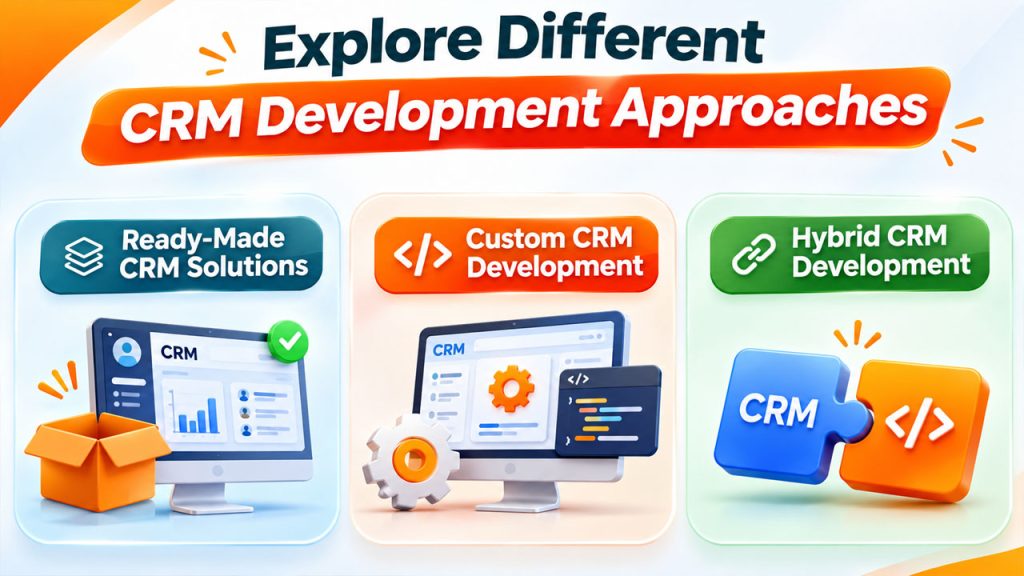
There is no single development method that works for every organization. Businesses should evaluate available options based on their operational needs, technical resources, and expected return on investment.
Ready-Made CRM Solutions
Ready-made CRM platforms provide pre-built features that businesses can start using with minimal development work. They typically include contact management, sales pipelines, reporting, task management, and automation features.
This approach is suitable for startups and small businesses that need a CRM without investing heavily in custom development.
Advantages:
- Faster implementation
- Lower initial development costs
- Pre-built business features
- Regular software updates and maintenance
Limitations:
- Limited customization
- Subscription-based pricing
- Dependence on third-party providers
- Potential restrictions on integrations
Custom CRM Development
Custom CRM development involves building software according to a company's specific workflows, operational processes, and business objectives.
For example, a real estate company may need property management, lead assignment, automated follow-ups, and commission tracking within one platform. A standard CRM may not support every requirement without additional customization.
Advantages:
- Complete control over features
- Flexible workflows and automation
- Custom integrations
- Better alignment with business operations
- Greater flexibility for future expansion
However, custom development generally requires a higher initial investment, technical planning, and ongoing maintenance.
Hybrid CRM Development
A hybrid approach combines an existing CRM platform with custom-built functionality. Instead of developing everything from scratch, businesses use established CRM features and customize specific areas where additional functionality is required.
This approach can balance development costs, implementation speed, and flexibility.
It is particularly useful for organizations that are satisfied with their existing CRM but need additional capabilities to support specialized workflows.
3. Evaluate Your Budget and Long-Term Costs
Budget is one of the most important factors when deciding how to develop a CRM. However, businesses should not focus only on the initial development cost.
A CRM investment may include:
- Software licensing or subscription fees
- UI/UX design and development
- Third-party integrations
- Data migration
- Employee training
- Hosting and infrastructure
- Maintenance and technical support
For instance, a ready-made CRM may appear affordable initially, but subscription fees can increase as the number of users grows. On the other hand, custom development may require a larger initial investment but provide greater control over functionality and future expenses.
During CRM solution planning, estimate both immediate and long-term costs. This will help you choose an approach that fits your financial resources without compromising essential business operations.
4. Check Integration and Customization Requirements
Modern businesses rarely operate with a single software application. They use multiple platforms for accounting, marketing, communication, customer support, payment processing, and project management.
Your CRM should work smoothly with these existing tools.
For example, integrating a CRM with an email marketing platform can help sales teams track customer interactions. Similarly, connecting it with accounting software can simplify invoice management and financial reporting.
Before choosing a development method, identify the systems your CRM needs to connect with.
Evaluate whether you require:
- Email and calendar integrations
- Marketing automation tools
- Payment gateways
- Accounting software
- Customer support platforms
- Business intelligence and reporting tools
- APIs for third-party applications
The ability to customize workflows and integrate external applications can significantly influence how effectively your CRM supports daily operations.
5. Consider Scalability and Future Business Growth
Your business requirements today may look very different two or three years from now. Therefore, selecting a CRM based only on current needs can create limitations later.
Imagine a startup with five employees that grows into an organization with 100 employees. Its CRM may eventually need advanced user permissions, automated lead distribution, multiple sales pipelines, and detailed performance reports.
A scalable CRM should support:
- Increasing customer databases
- Additional employees and departments
- New business processes
- Advanced automation
- Multiple locations
- Additional software integrations
When reviewing CRM software selection criteria, consider whether the platform can accommodate future growth without requiring a complete system replacement.
A flexible architecture and modular development strategy can make future improvements easier and more cost-effective.
6. Prioritize User Experience and Employee Adoption
Even a feature-rich CRM will deliver limited value if employees find it difficult to use.
A complicated interface can discourage adoption, increase training requirements, and create unnecessary delays in daily operations.
A well-designed CRM should provide a simple and intuitive experience. Employees should be able to access customer information, update lead statuses, assign tasks, and review important records without navigating multiple complicated screens.
Focus on the following elements:
- Simple dashboard navigation
- Clear data organization
- Mobile-friendly access
- Role-based dashboards
- Easy reporting features
- Minimal manual data entry
Involve employees from different departments during the planning stage. Their feedback can help developers understand practical challenges and create a system that supports actual working conditions.
7. Evaluate Development Time and Technical Expertise
Development timelines can vary significantly depending on the selected approach.
Ready-made CRM solutions can often be implemented relatively quickly because their core features already exist. Custom CRM development, however, requires planning, design, coding, testing, and deployment.
Businesses should also consider whether they have the technical expertise to manage the system internally.
If you choose custom development, work with an experienced development team that understands CRM architecture, database management, API integrations, security, and software testing.
Before starting, establish realistic milestones for:
- Requirement gathering
- System architecture and UI/UX design
- Development and integration
- Quality assurance and testing
- Data migration
- Deployment and employee training
A phased development strategy can help businesses launch essential features first and introduce advanced functionality over time.
8. Focus on Data Security and Maintenance
CRM systems store valuable business information, including customer details, sales records, communication history, and confidential operational data.
Security should therefore be considered from the beginning rather than treated as an additional feature.
Look for essential security capabilities such as:
- Role-based access control
- Data encryption
- Secure authentication
- Regular backups
- Activity monitoring
- Access management
- Data recovery procedures
You should also establish a maintenance plan that includes software updates, bug fixes, performance monitoring, and security improvements.
The right CRM development approach should make it possible to protect business information while maintaining reliable system performance.
9. Test the CRM Before Full Implementation
Before introducing a CRM across your entire organization, test it with a smaller group of employees.
A pilot implementation helps identify usability issues, missing features, workflow problems, and integration errors before they affect the wider business.
Collect feedback from users and evaluate whether the CRM is actually improving productivity.
Monitor important performance indicators, including:
- Lead conversion rates
- Sales cycle duration
- Employee adoption rates
- Customer response times
- Task completion rates
- Data accuracy
Use these findings to make necessary adjustments before the full rollout.
Conclusion
Choosing the right CRM development approach requires a clear understanding of your business goals, operational challenges, budget, and future growth plans.
Ready-made CRM platforms work well for businesses that need standard functionality and quick implementation. Custom CRM development is more suitable for organizations with specialized workflows and complex operational requirements. Meanwhile, a hybrid approach offers flexibility by combining existing CRM capabilities with custom-built features.
The most effective decision is not necessarily the one with the most features or the lowest initial cost. It is the approach that supports your employees, improves customer relationships, simplifies business processes, and adapts as your organization grows.
By evaluating your requirements carefully and following a structured development strategy, you can build a CRM environment that delivers lasting business value.
FAQs About CRM Development Approach
A ready-made or hybrid CRM approach is often suitable for small businesses because it offers essential features without requiring a significant initial investment. However, businesses with specialized workflows may benefit from custom development.
The cost depends on feature complexity, integrations, design requirements, development time, and ongoing maintenance. A basic CRM generally costs less than an enterprise-level platform with advanced automation and multiple integrations. Businesses should request a detailed project estimate before starting development.
Development time depends on the project's scope and complexity. A basic CRM may take a few weeks to a few months, while a complex enterprise CRM can require several months or longer. Requirement gathering, integrations, testing, and deployment also influence the timeline.
Yes. Many CRM platforms support customization through APIs, plugins, workflow builders, and additional development. Businesses can modify dashboards, automate processes, integrate external applications, and add specialized functionality depending on platform capabilities.
Scalability ensures that your CRM can support increasing customer data, additional employees, new departments, and changing business processes. A scalable system reduces the need for frequent replacements and helps businesses manage long-term growth.