


Have you ever captured a perfect photo that later comes out blurry, soft, or out of focus? Whether it’s a family photo, a travel shot, or a product image, unfocused pictures are frustrating, especially when you can’t retake them. The good news? Modern image enhancement tools can help fix blurry photos with ease.
This guide presents not only the reasons for out-of-focus images, but also how to fix unfocused pictures on different devices.
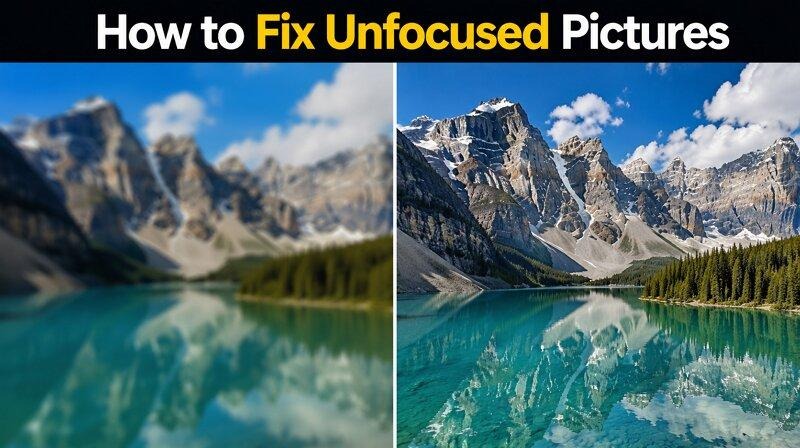
Why Are Your Pictures Unfocused?
Before learning to fix unfocused photo, it’s important to understand why this happens in the first place. Let’s consider a few common causes:
- Camera Shake: Blurry photos are usually because of this thing. A slight hand movement of the photographer during exposure can create noticeable blur.
- Incorrect Focus Point: Latest cameras and phones have autofocus systems. So, they may not always select the intended subject.
- Subject Movement: When the subject is moving constantly, but the shutter speed isn’t fast enough to freeze motion, you will get an unfocused picture.
- Low Light Conditions: In darker areas, cameras use higher ISO settings and slower shutter speed, which increases the risk of blur and softness.
- Dirty Camera Lens: A smudged lens often reduces the image sharpness. Fingerprints, dust, and moisture all contribute to poor focus.
- Depth of Field Issues: Sometimes, a wide aperture makes a shallow depth of field. If the focus point is missed even a little, various parts of a picture will appear blurry.
Can You Fix an Unfocused Photo?
The answer is yes, at least to some extent. The amount of recovery depends on the complexity of the blur. If you have slightly missed the focus point or the photo has a small amount of blur, it can be completely restored using AI enhancement tools. Even modern technology can fix the extremely blurred photos, but it may not return them to perfect quality.
Best Methods to Fix Unfocused Pictures That Actually Work
Here are some leading methods for fixing an unfocused picture on Windows, Mac, online, and mobile devices. Let’s dive into their detail:
Method 1 — How to Fix Unfocused Pictures with AI Photo Enhancers
Artificial intelligence has changed the way people fix out-of-focus photos. Instead of manually adjusting all the parameters, AI analyzes the image and intelligently reconstructs missing details. Although several options are available on the market, HitPaw FotorPea is the best AI tool for fixing unfocused pictures.
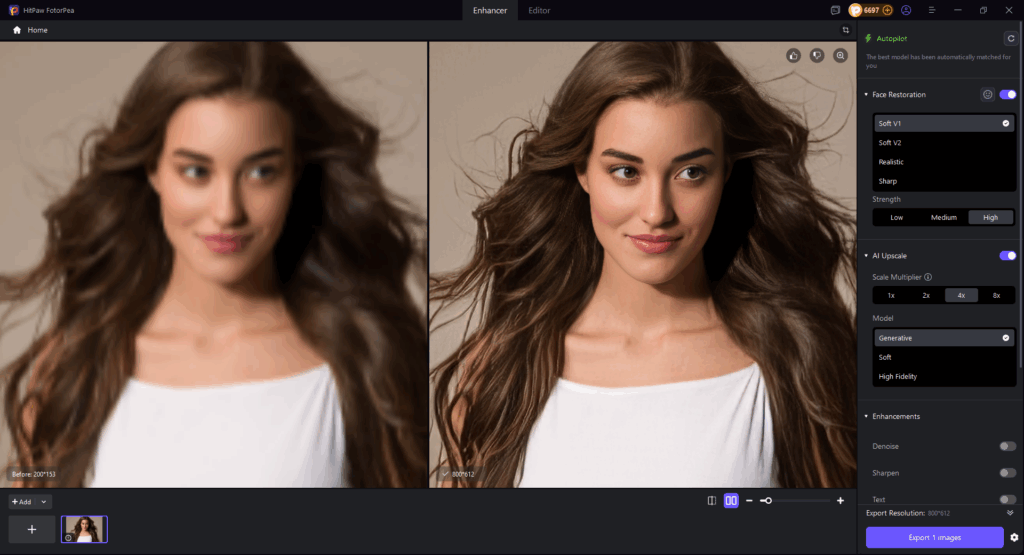
This remarkable software supports multi-model processing to enhance images and restore clarity, all within a user-friendly interface. Its AI algorithms can automatically detect and fix the missed focus, restoring clarity to blurry and unfocused photos with pixel-level precision.
You can easily improve facial features, reduce noise, enhance text, and upscale resolution, without any quality loss. It even allows fixing multiple unfocused pictures in a batch.
Step-by-Step Guide — Fix Unfocused Pictures Using AI
Step 1. Upload Unfocused Picture
First of all, download, install, and launch this software. Now, click “Enhance Photos Now” to get to the main interface. Then, tap or drag & drop the unfocused picture.

Step 2. Select Enhancement Model
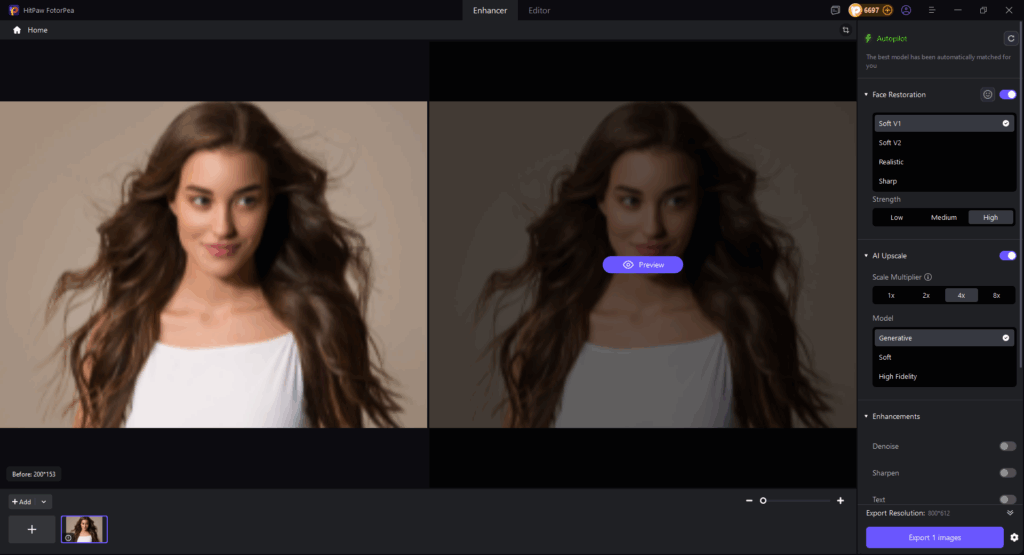
Next, enable the appropriate enhancement model, such as “AI Upscale” and “Face Restoration.” You can also pick the upscale models as “Generative,” “Soft,” “High Fidelity,” or “Repair Motion Blur,” etc.
Step 3. Preview and Export
Lastly, press the “Preview” button and let AI process the image. If the output looks good, hit the “Export” tab, and that’s all.
Method 2 — How to Fix Unfocused Pictures in Photoshop
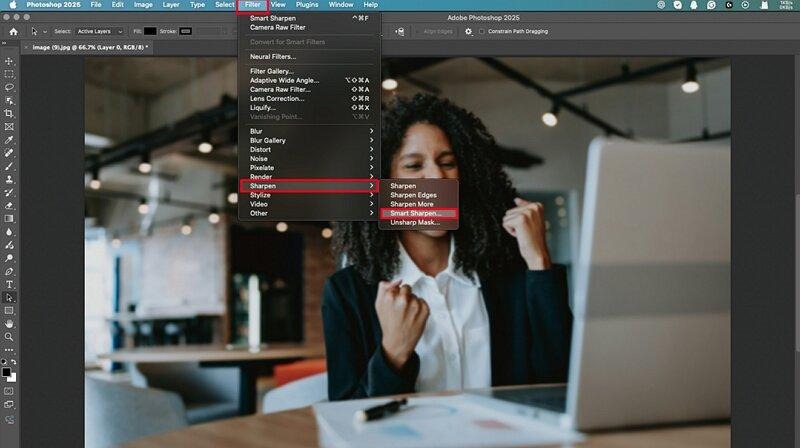
Adobe Photoshop is a well-known photo editor that offers extensive manual control to fix unfocused and blurry photos with layer masks and powerful filters. You can use the Smart Sharpen filter to improve photo clarity. It also eliminates noise, removes lens and motion blur, sharpens as desired, and enhances detail in all elements of a photo.
It is designed for high-performance workflows and is often used in advanced professional projects, especially by users with powerful hardware setups.
How to Fix Unfocused Pictures in Photoshop
Step 1. Open Blurry Photo
Launch Photoshop and open your unfocused photo. Unlock the background layer by clicking the lock button next to your photo layer in the “Layers” panel.
Step 2. Use Smart Sharpen
Next, press “Command/Control + J” to duplicate the layer. Then, go to “Filter” > “Sharpen” > “Smart Sharpen.” Adjust settings, choose an option from the “Remove” menu, and reduce noise as needed.
Step 3. Preview and Save
Finally, hit “OK” and let it load out. Tap the eye icon in the layers panel to toggle the option on or off to preview the output. Save it, and you’re all done!
Method 3 — Online Tools for Fixing Unfocused Photos
For those who don’t prefer installing software for fixing unfocused photos, online tools like iLoveIMG and Canva are the right choice. With ease of use, they can sharpen, enhance, and improve image clarity within your browser.
These platforms are ideal for social media creators, casual users, or anyone who wants a quick but basic enhancement solution. However, they can’t provide the advanced features and the same precision as premium software.
Method 4 — Mobile Apps for Quick & Easy Fix
Do you need to fix blurry photos quickly on the go? If so, mobile apps like Remini, AIMarvels, and PhotoDirector are of great help. They often use AI technology to restore details, sharpen edges, and improve overall image details with a single click.
They are useful for social media content, travel photos, and everyday snapshots. You can achieve professional-looking results without expertise and share the enhanced images directly from your device.
AI vs Photoshop: Which Is Better for Fixing Unfocused Pictures?
Choosing between AI tools and Photoshop depends on your experience level and some other factors. Here is a comparison table for a quick review:
| AI Tools | Photoshop | |
| Ease of Use | 1-click enhancement | Steep learning curve |
| Speed | Extremely fast | Moderate, but slow for complex tasks |
| Detail Recovery | Exceptional; reconstruct missing detail | High Precision |
| Flexibility | Mostly automated | Advanced manual control |
| Output Quality | Best for overall enhancements | Professional-grade quality |
| Cost | Affordable | Expensive |
AI tools like HitPaw FotorPea and Canva focus on fast AI-powered enhancement, helping users quickly improve image clarity, recover details, and upgrade overall quality with just one click. Photoshop is better for more advanced manual editing and precise control, but it also takes more time and experience to use effectively.
Best Settings for Fixing Unfocused Photos
No doubt, the right settings make a difference in achieving the professional, natural-looking results. Let’s consider some key adjustments:
- High-Resolution Input: Only a higher-resolution source image yields better restoration results. Always try to start with good-quality input.
- Moderate Sharpening: Always increase the sharpness gradually rather than applying the maximum values immediately. Also, over-processing makes the images look artificial.
- Don’t Skip Noise Reduction: Sharpening an image makes digital noise more noticeable, especially in low-light conditions. Try noise reduction to enhance image quality.
- Use Detail Recovery Features: If you’re using an AI tool, enable the detail recovery or face enhancement feature. It will analyze the image and reconstruct missing details.
- Preview Changes at Zoom: Check the output at full size (100% zoom). A photo often looks sharp in a small preview, but it often has unwanted artifacts.
- Save in the Right Format: After fixing an out-of-focus picture, export it as a high-quality PNG. It prevents further quality loss from compression.
When Do You Need to Fix Unfocused Pictures?
Not every photo needs fixation, but certain situations make it essential to restore clarity and sharpness. Here is when to fix unfocused pictures:
- Portrait photography: Even slight softness can make a face look dull or out of focus. Fixing unfocused portraits ensures that facial features appear crisp and detailed.
- Wedding photos: Blurred or unfocused images of once-in-a-lifetime events like weddings, graduations, or historical milestones feel disappointing because a retake is impossible.
- E-commerce product images: Because online buyers can only see product visuals, unfocused photos undermine credibility and reduce conversions.
- Travel photography: Travel photos capture unique landscapes, landmarks, and cultural experiences. Even a minor blur diminishes the impact of these images. If you are also trying to merge separate photos or create realistic composite images, check out our guide on how to combine two people in one photo for natural-looking results.
- Old scanned photos: Many old scanned photographs suffer from soft focus, fading, or minor blur. Digital restoration brings these images back to life.
- Social media content: High image resolution is crucial. Unfocused photos on social media reduce engagement and make posts appear less professional.
Conclusion
After reading this post, you must have learned how to fix an unfocused picture. You only need to choose the right tool and follow the respective steps. Although each method is suitable for different user types, HitPaw FotorPea is a comprehensive solution that offers ease of use, versatile AI models, fast processing, and studio-quality output with one-click AI enhancement.
FAQ — How to Fix Unfocused Pictures
Q1: Can You Fix an Unfocused Picture for Free?
Yes, several online tools like iLoveIMG and Canva offer free versions to fix blurry or unfocused pictures. But remember, premium tools generally produce better results and high-quality exports.
Q2: What is the best way to fix unfocused pictures?
AI photo enhancers like HitPaw FotorPea are the best way to fix unfocused pictures. It automates the restoration process and delivers the best quality output with a click.
Q3: Are online tools effective for fixing unfocused photos?
Yes, online tools can help fix slightly unfocused photos. However, severe focus issues require dedicated AI software for superior results.
Q4: What’s the Difference Between a Blurry Photo and an Unfocused Photo?
The fundamental difference is the root cause. Blurry photos are caused by camera and subject motion while the shutter is open. However, an unfocused photo happens due to the lens’ focus on the wrong area.
%201.png)

%201.png)

%201.png)

