

Every tax season, the IRS processes more than 160 million individual returns, and behind each one sits a stack of paperwork — W-2s from employers, 1099s from banks and gig platforms, K-1s from partnerships — that has to be read, verified, and pushed into downstream systems. For most accounting firms and fintech products, that reading still happens by hand or through legacy OCR that breaks the moment layouts shift. Machine learning changes the process of labeling tax forms, but only if the training data is right. And getting the training data right starts with labeling — the unglamorous, high-leverage step where a raw PDF becomes a structured example a model can actually learn from.
This guide walks through what tax form labeling really involves for W-2s, 1099s, and Schedule K-1s, where the process quietly breaks at scale, and how to design a labeling workflow that survives an actual tax season without falling apart in April.
Why Labeling Tax Forms Are Hard Than They Look
Labeling tax forms feel deceptively structured. Every W-2 has the same boxes. Every 1099-NEC follows the same IRS specification. But the specification is only half the story. Once you leave the IRS reference sample and start collecting real forms from real employers, banks, and partnerships, you run into the same wall every ML team hits: layout variance. A developer building a W-2 extraction backend recently summarized the entire problem in one line — layout variance across employers was the killer, and there were too many edge cases to handle reliably.
That variance shows up in three ways:
- Issuer-level variance. ADP, Paychex, Gusto, and hundreds of smaller payroll providers each render W-2s slightly differently — different fonts, different box borders, different placements of Copy B versus Copy 2.
- Input-quality variance. The same form may arrive as a clean digital PDF, a phone photo, a fax with speckle noise, or a scan skewed a few degrees off vertical.
- Semantic variance. A 1099 isn’t one form — it’s a family of at least twenty variants (NEC, MISC, INT, DIV, K, R, B, S, and more), each with its own field structure and its own labeling rules.
If your labels don’t account for all three, the model will look excellent on your validation set and collapse the first Monday of tax season.
What Actually Needs to Be Labeled on Each Form
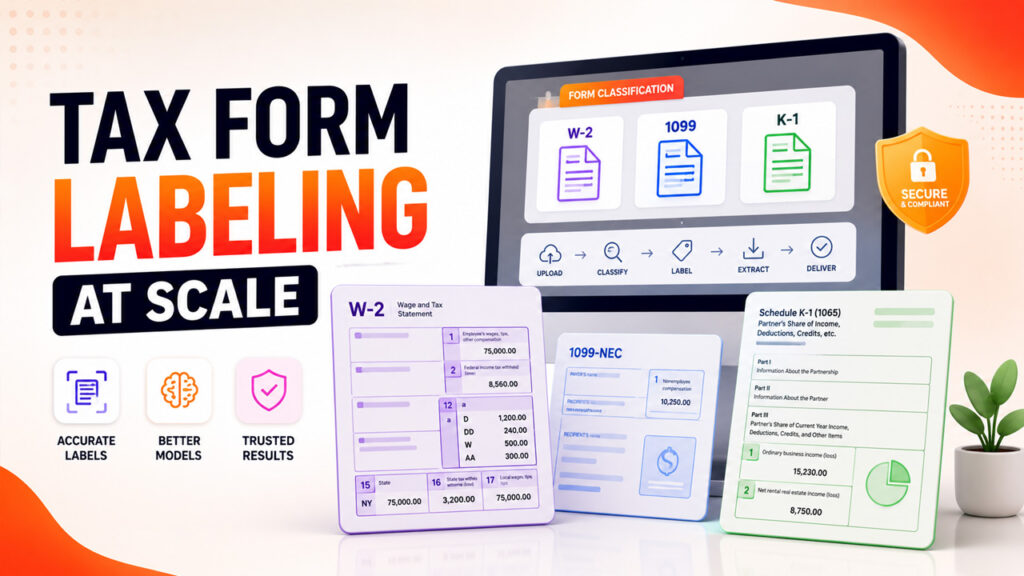
Form W-2 — The "Simple" Case That Isn’tForm W-2 — The "Simple" Case That Isn’t
A W-2 has around 20 numbered boxes plus state and local sections that can repeat. At a minimum, you’re labeling employer identifiers (name, EIN, address), employee identifiers (name, SSN, address), wage and withholding fields in Boxes 1 through 6, coded amounts in Box 12 with codes like D, DD, or W, and state sections in Boxes 15 through 20 — which are often stacked two, three, or four times for multi-state employees.
The gotcha most teams miss: Box 12 alone can contain up to four separate code/value pairs, and multi-state employees produce W-2s where Boxes 15 through 20 repeat vertically. If your schema treats state wages as a single field, you’ll silently drop everything after the first row. This is the kind of quiet data loss you only discover during a client audit.
The 1099 Family — Twenty Cousins in One Trench Coat
The 1099 family is where "just build one model" plans go to die. The most common variants a modern extraction pipeline needs to handle include:
- 1099-NEC — non-employee compensation for contractors and gig workers
- 1099-MISC — rents, royalties, prizes, and other income
- 1099-INT — interest paid by banks and financial institutions
- 1099-DIV — dividends and distributions
- 1099-K — payment card and third-party network transactions
- 1099-R — retirement distributions
- 1099-B — broker proceeds and basis reporting
Each variant has its own field structure. Box 1a on a 1099-DIV (ordinary dividends) is not the same field, semantically or positionally, as Box 1 on a 1099-INT (interest income). The best-performing pipelines treat each 1099 variant as a separate labeling task under a shared parent schema, not one giant "1099" bucket. That means step one of any 1099 labeling job is actually classification: which variant is this? Only after that decision is made does field-level labeling begin.
Schedule K-1 — The Form That Breaks Everyone’s Pipeline
K-1s are where most tax-form ML projects hit their real ceiling. As Thomson Reuters puts it plainly, there is no standard format for K-1s — they can arrive in a variety of formats and often include free-form text, footnotes, unstructured data, disclosures, and supplemental statements.
There are actually three different K-1s under the same name:
- Schedule K-1 (Form 1065) — partnerships and multi-member LLCs
- Schedule K-1 (Form 1120-S) — S corporations
- Schedule K-1 (Form 1041) — estates and trusts
Each has three parts (entity information, partner or shareholder information, and distributive share items), but the distributive share section is where the trouble lives. Many boxes simply say "see attached statement," which means the actual value is on a separate page — often a free-form dump of numbers with no consistent layout. Footnotes, tiered partnership disclosures, and international tax items on the K-3 extension can add dozens of additional pages to a single return.
A labeling schema that assumes "one form, one page, one set of boxes" will not survive contact with a real K-1. You need multi-page context preservation, entity linking between boxes and their referenced statements, and a footnote/statement label class of its own.
The Labeling Challenges That Kill ML Projects at Scale
Layout drift across tax years. The IRS updates form layouts. Box positions shift. New reporting requirements — such as the tax-basis capital account rule that now applies to every K-1 — add fields. A model trained on 2022 forms will start missing fields on 2024 forms unless your labeling pipeline is versioned by tax year and revalidated every filing season.
Scanned versus digital-native PDFs. A digital PDF has text objects the model can read directly. A scanned PDF is an image; text has to be OCR’d first, and OCR errors propagate into every downstream label. A well-designed labeling workflow tags which source each document came from and validates against both — because in production, you will absolutely see both.
PII on every page. SSNs, EINs, bank routing numbers, and full legal names appear on nearly every tax form. Labelers working in an unsecured environment is a compliance breach waiting to happen. Any serious tax-form labeling operation runs on SOC 2-controlled infrastructure with role-based access, audit logging, and — wherever the model doesn’t need to learn the raw value — automatic PII masking.
Attached statements and multi-page context. K-1s are the worst offender, but 1099-B and 1099-DIV also frequently ship with supplemental pages. Your labels need to link Box X on page 1 to its "see attached" content on page 3, or the model will learn a truncated version of every value it should predict.
A Practical Labeling Framework for Tax Forms
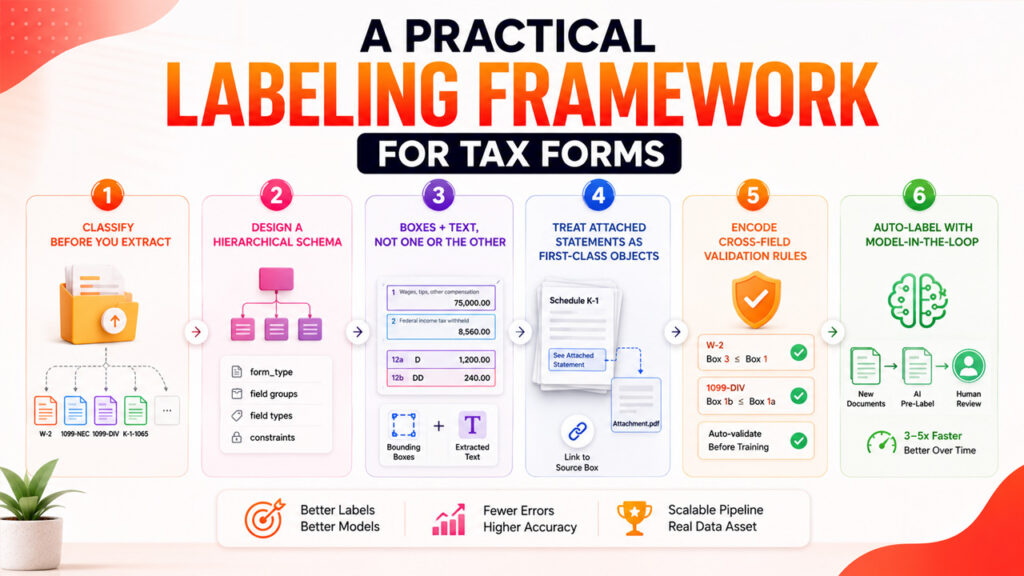
Step 1: Classify Before You Extract
The first model in a tax pipeline should be a document classifier, not a field extractor. Route each incoming PDF into the correct form-specific queue — W-2, 1099-NEC, 1099-DIV, K-1-1065, and so on — before any field labeling begins. Mislabeled forms sitting in the wrong queue corrupt the schema faster than any single bad annotation.
Step 2: Design a Hierarchical Schema
Use a parent-child structure: a top-level form_type label, per-form field groups, and per-field type constraints such as currency, SSN, EIN, date, and state code. Field-type constraints are how you catch labeling errors automatically — a "wages" field with a non-numeric value is almost always an annotation mistake, and the schema should reject it before it reaches the training set.
Step 3: Bounding Boxes Plus Text, Not One or the Other
For form fields, a bounding box tells the model where the value lives; the extracted text tells it what the value is. Both need to be labeled together, and both need to survive layout drift. Layout-aware models like LayoutLM and Donut consume both signals — but only if your labels supply both. Labels that carry only text lose spatial context; labels that carry only boxes lose meaning.
Step 4: Treat Attached Statements as First-Class Objects
Give footnotes, K-3 attachments, and "see attached" statements their own label class and a reference field that links back to the box they extend. Do not try to fold them into the parent form’s schema. When a K-1 arrives with a 12-page statement, that statement is data — not noise to be discarded.
Step 5: Encode Cross-Field Validation Rules
Box 3 (Social Security wages) on a W-2 rarely exceeds Box 1 (federal wages) by more than the standard 401(k) contribution differential. Box 1a and Box 1b on a 1099-DIV have a fixed relationship, since qualified dividends can never exceed ordinary dividends. Encoding these rules into the labeling QA layer catches bad annotations before they ever reach the training set — and dramatically reduces the debugging you’ll do later when the model produces impossible outputs.
Step 6: Auto-Label With Model-in-the-LoopStep
Once you have a few thousand hand-labeled examples, use them to train a first-pass model that pre-labels new documents. As these models mature, teams can move toward production-scale deployment using machine learning platforms such as Vertex AI, which help manage model training, evaluation, and deployment workflows. Annotators then correct rather than create — which is roughly three to five times faster and catches drift as the model sees new employer or issuer layouts. This is where labeling stops being a cost center and starts compounding into a real data asset.
Where Labeled Tax Data Fits Into the Broader Stack
Labeling tax forms don’t just train an extraction model. They become the entry point for a much bigger workflow. The same structured JSON coming out of a W-2 extractor can flow into a CRM to enrich a client record, into an accounting system for reconciliation, or into a lending model for income verification. This connects with how AI and machine learning are transforming CRM systems by helping businesses turn structured data into actionable insights.
Teams building this kind of end-to-end automation typically pair their extraction pipeline with the broader CRM intelligence patterns discussed in how AI and machine learning are transforming CRM systems — because once the tax data is structured, the customer-facing side is where the real ROI shows up.
For teams deploying at enterprise scale, the training and serving side often runs on managed ML platforms. If you’re evaluating those, this primer on Vertex AI is a useful starting point for weighing tradeoffs between hosted and self-managed setups. And for firms whose downstream use case is sales or lending intelligence, the breakdown of AI in modern sales workflows covers where extracted document data actually creates measurable lift for revenue teams.
The labeling platform itself sits at the bottom of that stack. It’s the layer that turns raw PDFs into training-ready examples, and it’s where most teams either save six months of engineering work or lose it. Purpose-built platforms for PDF data labeling are designed to handle the specific quirks of tax forms — multi-page context, PII controls, attached-statement linking, and per-issuer layout drift — without forcing your team to build all of that infrastructure from scratch. When you evaluate one, four questions matter: does it handle bounding boxes plus text? Does it support hierarchical schemas? Can it enforce cross-field validation rules? And can it version labels by tax year? If the answer to all four is yes, you have a foundation that will survive next April.
Final Thoughts
Labeling tax forms isn’t a checkbox on the way to shipping a model. It’s the single biggest determinant of whether your model performs at 95% accuracy on your validation set and 70% in the field, or holds up at 95% in both places. The teams that get it right treat labeling as an engineering discipline: they classify before they extract, they version by tax year, they treat attached statements as first-class objects, and they lock down PII from the moment a document enters the pipeline.
Do those things, and your W-2s, 1099s, and K-1s become the reliable foundation of every downstream workflow they touch. Skip them, and you’ll spend every tax season firefighting edge cases that better-labeled training data would have caught six months earlier. For teams building this out from scratch and looking to shortcut the six to nine months it typically takes to design labeling schemas, PII controls, and validation logic that actually hold up under production load, working with an established AI asset management platform is often the fastest path from a pile of raw PDFs to a production-grade training set.
%201.png)

%201.png)

%201.png)