

What SPF Flattening Is and Why the 10 DNS Lookup Limit Matters
The Sender Policy Framework (SPF) plays a crucial role in email authentication, along with enhancing domain protection and verifying senders. As part of a comprehensive Email Security Software strategy, SPF helps organizations prevent email spoofing, improve deliverability, and strengthen overall email security. The framework enables the domain owners to designate which email server are authorized to send emails on their behalf. This process also relies on SPF record, a type of DNS TXT record, that offers details of the approved email sources and mechanisms, such as include, a, mx, and ip4. Although the major limitation still outlines in REC 7208, that is required by the IEFT stipulates that an SPF record must not exceed 10 DNS lookups during authentication. If this limit is surpassed, receiving servers will return a “Too Many Lookups Error,” or SPF PermError, rendering the SPF authentication for that email invalid.
This 10 query limit is essential as it prevents numerous recursive DNS requests that could burden the infrastructure and jeopardize the overall reliability of email validation. With the increasing application of cloud email services, third-party senders, such as Google Workspaces, Office 365, SendGrid, and other marketing platforms, rise in vendor traffic. Through this the SPF records have become more complicated. Because of this, the SPF records have become more complicated. With the addition of each mechanism, such as include or mx, it tends to add more DNS lookups. With multiple third-party vendors or the splitting of subdomains, it’s simple to surpass the lookup threshold. When this occurs, even well-crafted SPF policies can become ineffective, leading to issues with email delivery, SPF failure outcomes, and potential harm to the sender's reputation.
When to Use SPF Flattening: Common Causes of SPF PermError and Authentication Failures

SPF flattening tackles a critical issue in SPF management: exceeding the limit on DNS lookups and encountering the Too Many Lookups Error. Common contributors to this problem include:
- Multiple Third-Party Services: Utilizing various email service providers (ESPs), customer relationship management (CRM) systems, support solutions, or order fulfillment platforms (like Google, Office 365, SendGrid, or Telit) can create a multitude of
includedirectives, leading to a rapid accumulation of DNS lookups. - Nested SPF Records: Some vendors utilize nested SPF records, where one SPF record calls upon others, which increases the number of required DNS lookups.
- Changes in Vendor Traffic: Marketing teams often modify their automation or outreach tools, as highlighted by Channel Program and G2 research. These changes can result in frequent updates to SPF records, which can contribute to record bloat.
- Duplicate Senders and Shared IP Addresses: Overlapping vendors or neglecting to delete inactive entries can exacerbate the complexity and volume of SPF mechanisms.
These circumstances also increases the likelihood of SPF authentication faliure, even if DKIM and DMARC settings are properly configured. When a PermError occurs, the recipient mail transfer agent (MTAs) can ignore DMARC information, or simply resort to a neutral status, which ends jeopardizing email deliverability and security of the domain.
How SPF Flattening Works: Replacing Include Mechanisms with IP Addresses
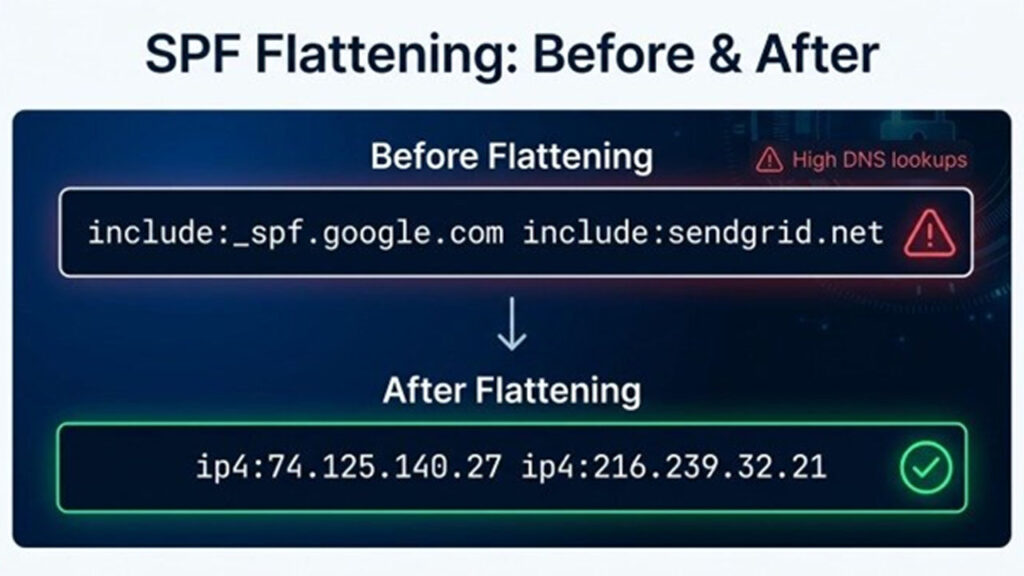
AutoSPF Help in simplifying SPF flattering by minimizing the total number of DNS lookups that are required for SPF validation. Instead of just relying on multiple mechanism, like include:sendgrid.net or include:_spf.google.com, the platform replaces them with a consolidated list of corresponding IP addresses. This help in creating a streamlined SPF record, which can reduce external DNS queries, and help in preventing the 10-DNS-lookup limit form bein exceeded. It also improves email authentication, reliability and deliverability.
Why Replace SPF Include Mechanisms?
Every include directive in your SPF setup may lead to several DNS lookups because of potential recursive references. By employing SPF flattening, various tools like MxToolbox, dmarcian, IRONSCALES, or dmarc.io can simplify these includes, determining their corresponding IP addresses and adding them straight into your SPF record. Additionally, other mechanisms, such as mx and a, can also be flattened in a similar manner.
The Anatomy of a Flattened SPF RecordThe Anatomy of a Flattened SPF Record
An ordinary SPF record that utilizes includes may appear as follows:
v=spf1 include:_spf.google.com include:sendgrid.net ~all
After flattening, it transforms into:
v=spf1 ip4:74.125.140.27 ip4:216.239.32.21 ip4:167.89.98.12 ip4:198.21.1.10 ~all
This optimized SPF record significantly minimizes DNS queries and guarantees consistent sender validation, even with numerous third-party services involved.
Risks and Best Practices: Keeping Flattened SPF Records Accurate, Secure, and Maintainable
Risks of Using Flattened SPF Records
Although SPF flattening addresses the Too Many Lookups Error and improves SPF authentication, it comes with new potential issues:
- Dependence on Static IPs: Third-party services like SendGrid and Office 365 may change their outbound mail IP addresses without prior notice, requiring manual updates to IP lists. Failing to do so might result in the blocking of legitimate emails (SPF failure).
- Increased Complexity and Record Size: Including numerous IP addresses can cause record bloat, potentially exceeding the 255-character limit for DNS TXT records and complicating SPF management.
- Security Vulnerabilities: If a flattened SPF record contains outdated or stale IP addresses, it may allow unauthorized senders or disrupt legitimate vendor communications if not updated in a timely manner.
- SPF Alignment Issues: In environments with multiple domains or subdomains, incorrect SPF flattening or misplacement of the "all" mechanism can jeopardize SPF alignment, impacting DMARC results negatively.
SPF Best Practices for Maintaining Flattened Records
- Automated SPF Streamlining: Utilize trusted tools like dmarcian’s SPF Surveyor, MxToolbox’s SPF flattening service, or IRONSCALES to consistently produce updated flattened SPF records. This approach reduces the likelihood of human error and the need for manual updates.
- SPF Oversight and Change Tracking: Implement SPF monitoring solutions and keep detailed logs to oversee SPF configurations. This practice helps avoid conflicts with IP ranges or duplicate sender entries.
- Eliminate Unused Entries: Periodically review your email sources, vendors, and SPF mechanisms to remove any entries that are no longer in use, thus preventing record expansion.
- Restrictive Directives: Opt for a strict SPF record, such as “-all” (which blocks everything not explicitly permitted) or “~all” (soft fail, allowing some leeway), depending on your requirements for SPF compatibility and legitimate communications. Ensure this aligns with your business’s deliverability needs.
- Subdomain Segmentation: Whenever feasible, segment by subdomain so that each function (like Marketing Automation or Customer Support) has a tailored SPF policy, each with its own lookup capacity.
Step-by-Step SPF Flattening Workflow: Audit, Flatten, Test, Monitor, and Update
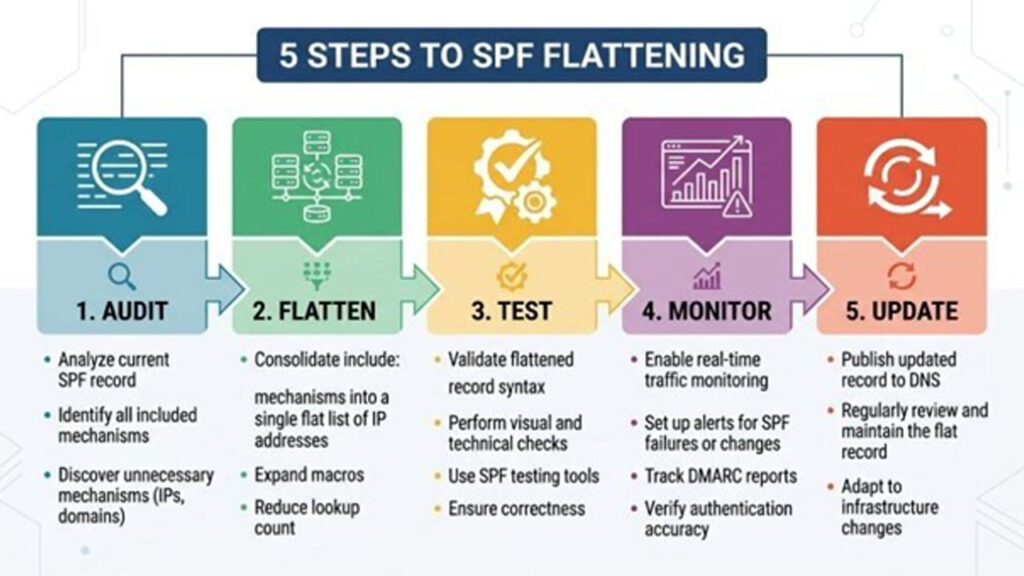
1. Audit Existing SPF Record and Email Sources
Start by thoroughly assessing your SPF record with tools like MxToolbox, dmarcian’s Domain Overview, or the Detail Viewer. Examine all the SPF mechanisms and vendor services while evaluating your SPF lookup count. Use DMARC data to gauge the SPF pass rate and identify where SPF failures or neutral outcomes occur, particularly those resulting from Too Many Lookups Errors.
2. Flatten SPF Record
Utilize an SPF flattening tool — such as IRONSCALES SPF Management, MxToolbox SPF Flattening, or open-source choices recommended by industry professionals Asher Morin and Tim Draegen — to create a revised, flattened SPF record. This updated record must substitute all include mechanisms with specific IP addresses and, when applicable, merge any overlapping IP ranges.
3. Test SPF Configuration
Prior to releasing the simplified SPF record, utilize external SPF validation tools to verify the setup, and pay close attention to the positioning of the “all” mechanism (such as “-all” for a strict deny-all approach or “~all” for a softfail). Confirm that the SPF aligns correctly with the DKIM settings and follows the alignment policies specified by DMARC. Tackle any problems related to record size and ensure compliance with character length restrictions.
4. Monitor Results and Continuously Review
Once you have implemented the flattened record, utilize SPF monitoring tools like dmarc.io or dmarcian to observe actual SPF authentication results related to the MAIL FROM and return-path headers. Keep an eye on the SPF pass rate, vendor traffic, and be vigilant for any unexpected SPF failure results.
5. Update and Maintain
Implement routine reviews of SPF management and automate checks when possible. During vendor onboarding or the removal of email sources, quickly update manually or initiate a new automated SPF flattening process. Keep abreast of changes to vendor IP addresses, as providers like Office 365 and SendGrid frequently release updates, and adjust your SPF records as needed. Eliminate any unused entries, and think about conducting regular SPF audits to assess their effectiveness.
Conclusion
By adhering to these SPF best practices and actively monitoring your SPF setups, organizations can enhance email deliverability, protect their sender reputation, and ensure strong domain security — while steering clear of the infamous Too Many Lookups Error and issues associated with improper SPF configuration.
%201.png)

%201.png)

%201.png)