

There is a point in almost every small business when customer information starts turning up in too many places. A booking is written into the calendar. A phone number sits in a spreadsheet. Someone has added a note to the CRM. Another employee remembers that the customer prefers a particular time of day. Then the phone rings, the business is busy, and nobody is quite sure which piece of information is the most current.
It sounds like a technology problem, but it usually starts as a workflow problem. Small teams tend to build systems gradually. A calendar is introduced because appointments need to be managed. A CRM arrives later because customer records need to be organized. A spreadsheet appears somewhere in between because there is one particular piece of information the other two systems do not handle conveniently. Each decision makes sense on its own. However, with a CRM booking system, they can create a surprisingly complicated daily routine.
That is why an online booking system for small business can be useful as part of a wider customer-management process. It does not have to replace a CRM. Instead, booking information can become one of the most practical sources of customer context — provided the team knows what should be recorded, where it belongs and who is responsible for keeping it current.
The booking calendar knows more than you think
A CRM booking system can make this information more useful by connecting individual bookings with the wider customer record. Consider a typical customer record. At first glance, it might contain little more than a name, a telephone number and an appointment time. Look closer, though, and there is often a useful history hiding in plain sight.
How many times has this person booked? Do they usually come on weekday mornings? Have they cancelled several appointments at the last minute? Do they always request the same employee or service? When was their last visit?
None of this is particularly sophisticated data analysis. It is simply the story of the customer's interaction with the business, recorded one appointment at a time.
The mistake is treating each booking as if it expires when the appointment does. For the customer, the relationship continues. For the business, previous bookings can make the next interaction easier. A returning customer should not have to explain the same preference for the fourth time simply because the information was stored in a different place.
When two systems tell two different stories
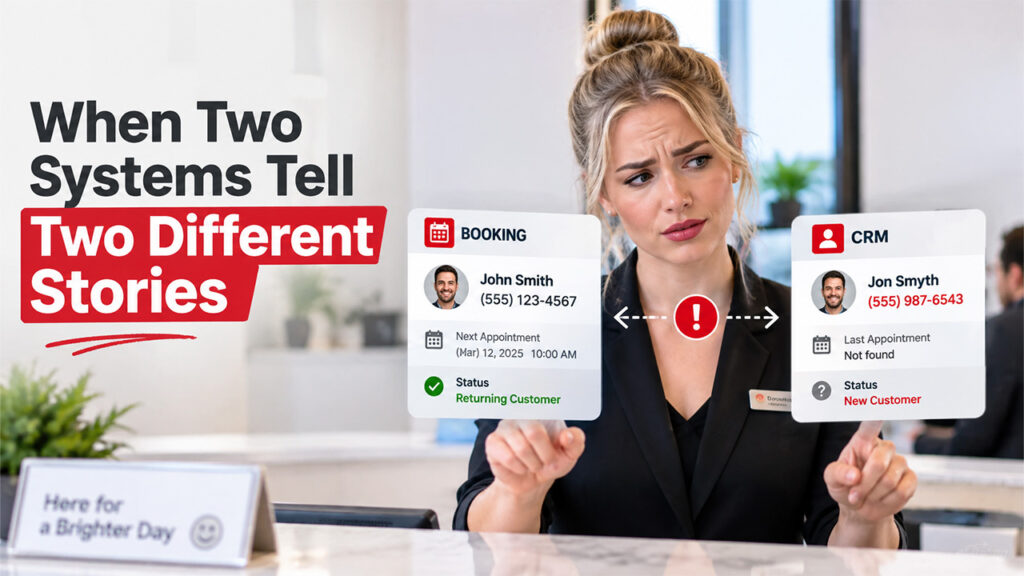
The awkward moment comes when the booking system and CRM disagree.
Perhaps the CRM contains an old telephone number. Maybe the customer's name is spelled differently in the booking calendar. One system shows a previous appointment, while the other appears to suggest that the person is new.
When this happens repeatedly, employees develop their own workaround: they ask colleagues, search old emails, or simply ask the customer again. The technology is still there, but people stop trusting it. This is where a CRM Booking System needs clear rules about where customer information belongs and which system should be trusted.
The solution is less complicated than it sounds. Decide what belongs where.
The booking system should be the source for appointments, times, availability and attendance. The CRM can handle longer-term customer information and relationship history. Contact details may need to exist in both places, but there should be a clear rule about which system is considered authoritative.
It is also worth agreeing on how much information staff actually need during a normal working day. A receptionist checking in a customer does not need to read their entire history. A technician or consultant may need one or two specific notes.
The front desk test
There is a simple way to find out whether a customer-data workflow is working: watch what happens when the business is busy.
If an employee has to switch between the booking calendar, CRM, email and a spreadsheet just to answer a straightforward customer question, there is friction in the process.
The same thing happens with regular customers. Imagine someone arrives for their eighth appointment. The person at the desk recognizes them, but the system does not. The customer explains a preference that was mentioned several times before. A note exists somewhere, but nobody has time to look for it.
That is exactly the kind of small failure that makes a business feel less personal.
The answer is not necessarily more automation. Sometimes it is simply a better daily view. The booking screen should provide enough context for the immediate interaction, while the CRM remains available for deeper information when it is actually needed.
A booking is the beginning of a conversation
The most useful customer information often appears at the moment of booking.
A customer might mention that they are coming from out of town and need an earlier appointment. Someone else may ask for a particular member of the team. Another person may be arranging a repeat service and wants the same option as last time.
These are small details, but they can make a noticeable difference later.
The trick is to record information while it is fresh rather than relying on someone to remember it at the end of a busy day. Notes should also remain factual. “Requested morning appointment because of work schedule” is much more useful than an informal comment that only makes sense to the employee who wrote it.
Regulars, cancellations and the patterns between them

Customer loyalty is often visible before a business formally measures it.
A person who books every month has already told you something through their behaviour. They may never describe themselves as a loyal customer, but their booking history does. Recognizing that pattern can be as simple as remembering their preferred time or avoiding unnecessary questions.
The same principle applies to cancellations and no-shows.
A single missed appointment does not necessarily mean anything. A pattern might. Several short-notice cancellations could indicate that reminders are arriving too late, that a particular time slot does not work well for customers, or that the booking process makes changes unnecessarily difficult.
The useful response is to look for the operational lesson rather than attaching a label to the customer.
Automation should remove repetition, not add complexity
A CRM Booking System can use CRM workflow automation to handle some of these predictable connections, such as creating or updating a customer record when a new booking is made. There is a temptation to automate everything once two systems are involved. Small businesses should resist it.
Automation is most useful for predictable, repetitive tasks. If a new booking always needs to create or update a customer record, that is a sensible candidate. If appointment status always changes after a completed visit, that may be another.
But some information is better reviewed by a person. A short weekly check can catch duplicate profiles, outdated contact details and notes that were never transferred correctly.
In other words, automation does not eliminate responsibility. It simply removes some of the repetitive work.
For many small teams, the best system is surprisingly modest: clear rules, a few useful fields, consistent naming and a short weekly review.
Conclusion
At the end of the day, a CRM Booking System isn't really about buying more software. It's about deciding, clearly, what information lives where, and making sure your team actually trusts it. It's about deciding, clearly, what information lives where, and making sure your team actually trusts it. A booking calendar and a CRM can work well together once everyone agrees on the rules: what gets recorded, who updates it, and which system wins when they disagree. Get that right, and a returning customer won't have to repeat themselves for the fourth time. Small, consistent habits, checked once a week, do more for a business than any complicated new tool ever could.
%201.png)

%201.png)

%201.png)