
Quick answer: pick the tool built for your kind of chaos
The best manufacturing planning software depends on the reality of the factory, whether you run a large multi-constraint site, a high-mix job shop, or a two-line maker chasing tight lead times.
Manufacturing planning software comes in several forms, from SMB-focused MRP platforms to enterprise APS systems and AI coordination layers. The right choice depends on how your factory handles materials, capacity, scheduling, and supplier delays.
| Product | Best when… | Layer | Late-material strength |
| Organizely | You want an AI agent to draft tomorrow’s plan while the coffee brews | AI-coordination layer | Flags shortages and drafts a revised purchasing and production plan for team approval |
| Siemens Opcenter APS | One slipped component ripples across multiple constraints at a large site | Stand-alone APS | Finite scheduling plus a Show Shortages Only view in Material Explorer |
| PlanetTogether APS | Your ERP stays, but its schedule collapses under real constraints | Stand-alone APS | What-if schedules that you publish back to the ERP |
| MRPeasy | Small maker escaping spreadsheets needs MRP that “just works” | SMB MRP | Shortage reports and finite-capacity scheduling with drag-and-drop rescheduling |
| Katana | Product brand juggles e-commerce channels and assembly lines | SMB MRP | Orders and stock kept aligned across Shopify, wholesale, retail, and 3PLs |
| Odoo Manufacturing | Tech-savvy team prefers modular, open-source freedom | Modular ERP/MRP | Flexible path that grows with add-ons |
Users should pick the square that perfectly matches their shop and ask each vendor to run a live demo, where a delayed PO date ripples through orders, capacity, and cost. One real-world test beats all feature grids.
What is Manufacturing Planning Software?
Manufacturing planning software helps manufacturers coordinate materials, production orders, capacity, purchasing, and delivery commitments. Depending on the platform, it may include MRP, finite-capacity scheduling, production planning, inventory management, or AI-powered planning.
When materials run late, manufacturing planning software should do more than flag a shortage. It should show which orders are affected, help planners understand the capacity impact, model alternative scenarios, and support a revised production plan.
Organizely: the AI teammate that drafts tomorrow’s plan while you pour the coffee
Organizely is a platform that runs AI agents that can keep people, machines, and stock in sync, using the sales, stock, and purchasing data to the team that already has it. When a supplier data slips, the agents can:
- Flag the shortage agains the orders it affects.
- Draft a revised purchasing and production plan that shows what moved.
- Send the draft to your team for approval by message.
Nothing goes out until the team is against it, so even change-averse planners can keep the final control. The agents can work alongside the systems that the team already run, they do not replace them.
Who benefits most? Manufacturer whose materials, equipment, and labor plans live in separate spreadsheets and cross-department email threads.
Ask the vendor to show you
- Edit a supplier ETA and watch the agent draft a revised material and production plans.
- Check how many jobs have moved in the draft and the overtime or ex
- how many jobs move in the draft and the overtime or expedite dollars at stake.
- Approve the draft and confirm exactly what goes out after signing off.
Skip the canned slide deck. Run your late-material script live, and you’ll know within five minutes whether this AI teammate deserves a spot on your org chart.
Siemens Opcenter APS: heavyweight scheduling that respects your material stack
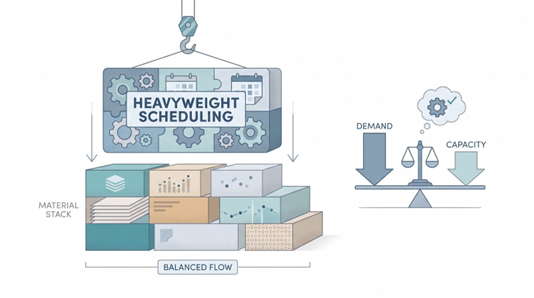
Enterprise plants love capacity math but hate surprises. Opcenter APS has bought a finite and rule-divine engine that treats raw material as a hard constraint, and never an afterthought.
Open Material Explorer and switch on Show Shortages Only to see just the materials that are short. The view arrived in release 2510, together with a configurable alerts window that can take alerts from any MES. From there, planners decide which orders to move first.
Where it shines
- Handles complex routings with secondary constraints and sequence-dependent setups.
- Takes alerts from your MES in a configurable alerts window (new in 2510).
- Aims to reduce setup time and make shortages easy to spot.
Watchpoints
- Quote-only pricing; implementation effort rises with each custom rule.
Demo tips
- Delay a raw material and confirm the shortage marker appears without a manual refresh.
- Lock a frozen zone, rerun the plan, and count how many jobs stay put.
- Compare two scenarios, one with overtime and one without, and trace the margin impact back to the sales order.
If the factory feels like an airport tarmac, with tight connections, shared equipment, and penalties for delays, Opcenter can give planners the tower a view to keep departures on time.
PlanetTogether APS: the ERP sidekick that turns “what if” into “why not”
If the user is happy with their ERP solutions, until the schedule melts, PlanetTogether can bolts on, imports, orders, inventories, and routings, and can give planners a sandbox environment to test ideas before going live. Users can drag a job, add overtime, swap a work center, or push a receipt date and see the new schedule. Stack scenarios like browser tabs, compare due-date hits and overtime dollars, it can then be publishing the winner the team agrees.
PlanetTogether cites one medical-device maker that cut overtime labor costs by about 20 percent and inventory overhead by about 15 percent.
Strengths
- Runs visual what-if plans that respect both material and finite capacity.
- Connects to ERPs such as SAP, Microsoft Dynamics, Oracle, NetSuite, Infor, Epicor, and QAD.
- Publishes the chosen schedule back to the ERP so the floor can act on it.
Mind the gaps
- Pricing isn’t public, so plan on a discovery call.
- Integration quality depends on ERP data hygiene.
Demo checklist
- Import a live order book, slip a component ETA, and watch the shortage propagate.
- Build two scenarios, then export the chosen one straight back to ERP, no manual edits.
- Lock three frozen orders and confirm they stay put while the rest shuffle.
Need flexibility without a full system rip-and-replace? PlanetTogether delivers enterprise-grade scheduling finesse in a footprint your IT team can live with.
MRPeasy: small-manufacturer MRP that kicks spreadsheets to the curb
If your plant headcount sits closer to 50 than 500, you need speed, not a six-month rollout. MRPeasy lives up to its name: sign up, load BOMs, and run your first material plan in a free trial. Public pricing pages list plans starting at $49 per user per month for the Starter tier.
When a part runs late, shortage reports show what is missing, and the Gantt chart lets planners drag and drop operations to a new slot.
Why owners rave
- Post transparent, per-user pricing that scales as you grow.
- Balance materials and capacity so no one guesses if the lathe has hours left.
- Report shop-floor progress from a kiosk so stock and plans stay current.
Limitations
- Finite-capacity logic is solid but less granular than enterprise APS.
- Deep process-industry features are thin.
- Lot traceability and quality control depend on the plan you pick; there are no add-on modules.
Demo playbook
- Import a multilevel BOM and slip one purchased part.
- Drag the affected operations to a new slot and check the revised dates.
- Issue material on the shop floor and watch inventory and the plan update.
For makers graduating from Excel, MRPeasy delivers credible material and capacity plans; no consultants, no seven-figure budget.
Katana: live inventory and multi-channel control for product makers
When your business straddles factory floors and ecommerce carts, Katana keeps every SKU, channel, and material in one live view.
Its advantage is one live view of stock across channels. Katana keeps orders and stock aligned across Shopify, wholesale, retail, and 3PLs, so a late supplier delivery shows up against the orders that need it.
Why product brands choose it
- Connect natively to Shopify, WooCommerce, and BigCommerce with real-time stock sync.
- Drag jobs on a production schedule that balances materials and basic capacity.
- Start on a free tier (30 SKUs), then move to Core (from $299/month, no per-user fees) as your catalog grows.
Heads-up items
- Capacity planning is basic next to a dedicated APS.
- Serialized traceability and advanced warehouse flows are paid add-ons.
Demo checklist
- Import real web orders, slip a shared component, and watch availability flip in the order card.
- Raise a purchase order from the shortfall and verify lead time and cost pull through.
- Clock an operation in the Shop Floor App and see stock refresh.
For growing brands selling through multiple channels, Katana delivers a clear-to-build view your spreadsheet cannot provide, without burying you in enterprise complexity.
Odoo Manufacturing: modular freedom for teams that like to tinker
Some manufacturers want total control: self-hosted servers, custom workflows, and the freedom to bolt on only what they need. Odoo’s modular apps scratch that itch.
Start with the free Manufacturing app and you get multi-level BOMs, work orders, and basic scheduling. Add Inventory, Maintenance, or PLM modules later. Because the apps share one database, master data stays in sync without middleware gymnastics.
Why developers love it
- Write custom rules through Odoo Studio or the external API.
- Choose Odoo Online, Odoo.sh, or on-premise hosting, ideal for strict IT policies.
- Browse an app market for bar-coding, quality, or advanced-planning plugins.
Watch for bumps
- Advanced constraint scheduling needs add-ons or partner work.
- Implementation quality hinges on the partner; vet for manufacturing skill, not just ERP knowledge.
- Without discipline, an over-stuffed app stack can turn into maintenance headaches.
Turn the knobs in a demo
- Build a simple routing, slip a component, and watch the Gantt refresh.
- Install the Maintenance app mid-demo and confirm BOM and inventory still align.
- Post a revised ETA via API and see whether the plan adjusts.
Odoo is not designed to hand user a polished, out-of-the box APS solution. It offers flexibility, source code, and cost control, that outranks vendor hand holding. It also lets the team craft exactly the manufacturing suite for the need, and nothing more and nothing less.
MRP vs. APS vs. ERP vs. MES vs. AI agents: which layer do you really need?
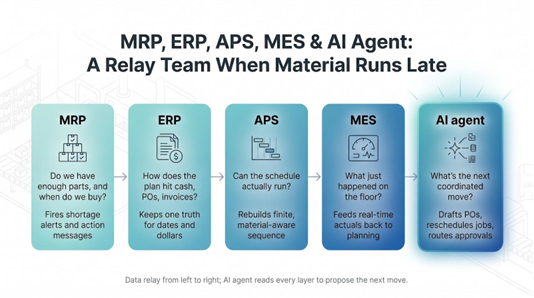
Software acronyms can multiply faster than backlog emails, so this is what each layer much do the moment a supplier slips.
Think of the stack as a relay team:
- MRP decides what and when to buy or make.
- ERP links that plan to sales, purchasing, cost, and finance.
- APS builds a feasible sequence that honours machines, labour, tooling, and material.
- MES records what actually happened on the line and feeds back consumption and downtime.
- AI agents watch every layer, draft coordinated fixes, and ask for your approval.
| Layer | Core question | Data it owns | Late-material edge | Best-fit buyer |
| MRP | Do we have enough parts and when should we order? | BOMs, lead times | Fires shortage alerts and action messages | Small and mid-size plants starting digital planning |
| ERP | How does the plan hit cash, POs, invoices? | Company-wide transactions | Keeps one truth for dates and dollars | Firms standardising on one business suite |
| APS | Can the schedule actually run? | Capacity, constraints, rules | Rebuilds a finite, material-aware sequence in minutes | Plants with shared resources and tight setups |
| MES | What just happened on the floor? | Real-time production, quality | Feeds actuals back to MRP and APS so the next plan is sane | Operations needing traceability and live OEE |
| AI agent | What’s the next coordinated move? | Reads every layer | Drafts POs and revised plans, routes them for approval | Teams swamped by cross-system exceptions |
Users should start with the layer that solves the biggest problem. A startup might jump straight to a cloud MRP, such as MRPeasy or Katana, but a mid-market plant generally adds APS beside an existing ERP, enterprise layer AI agents only after BOMs and capacities are reliable.
They should buy in sequence, implement APS before changing BOMs, and only optimize poor data. Adding AI to ERP that still plans infinite capacity just automates the guesswork. Build the relay so every runner hands can clean data to the next.
Run a late-material demo that separates hype from help
The fastest way to evaluate manufacturing planning software is to test it against the problem your planners actually face: a supplier slips, material becomes constrained, and multiple production orders need to be rescheduled.
Most vendor demos show perfect data and zero surprises. Flip the script with your own dataset and this stress test:
- Load real orders and BOMs. If the vendor insists on a canned file, end the call.
- Delay one purchased component by 10 days, choosing a part shared by several SKUs.
- Allow only 40 percent of the quantity to arrive on the original date. Partial receipts reveal weak allocation logic.
- Insert a rush customer order due before the new ETA. The tool must balance service and stability.
- Freeze three staged work orders. Good systems respect the frozen zone; bad ones bulldoze it.
- Create two scenarios (wait versus overtime) and compare cost and OTIF. Numbers, not adjectives.
- Approve the winner and watch it write back to ERP or purchasing. No manual exports.
- Slip the ETA again and time the full recycle. A strong platform should finish in under two minutes and fewer than five clicks.
User should track every click, screen, and elapsed minutes. The best product ideally proves itself through traceable action, and not by marketing claims.
Conclusion
There is no one tool that works for all types of plants. Large sites with multiple constraints may need an APS such as Opcenter or PlanetTogether, while smaller manufacturers may start with MRPeasy, Katana, or Odoo. Teams overwhelmed by exceptions between different systems may also consider an AI coordination layer such as Organizely.
For large sites with multiple constraints, companies use an APS such as Opcenter or PlanetTogether. Smaller manufacturers begin with MRPeasy, Katana, or Odoo, and those teams who get overwhelmed by exceptions between different systems add an AI layer like Organizely which drafts the replan for approval. Run the late-material demo mentioned above on your own data and let the results decide which tool to choose.
%201.png)

%201.png)

%201.png)