


If you ask a salesperson where the source of their last three deals was, and they honestly say, 'in a LinkedIn message', then ask them where that conversation is recorded in their CRM system. This is precisely why more sales teams are looking for a CRM for LinkedIn DMs that can connect prospect conversations with contact records, deal stages, and follow-up activities.
That is generally not true. The CRM includes the proposal, the call notes, and the amount at which the deal was closed; however, the first response, the 'send me more information' message, and the three weeks of intermittent communication that eventually led to the deal being completed end up in an inbox that the CRM does not have access to. Your system of record only starts halfway through the account history.
Many tools claim that they can cure this problem, and the features offered by a CRM may make it seem as though the problem has been solved when in fact it has not. The following is how you can evaluate your options without ending up with the wrong choice.
What Is a CRM for LinkedIn DMs?
A CRM for LinkedIn DMs is a customer relationship management system that helps sales teams capture, organize, and track conversations that begin through LinkedIn direct messages. Instead of leaving prospect interactions scattered across individual inboxes, it connects important conversation details with contact records and sales pipelines, deal stages, and follow-up activities.
Depending on the integration, a CRM may capture contact information, record message activity, add conversation notes, or create reminders for the next interaction.
However, not every CRM for LinkedIn DMs offers complete message synchronization. Some only capture profile information, while others provide deeper activity tracking through browser extensions or connected workflows.
The right choice depends on how much conversation history your sales team needs to retain and how consistent representatives can record their interactions.
Start by being honest about what "LinkedIn integration" means

The expression consists of at least three different elements, and the vendors tend to confuse them:
- When it comes to profile enrichment and link-outs, the CRM stores the LinkedIn URL, can obtain the job title, and includes a button that opens the profile; this is useful, but it doesn't keep record of any conversation.
- A browser extension which captures contacts - if you are on a person's profile and click once, the contact will either be created or updated in the CRM - is an improvement because it addresses the problem of having forgotten to add them, even though it usually doesn't answer the question of what you talked about.
- The messages are synchronised and appear in the CRM's timeline, which is usually the kind of feature people have in mind when searching for LinkedIn CRM features, and it is also there that the limitations become obvious. In the case of a team that is already using HubSpot, the LinkedIn HubSpot Integration can help bridge this gap by connecting LinkedIn activity with the CRM rather than asking sales representatives to maintain two separate sets of records.
The way that LinkedIn messaging integrations operate is varied, and the method chosen does make a difference. Although some tools rely heavily on browser extensions, others use different types of integration. Therefore, it is necessary to find out exactly how the messages are captured, what would occur if LinkedIn changed its interface, and what data is actually synced with your CRM.
The fact that this is so does not mean that message sync is bad or of no use; it only indicates that you shouldn't build your process on the assumption that it will work perfectly forever.
Decide what the CRM actually needs to remember
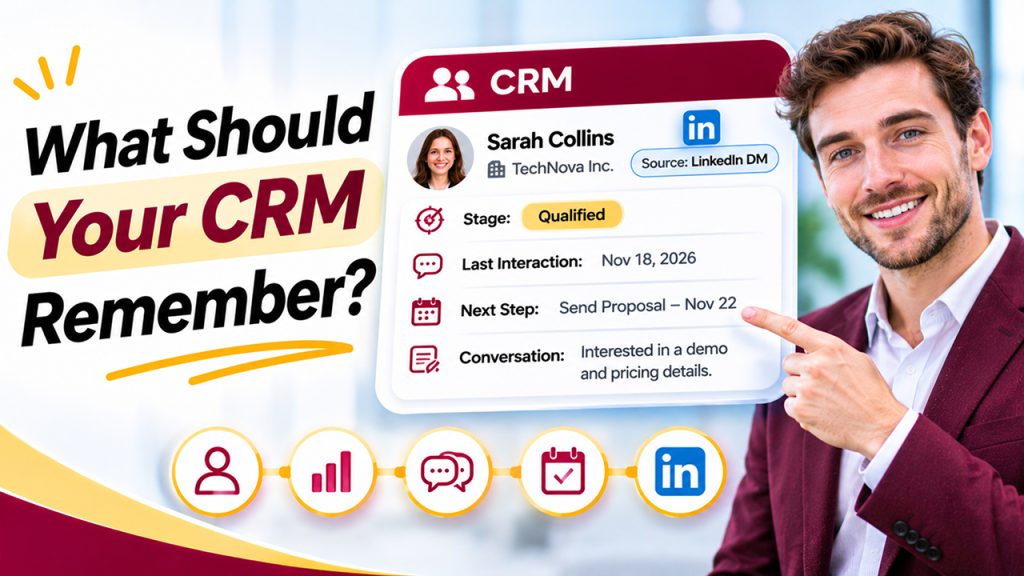
Before you begin to compare the various tools, first decide on the minimum record you will need for a deal that starts in a DM; for most teams this consists of five items:
- What is the person's name and which company do they work for?
- What is the present state of the conversation (in this case, a stage)?
- What was the latest time at which you spoke?
- What is going to happen and when?
- The origin of it being LinkedIn will be one of the points you can mention in future reports.
The only thing missing is the full transcript. Although it might be satisfactory to copy each message into the CRM, a brief two-line summary along with a next step date is generally more useful than a thousand lines of pasted chat. Therefore, as long as the tool reliably offers the five items mentioned above, it will have overcome most of your problems, even if it does not carry out the message sync.
Here's a simple exercise: look at the last ten deals that you have completed - those that you won as well as those that you lost - and determine at what point the very first actual conversation occurred. For example, if six of the ten of them started on LinkedIn, then you do have a real gap that is worth spending money to close. On the other hand, if only two out of the ten began on LinkedIn, you may in fact be looking for a solution to a problem that is smaller than you believe. Tracking these patterns through CRM data analytics can help identify which channels generate meaningful sales opportunities.
What Features Should a CRM for LinkedIn DMs Include?
Not every CRM needs advanced LinkedIn functionality. However, teams that generate a significant portion of their pipeline through direct messages should look for a few essential capabilities.
- Contact capture: Add LinkedIn prospects to the CRM without manually entering every detail.
- Conversation tracking: Record important LinkedIn interactions or maintain summaries within the contact timeline.
- Follow-up reminders: Schedule the next action so promising conversations do not disappear in an inbox.
- Lead source attribution: Identify LinkedIn DMs as the original acquisition channel.
- Contact Deduplication: Match LinkedIn prospects with existing CRM records.
- Team visibility: Allow authorized representatives to access relevant relationship history.
- Activity reporting: Understand how many conversations generate qualified leads and closed deals.
What to Evaluate
Before choosing a CRM, there are several practical details worth testing rather than simply taking the vendor's word for them:
- work out how long it takes - count the number of clicks and the number of seconds between the message "I just got a reply from a prospect" and "it's logged" - and if the time taken is more than about ten seconds, then on busy days people will ignore it and your data will gradually get worse. Don't merely trust the demo; test it on real contacts when you're having a trial;
- usually, when you see people on LinkedIn, they won't have an email address. It's possible that the same individual could appear in your CRM some weeks later via a web form or as part of an email conversation. Does the system merge these different entries into one record or do you end up with two incomplete contacts? You should ask the company to tell you how it handles duplicate entries, since this problem becomes more serious as the number of records grows;
- the benefit of using a CRM when dealing with a large number of direct messages isn't about storing information but about setting reminders. Conversations in a direct message thread disappear without a trace because LinkedIn never tells you that it has been nine days since your last reply; make certain that you can set a next-step date for a contact in just a few seconds and get a reliable reminder when that date is due.
- in order for the source attribution to continue to be valid - such as the case where 'LinkedIn DM' is lost when a contact is converted into a deal and thus you can never work out which channel is producing the results - it is important that the source be carried through the whole lifecycle;
- if you choose to exit or export your data, you should check what will occur should the extension fail, if you cancel the operation, or if you switch to a different tool in two years; you want an export which is complete and includes your notes and activity, not merely your names;
- regarding team behaviour, when more than one person is working on the pipeline it is necessary to check who is responsible for a relationship that began in one representative's personal DMs. If that representative leaves, the conversation history will also depart with them unless there is a practice of recording such information and a tool that allows this. This problem is just as much a matter of process as it is of software.
Match the setup to the size of the problem
They are general guidelines and not strict instructions:
- It is usually enough to use a lightweight CRM along with a good capture extension and a simple stage list either on your own or as part of a very small team, with no need to customize it. The CRM that you end up updating should be preferred to one that has the best reporting facilities. Remember to spend time every week reviewing it, because the tool will not do this for you.
- The sales team is very small (it consists of only a few representatives). In that case, consistency is more important than the features of the tool. You must choose a tool which has compulsory fields at the point when the data is captured, offers shared visibility, and enforces the source field. As a team, you should clearly agree among yourselves what counts as a 'logged' entry and then adhere to that agreement. The software will not work unless everyone uses it in the same way.
- When you have a big team or are sending out a large number of messages, tools will start to link outreach automation with CRM functions. Nevertheless, you should be careful as automating a high volume of messages on LinkedIn does carry the risk of your account being restricted, and merely increasing the number of messages makes no difference unless the underlying conversations are properly tracked. So you should first establish the procedure for recording and following up on contacts, and only then consider using automation.
What no CRM will solve
Even if the tool is of high quality, you still have to take responsibility for certain aspects of the problem.
The DM's LinkedIn page remains active. Even if you don't rely entirely on sync, you should get into the habit of copying a one-line summary into the CRM after having important conversations. Though this task is tedious, it is also the most reliable one since it does not depend on anyone's extension still functioning after the next interface update.
Judgment is not passed on as well either. Even if a CRM tells you that a lead has gone quiet, it cannot say whether the silence means 'not interested' or 'busy until after the quarter ends'. The kind of context involved is found in the actual messages, which is once again a reason why short notes are better than automated logs.
A two-week test before you commit
Don't pick a CRM from a comparison table, including this one. Run a small trial instead:
- take ten live LinkedIn conversations and put them all into the candidate tool;
- log every new reply for two weeks using only the tool's own workflow, with no side spreadsheet as backup;
- at the end, check three things: did every conversation have an accurate next step, did you lose any contacts to duplicates or capture failures, and did you ever avoid logging because it was a hassle?
That last question is the one that matters most. A tool that's a pain to use will be quietly abandoned within a month, no matter how impressive its feature list.