
If you’ve ever dug through three different spreadsheets just to find one customer’s contact history, you already understand why data management tools exist. Businesses generate more information than any single person can track manually: customer records, sales data, support tickets, inventory numbers, and without a system to organize it, that data just becomes noise instead of something useful.
The purpose of all these data management tools is simple. It’s about transforming chaotic data into structured and useful information. Whether it’s a database, customer management platform, or cloud storage doesn’t matter. What matters is that it takes you less time to search for the information, and more time to use it.
In this blog, we’ll walk through what these tools actually do, the different types you’ll come across, a few well-known options worth knowing, and the habits that make any data management system worth the investment.
What Are Data Management Tools?
Data management tools are software systems built to collect, store, organize, and maintain data so it stays accurate, accessible, and useful over time. In contrast to the situation when there are no unified approach and all the data is saved in separate emails, spreadsheets, or notes of each employee individually, such tools unite all the necessary information in one structured system that can be utilized by the whole team.
What sets a data management system apart from merely “a storage space for files” lies in its structural foundation. An authentic system does not only store data, but it categorizes it logically, maintains an audit of changes, regulates access, and sometimes even automates certain aspects of the process, such as identifying duplicate entries or backing up data regularly.
This matters across nearly every part of a business. Sales teams need customer histories they can trust. Support teams need ticket records that don’t disappear. Finance teams need numbers that reconcile. Without a proper system behind all of it, data quietly becomes unreliable, and unreliable data leads to bad decisions.
Types of Data Management Tools
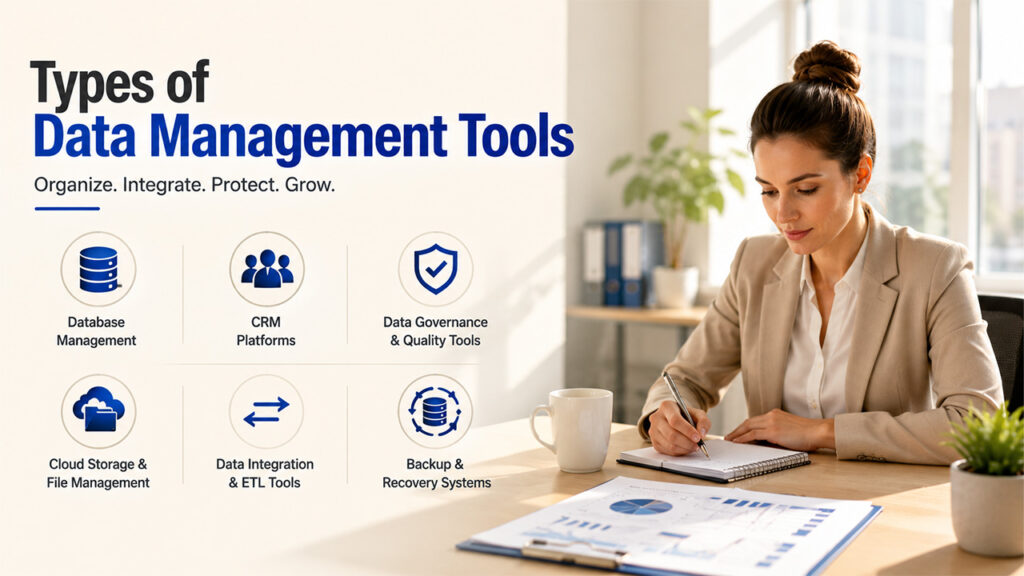
However, there are several categories of data management tools, which solve different problems, and understanding their differences helps determine the exact requirements of your organization:
- Database management systems (DBMS): These store and manage structured data, like MySQL, PostgreSQL, and Microsoft SQL Server, forming the foundation for most other solutions.
- Customer relationship management (CRM) platforms: CRM systems specialize in managing data about customers and related information like contact history, deal stages, communication history, and so on, linked to specific accounts.
- Data governance and quality tools: Such solutions ensure accuracy, consistency, and compliance by finding duplicates or outdated records in the database and preventing possible issues.
- Cloud storage and file management platforms: These manage the storage of documents and files, and offer access control and versioning as well.
- Data integration and ETL tools: These allow transferring and transforming data from one system to another to enable its further use.
- Backup and recovery systems: Protecting from data loss caused by hardware failure, human errors, or cyberattacks.
Most organizations have to use some combination of these rather than rely on only one tool.
Popular Data Management Tools
Here are a few popular names that belong to the range of data management systems that one should know about.
PostgreSQL
Open-source relational database management system with more than 35 years of active development. It is ACID-compliant and highly extendable; no license fees are needed for managing simple as well as complex data structures.
HubSpot CRM
The one that manages customer data stores all contact information, deals, stages, and communications. The free tier supports up to 1,000 contacts and 2 users, though deeper automation requires a paid plan. If you’re specifically weighing platform types here, it’s worth reading up on Custom CRM vs SaaS CRM before deciding which model fits your business.
Qlik Talend Cloud
An experienced platform for data integration and governance, now a product of Qlik due to its acquisition in 2023. It can connect to 1,000 data sources and process ETI pipelines. The free open-source version was discontinued in 2024.
Dropbox
Cloud storage and file management system. The Basic version is free but offers only 2 GB of space, whereas the Plus version costs an estimated $11.99 per month for 2 TB, with additional features such as 30-day file recovery and version history.
Each one of them handles a different aspect of data handling, such as structure, customer information, integration, or storage, hence making most companies combine more than one instead of sticking to a single one.
Benefits of Using Data Management Tools
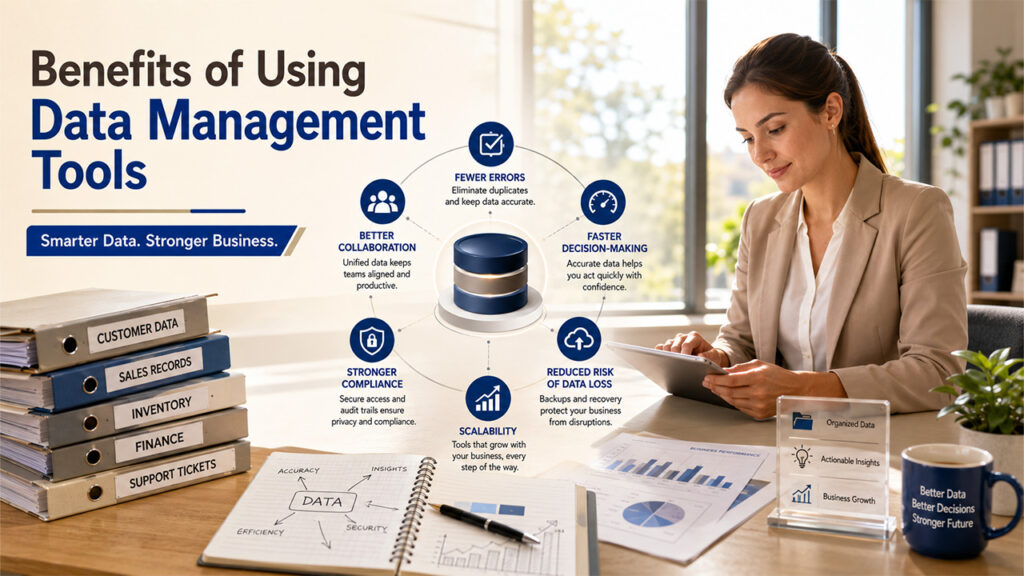
Investing in proper data management tools pays off in ways that compound the longer a business runs on them:
- Fewer errors: Data entry errors and duplicates will not happen since the system will be structured in such a way as to prevent this.
- Faster decision-making: With accurate data to work with, there will be no need to spend time verifying the data and more time taking action.
- Better collaboration: When all team members work with the same database, there won’t be problems related to different versions of information being used.
- Stronger compliance: The right data access control mechanisms and audit trail will make the company easily comply with privacy rules without any trouble.
- Reduced risk of data loss: Backup and recovery features mean a hardware failure or human error doesn’t become a business-ending event.
- Scalability: An efficient system should evolve with the company and not break down because of its growth.
None of this happens automatically, though; the tools only deliver on these benefits when they’re actually set up and used properly, which is exactly where good habits come in.
Best Practices for Data Management
Having the right tools only solves half the problem; how a business actually uses them determines whether data stays reliable over time:
- Standardize data entry: Inconsistent formatting, like mixing “NY” and “New York”, quietly breaks searches and reports down the line.
- Set clear access permissions: Not everyone needs access to everything. Limiting who can view or edit sensitive data reduces both errors and security risk.
- Back up regularly, not occasionally: A backup schedule only helps if it’s actually followed consistently, not just set up once and forgotten.
- Audit your data periodically: Duplicate records and outdated information pile up quietly if nobody’s checking for them.
- Document your processes: When only one person understands how the system works, that’s a risk, not a strength.
- Know when to bring in outside support: For businesses without dedicated IT staff, working with managed IT services can keep infrastructure, backups, and security running smoothly without needing to hire in-house.
None of these habits require advanced technical skill, just consistency, and they’re what actually separates data that stays useful from data that quietly turns into clutter.
Conclusion
Ultimately, however, data management is not about software, but rather about ensuring that the data that the company needs is accurate and readily available to use. No matter if it is a database, CRM, integration platform, or cloud storage, the right combination will turn random data into something that could be trusted by all members of the team.
While the choice of a tool is important, its usage practices may make even the best tool obsolete. Data management is about using good practices like keeping it clean and accessible and regular backups, which cannot be done by a platform alone.
Begin with the tool that meets your urgent need, whether it is the disorganized records of customers or the untrustworthy backup system. The appropriate tool will pay for itself very quickly after it is implemented.
Frequently Asked Questions
What’s the difference between a database and a data management tool?
A database stores structured data, while data management tools are the broader category, covering databases, CRMs, backup systems, and integration platforms that all work together to organize and protect information.
Do small businesses actually need data management tools?
Definitely, a simple customer list requires structuring. Managing things manually using spreadsheets can do for a while, but sooner or later mistakes will appear along with duplicated information.
Are free data management tools good enough for growing businesses?
Most often, yes. Free versions of many data management tools have quite user-friendly functionality despite the limit on contacts, storage, and automation capabilities.
How often should data be backed up?
It is dependent on the frequency of the change in your data, but backups on a daily or weekly basis can be considered an acceptable starting point.
What’s the biggest mistake businesses make with data management?
Treating it as a one-time setup. Tools only stay effective with ongoing habits, regular audits, clean entry standards, and consistent backups, not a system left untouched after the initial setup.
%201.png)

%201.png)

%201.png)