
Introduction
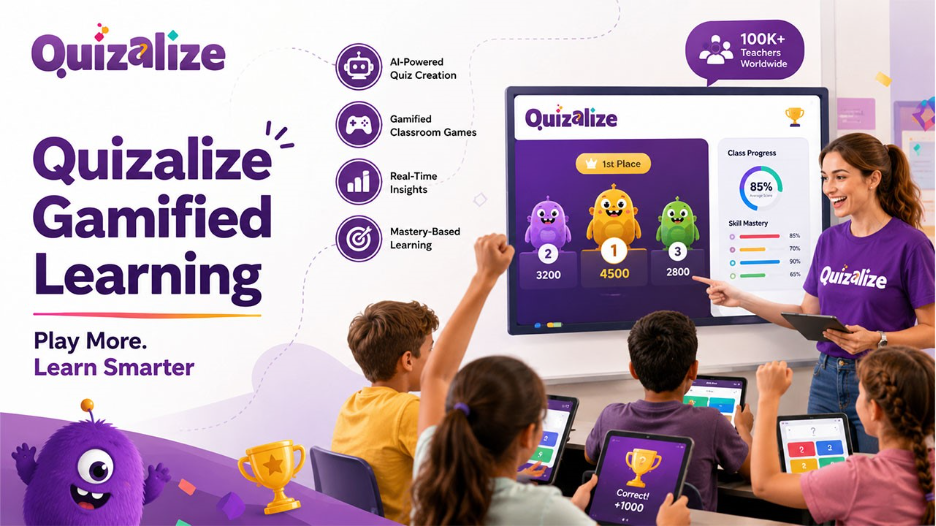
Traditionally, classroom assessments have always been hard work for students or teachers. However, it does not have to be one. Quizalize refers to a gamified learning platform that converts ordinary quizzes into interactive games while providing educators with real-time and detailed data on student performance. Used by around 100,000 teachers around the world, this quiz-driven learning platform creates a unique combination of AI-driven quiz generation with classroom-based games, making sure that assessment is both fun and extremely valuable for monitoring progress. Irrespective of whether you are a classroom teacher looking to enhance engagement or a school leader exploring a scalable assessment platform, comprehending how Quizalize operates can aid you in deciding if it aligns with your teaching objectives.
Understanding Quizalize
Quizalize refers to a gamification and quiz creation platform created for K-12 classrooms. It enables teachers to design quizzes from scratch, import available content from tools such as Quizlet or Google Forms, and immediately convert that content into game-based or competitive learning experiences.
It was officially launched in 2015 by the educational technology company Zzish. It was created around a straightforward idea: students learn more effectively when assessment feels like playing a game, and teachers teach in a better way when they have a clear idea on the weak areas of the student.
Important defining characteristics of the platform are as follows:
- AI-driven quiz creation that creates questions around specific topics, grade levels, and standards.
- Individual student tracking via login-driven accounts instead of anonymous play.
- Automatic differentiation, which directs students to follow-up resources as per their scores.
- Google Classroom Integration and other systems of learning management.
Read More: Platforms such as Gimkit follow a philosophy of converting review sessions into competitive and reward-driven games. Want to know how it works? Check out our detailed guide on Gimkit Host Mode.
How to Get Started with Quizalize in the Classroom?
How does Quizalize work in the classroom? It follows a simple three-step process that the majority of teachers can follow in just a few minutes.
1. Import a Quiz or Build It:
Teachers can easily create a quiz from zero, browse through a library of pre-built content, or extract available materials from Quizlet or Google Forms. The feature of AI smart quiz can also auto-create questions associated with a selected standard or topic.
2. Share a Code with the Class:
Students can join with the help of a simple class code. Teachers may ask students to sign in instead of playing anonymously; their results directly go into a persistent leaning profile instead of a single game session.
3. Track Real-time Results:
As students provide answers, teachers see a color-coded and live dashboard that shows who requires assistance and who understands the materials. This ensures Quizalize becomes as much of a diagnostic tool as it is a game.
Apart from the standard format of quiz, the platform provides numerous browser-driven games that reward all right answers of students with in-game progress. Different gaming formats include basketball and football-style formats and 3D multiplayer worlds. None of these require software installation, so students can easily join with the help of a tablet, phone, or laptop.
Important Features That Differentiate Quizalize
While different quiz tools mainly focus on engagement, Quizalize has positioned itself as more of a comprehensive assessment and learning environment. Key features are as follows:
- Mastery dashboards – Questions are provided as per the specific learning objectives. Thus, teachers can see which skills each student has become proficient in instead of the overall score.
- Auto-differentiation – As per the quiz results, students are directed automatically to explore additional materials or advanced follow-up activities.
- In-built Class Management- Teachers can generate fixed code classes, compare averages in class, and handle rosters much like a simple LMS.
- Learning Management System and Platform Synchronization – Results can automatically be pushed into Microsoft Teams, Google Classrooms, and a connected grade book.
- I-generated Reports and Feedback- Plans with higher-tier pricing include automatic creation of performance summaries and student report cards.
As per the reports, there has been an 8-10 percent increase in end-of-year standardized test scores in one middle science school program, a substantial decrease in the attainment gap for disadvantaged student from 33.4 percent to 25.4 percent, and a 25 percent improvement in exam pass rates at a UK further education college.
Quizalize Pricing Overview
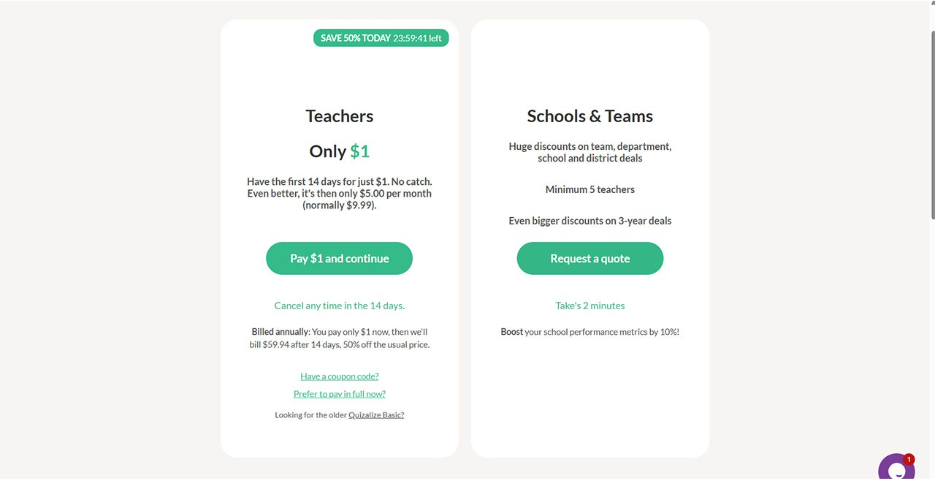
Quizalize provides a tiered structure of pricing created to scale from individual teachers to entire district or school deployment.
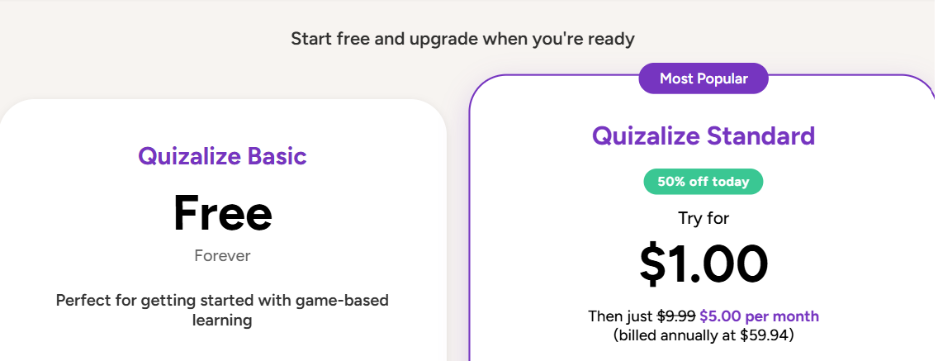
- Basic (Free) – Involves one class, multiple choice question types, a limited number of saved quizzes, the leaderboard game mode, and small allowance of AI-driven quizzes per month.
- Standard (Paid, Billed Annually or Monthly) – Unlocks saved quizzes and unlimited classes, team-based games, all eight types of questions, mastery dashboards, and student report cards. It comes with a 30-day free trial.
- School and Teams Quotes – Institutions can request personalized pricing and proposals for larger rollouts.
There might be some changes in the exact pricing plan over time. A few promotional discounts can also be introduced. Thus, check the official pricing page of Quizalize to find out the latest pricing plan.
Current pricing plan are provided in the screenshots below-
Conclusion
Quizalize offers a practical way to make classroom assessment more engaging without sacrificing the data teachers need to guide instruction. Its combination of AI-assisted quiz creation, curriculum-aligned content, and automatic differentiation makes it a useful option for teachers who want quizzes that do more than just generate a score. Similar to tools like Plickers, which help teachers collect real-time classroom responses through interactive assessment methods, Quizalize supports educators in creating engaging learning experiences while maintaining meaningful insights into student performance. For classrooms looking to blend gamified learning with meaningful, standards-based tracking, Quizalize is worth evaluating as part of a broader assessment strategy.
Related blog: Blooket Bot: Why It Has Become Such a Concern for the Educators?
FAQs About Quizalize
Q1. Is Quizalize free to use?
A- Yes. A free Basic plan is available, offering a limited number of classes, saved quizzes, and AI-generated content each month. Paid plans unlock unlimited usage and advanced reporting features.
Q2. Does Quizalize work with Google Classroom?
A- Yes. Quizalize integrates with Google Classroom and other learning management systems, allowing quiz results to sync directly with a teacher's existing gradebook.
Q3. What age groups are Quizalize designed for?
A- The platform supports a wide age range, generally suited for students from early primary grades through the end of secondary school, depending on the quiz content a teacher builds or selects.
Q4. Can students play Quizalize without creating an account?
A- Students can join a quiz using a class code without logging in, but teachers who want to track individual progress over multiple sessions should have students log in with an account.
%201.png)

%201.png)

%201.png)