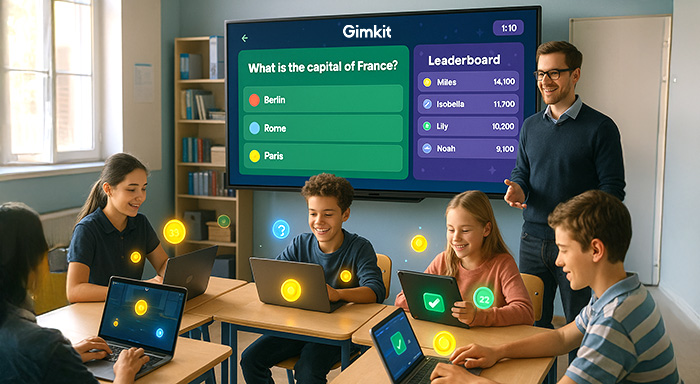

If you require a classroom game that students really look forward to, Gimkit Host mode is worth looking at. Contrary to passive review platforms, Gimkit puts the teacher in the driving seat, from creating question kits to choosing game modes and monitoring individual performance after every session..
However, hosting a Gimkit game involves a lot more than just selecting the “Start” button. The platform provides you with a control set in different layers, which, if used well, can transform a standard quiz into a genuinely educational and competitive experience. Irrespective of whether you are deploying a quick five-minute warm-up or an entire-period team battle, being familiar with the Gimkit host setup process aids you in getting the most out of each session.
In this guide, you will be taken through each stage of Gimkit hosting, from developing your first kit to reading post-game analytics so that you can host the game with total preparation and confidence.
Understanding Gimkit Hosting
At the very heart of the game, it implies that you are both the architect and the conductor. You do not just kickstart a game by sharing a Gimkit code; you design the entire learning landscape. Gimkit hosting deals with choosing the right battlefield (game mode), setting the right engagement rules (personalization), ensuring the arsenal (the kit), and assessing campaign outcomes (reports). Your role becomes a pivot between dynamic and static content, ensuring sustained, student-driven excitement.
Here is what you mainly control as the Gimkit game host-
- The Foundation (Kits): You have the option to either build the kit or choose it, collecting answers and questions that boost your game.
- The Arena (Game Mode): You can select how students can ensure interaction with that content. You can select whether it will be a strategic team battle or a frantic survival race.
- The Rules (Personalization & Settings): You can choose to refine the experience, win conditions, game length, power-up availability, late-joins, music volume, etc. This is where your pedagogical objectives align with the gameplay.
- Moderation & Launch: You begin the game, track progress, share the join code, and can even intervene during the game, i.e., you can pause the game and regulate the settings mid-game if required.
- The Debrief (Reports): Once the dust has settled, you can go into in-depth analytics showcasing individual mastery gaps and class-wide trends. This is quite important as far as formative assessment is concerned.
Starting Ahead: Your First Hosting Mission
Step 1: Developing your arsenal- creating the best kit
You can think of your kit as ammunition. Without the right questions, even the best game feels ineffective. You can explore various options such as:
- Develop from Scratch: This is the most conventional method. You can input your answers and questions directly into Gimkit. Pro Tip: You can leverage varied type of questions (text input, multiple choice) and include images for a better level of engagement.
- Import: Have you got a CSV file or a Quizlet set? Gimkit ensures that importing existing content feels like a quick process. This proves to be quite a lifesaver for teachers who remain busy.
- Kit Collab: This is a top-level hosting component that is generally underutilized. You can enable Kit Collab even before the launch happens. You can share a link with the students, and they can contribute questions, which you can then approve or edit. You will suddenly feel that content creation has become collaborative, enhancing pre-game thinking and ownership.
- Copy & Discover: You can access the vast library of kits created within the community. Choose one that is a lot closer to your topic; then, you can copy it to your account and modify it to perfection. Discovering and copying the kits saves you a lot of time as you do not have to start from scratch.
Step 2: Choosing the Game Mode
The genius of Gimkit exists in its variety. Live Gimkit game hosting implies hosting that aligns with your class vibe and objectives
- Classic: This is the most conventional method. You can simply answer questions, invest extensively in upgrades to earn quickly. This game mode relies solely on pacing and strategy.
- Find Imposters: In this game mode, the players need to recognize imposters trying to sabotage the game while delivering answers to the questions. This helps students improve their critical thinking.
- 2-dimensional World Game: Here, players get coins for answering questions correctly. Students can then use the coins to progress in a very straightforward and addictive game such as snowball fights or fishing. It is vital for a longer period of focus. To get more coins, ammo, or bait, students need to answer more questions correctly.
- Survival: This feels like a survival game where students need to answer questions to create a path forward. And for every wrong answer, a section of the path collapses. It is a simple game mode but provides a thrilling experience for the students and teaches them about the importance of knowledge for survival.
- Team Play: A boss battle or flag capturing is an example of this game mode. This nurtures a higher level of collaboration. Teams work together to answer questions, get power-ups, and attain a shared objective. For example, students need to capture all the flags and ultimately capture the boss. This instills a sense of fellowship and teaches the importance of teamwork and collaboration.
Step 3: Refining the Experience- Host Game Options and Settings
This is exactly where Gimkit hosting transitions from standard to excellent. You do not have to keep things “by default.” Try customizing the game by selecting the settings that you want.
- Game Objective: As a game host, you can decide what will ultimately decide the victory. Will it be a cash target? Will it be capturing the boss? Will it be reaching the map end? Customize your settings and set a clear objective that aligns with your learning goals.
- Create an Economy Balance: Regulate starting cash, define the rates for all the correct answers, and determine the cost of in-game settings and power-ups. Does the game feel too easy? Choose to elevate prices.
- Flow & Accessibility: Enable late joins. Allow the students to play consistently once they are out in the elimination modes. You can choose to disable or enable particular power ups. Control the SFX volume as well as music.
- Question Flow: While you are setting the criteria for correct answers for progress in a few modes, set a time limit for each question. You can also randomize the order of questions.
- Anonymity & Questions: Enable the students to choose specific nicknames. You can choose to use their real names or select a specific nickname. Choosing nicknames lets you anonymize the results you wish to showcase on the leaderboard.
Step 4: Invite Your Students
Once you have loaded your kit and dialed in your settings:
- Gimkit creates a unique code.
- Students can proceed to visit the website gimkit.com/play and provide their code. No student account is required for basic play. However, student accounts are essential for unlocking XP and cosmetics.
- You can then wait till the lobby fills up. Check who has entered the game. You can also drop a hint regarding the strategy of the game mode.
- Choose “Play Live” for your selected mode.
- Then, when you are ready, you can select the option “Start Game.” The fun then starts.
Step 5: The Insightful After-game Report
Once the game ends, students will be anxious to see the outcome. Your job as a host is not done yet. You must gain accessibility to the game report. This will contain a lot of insights regarding the knowledge-level of students as well as their game awareness. Now, you can choose to either show the complete game results or a portion of the game results to students. For example, you can avoid showing who emerged as the worst player of the game.
- Overview of Class: You can show the game winners, overall accuracy of answers, as well as pace of answers given.
- Individual Performance of Students: You can precisely see the overall number of correct answers provided by the students. With the 2-3 games, you can also start to understand the pattern of mistakes that students are making. You can find out specific weak areas and strengths of the students. You can know which student is struggling with a particular subject or concept. Designated faculties can then work on such students to enhance their level of understanding.
- Question Analysis: Now, there will be a few questions which the entire class will struggle to answer. Perhaps, the question was vague, incorrect, or improperly phrased. Maybe, there were gaps in the teaching, which made the entire class fumble to answer the question because they could not understand a particular topic.
- Item/Cash Usage: You can also gain insights on which power ups were popular, and which were totally ignored. This will improve your understanding of which setting you need to choose the next time.
The reports are one of the most vital aspects of hosting Gimkit. It will provide you with insight-rich analysis on each student.
Expand Your Gimkit Hosting Toolkit
The significance of Gimkit Hosting is not limited to the frenetic and live classroom session. Extend your reach:
Asynchronous Hosting: If you cannot host a student live, you can assign it as homework via asynchronous hosting. Choose a deadline, then select a mode (this generally works fine with simpler 2D games or “Classic” games). Gimkit can then auto grade it. In asynchronous hosting, students have the option to play their game at their own pace, but you will still get the in-depth report.
Gimkit Creative: Are you feeling adventurous? Gimkit Creative enables you to develop your own custom 2D worlds on your own or with the help of the students. As a host, you have the option of:
- Creating an initial map.
- Providing editing permissions to class representatives (or the entire class) to work together on the developing the map, designing roadblocks, or placing the challenges.
- Populating the map with specific question checkpoints.
- Hosting a trial game on the map you all have developed together. This will help you get students involved even before the game has started.
Handling Student Accounts: While this is not mandatory, you can encourage students to setup free account unlocks such as:
- Leveling and XP: A subtle system that shows progression.
- Cosmetics: Students can spend in-game currency on skins, hats, and pets. It is quite harmless, but it enhances identity.
- Long-term Statistics & Streaks: This can work as a motivation to keep on playing for a long time.
As a host, you do not need to handle such accounts per se. However, you need to allow the environment where they provide value.
Best Tips for Gimkit Hosting
The following tips can greatly improve the impact of your Gimkit game. Such tips can turn you into an expert Gimkit host, maximizing the effectiveness of the game:
- Start in a Simple Way and Then Scale Up: Try not to overwhelm yourself or your students with the most complex game mode. Practice with the “Classic” mode before proceeding with complex creative maps or “Trust No One Mode.”
- Use KitCollab Early On: KitCollab can empower you to get your students connected with the game both emotionally and psychologically. You can also check their questions and get them approved before the launch.
- Adjust the Economy: In your game, if the students start earning coins way too quickly, then power ups can feel a lot meaningless. However, the flipside of this is that if the earning is too slow, then it can cause a great deal of frustration to the students. Experiment with the game a lot more to find the right balance. If you are beginner, start building the game with default settings. Then, as you grow into the game, you can adjust the length and intensity of the game.
- Wisely Utilize Your Nickname: Nicknames can be useful to some users as they minimize anxiety. However, you must establish some ground rules for nicknames as the environment remains fun, healthy, and appropriate. Avoid allowing abuses, insinuating slang, or grossly inappropriate nicknames.
- Prioritize Reports: Spend some time post-game to go through individual performance and question analysis. You can compile these identified misconceptions into an interactive flipbook study guide for your students or team to review before the next challenge.
- Allow Students to Lead: Once the students have understood the game navigation and other fundamentals, you can enable a student to host a review game. You can allow students to learn hosting as you observe how they conduct the game.
- Control the Sound: Since you are hosting an intellectual game, overly loud music and sound can sometimes be distracting. Nevertheless, SFX and music are an integral portion of the immersive in-game experience. Headphones can be optional for both live games and assignments.
Gimkit Host Vs Student View- What Is the View of Each Side?
One of the most valuable things a Gimkit host can do is know how students are experiencing the game. The two perspectives are entirely different, and understanding both enables you to make effective real-time decisions.
As the host, you see:
- A real-time lobby where every student who has joined the game will be listed along with their selected nickname.
- Leaderboard that automatically updates as the game progresses.
- Effective controls to pause the game, adjust the settings during the game session, or end the game early.
- A summary screen, which you will see once the game concludes, directly leads into the complete post-game report.
If you have joined the game as a student, you will see:
- Question screen with answer choices and a real-time cash counter.
- A power-up shop where they can spend earned currency on different questions.
- A leaderboard that shows their rank and their classmates.
- In 2D world modes, they will also see a live game map, which they can navigate by correctly answering the questions.
The important takeaway for Gimkit Hosting is this: while you are seeing the macro view, students are quite deep in their own micro-world economy where they are earning, spending, and strategizing. If you notice that the engagement has dropped on your end, slower leaderboard movement, fewer answer submissions, these might be an indication that the economy settings require better adjustment, or question difficulty is turned off. In that case, briefly pause the game to reset the pace and see whether it elevates the engagement.
Related Post:
Classroom 15X: Future of Education with AI, VR & Personalized Learning
Kahoot Bot Explained: A Comprehensive Guide
10 Best Blooket Alternatives in 2026 (Pricing, Pros & Cons)
Conclusion
Gimkit hosting provides teachers with a great level of control that the majority of game-based learning platforms simply cannot offer. From the time you create your own kit to the final post-game report, each step is carefully built to maintain engagement level of students while providing actionable insights based on their progress. The game modes ensure that sessions remain fresh; the personalization options enable you to recognize gaps before they become major problems. Start in a simple way, modify settings, experiment with new ideas, and use the data to plan your next game. Once you have clear idea how specific Gimkit settings affect students’ engagement, you can master the platform and raise students’ interest and help them connect better with their studies, elevating their academic caliber.
Read also: Plickers: The Card-Based Tool Making Classroom Assessment Simple
FAQs for Gimkit
Q. Will KitCollab lead to the inclusion of bad questions in the game?
A- As a Gimkit host, you can choose to enable KitCollab and share a unique URL. This will allow students to share their questions along with answers. However, this does not mean that questions will start appearing in the game. You can check these questions in the pending section, and from there on, choose to either approve or reject the question.
Q. Is creating an account mandatory for the students?
A- No, creating an account is optional for the students. In order to access the game, students only need a game code.
Q. Will Blooket bot work on Gimkit?
A- No, a blooket bot is specially built for the Blooket hosting. Furthermore, using bots is not recommended as it can disrupt the learning experiences and lead to account suspension.
Q. What should be the duration of a Gimkit game?
A- A typical Gimkit game generally lasts between 5-10 minutes. However, there are a few strategy modes or team battles that can go as long as 15-25 minutes. You can even personalize the game duration via game goal settings.
Q. How many players can join a Gimkit game? become an official company?
A- Gimkit is ideal for classroom purposes and supports a large group of players at a time. Furthermore, you will not face any lagging or performance issues even if a large group of players join the game.
Q. Is Gimkit popular in Canada?
A- Yes, Gimkit is extremely popular in countries like Canada. Canadian educators have started to trust the platform to maximize student’s participation and engagement. The platform has gained traction in Canada alongside other platforms like Quizalize, Blooket, Quizizz, Kahoot, etc.
%201.png)

%201.png)

%201.png)