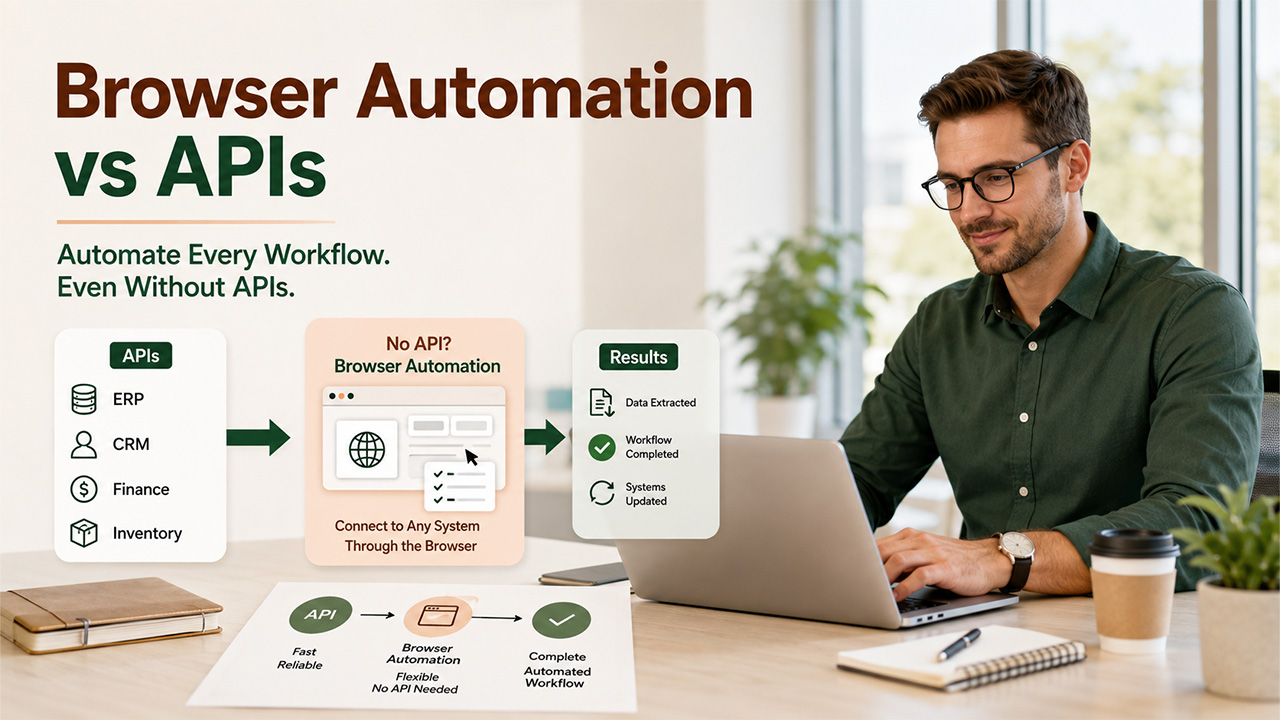

APIs are always preferable when they exist. The real strategic question is what to do for the 30 to 40 percent of your workflow that has no API access at all. Browser-based automation fills that gap without requiring you to either wait indefinitely for vendor roadmaps or hire expensive RPA consultants. Understanding API vs browser automation helps organizations choose the right automation strategy for every workflow instead of relying on a single approach.
Many enterprise buyers think if a software company currently does not provide an API, it can create one in the future as part of its product development plan. However, this thinking comes to an end when you come face-to-face with old systems, county databases, government portals, supplier extranets, and older ERP screens.
Vendor roadmaps shift. A feature promised for Q3 slips to Q4, then gets deprioritized in favor of mobile optimization. Partner-tier access controls block even API endpoints that exist. Many systems offer read-only endpoints but no way to submit forms, update records, or trigger actions. A carrier tracking portal might expose shipment data through an XML feed but give no way to request pickup or change delivery dates. An invoice management system might show you past invoices through a web interface but provide no API for approvals or payment routing.
The vendor economics make sense from their side. Maintaining an API requires documentation, versioning, support tickets, and backwards compatibility. A web interface costs less to maintain if the audience is small. But that reality doesn't change your operational need. This is exactly where the discussion around API vs browser automation becomes critical for organizations trying to eliminate manual work.
What Browser-Based Automation Actually Does Well
Browser automation excels at tasks that were designed for human users. Tasks like logging into secure portals, managing user sessions, downloading files, filling out and validating forms, and extracting information that is only visible on the screen are all well suited for browser automation. For example, if a supplier extranet portal asks you to sign in, navigate through several menus, choose options from multiple dropdown lists, upload a spreadsheet, and then download a results file, browser automation can handle the entire process efficiently.
Consider a practical scenario: your procurement team needs price lists from five suppliers. Three suppliers have APIs you've already integrated. Two suppliers have web portals with no API. Now, every month, your team has to log into each portal, download spreadsheets, and deliver it to the finance department via email. However, if you have browser automation, this entire process can be executed automatically. It automatically authenticates, searches, filters by your account, downloads the correct file, and saves it in your shared storage. The task takes a human fifteen minutes. Automated, it takes seconds. In practice, API vs browser automation is rarely a competition because both approaches solve different parts of the same workflow.
Twin and similar agent-driven solutions handle these scenarios by treating browser interaction as a first-class automation method rather than a fallback. An agent can understand the context of what it's viewing, adapt to minor layout changes, and respond to unexpected prompts, rather than failing on the first visual variation.
Failure Modes and How Modern Agents Handle Them

Browser automation has genuine failure modes that APIs don't have. Layout changes break rigid element selectors. Multi-factor authentication interrupts unattended flows. Session tokens expire mid-process. Rate limits or temporary unavailability cause silent partial failures where some records process but others don't.
Traditional RPA tools treat these as showstoppers. They fail, send an alert, and stop. A human has to intervene. Modern agent-driven approaches use AI-powered CRM automation to handle many of these issues intelligently. An agent can recognize MFA challenges and integrate with secure credential storage. It can detect layout variations and still identify the right elements based on context rather than fixed coordinates. It can handle session expiry by re-authenticating and resuming from a checkpoint rather than restarting from scratch.
Rate limits and throttling require different handling. If a supplier portal allows ten requests per minute, an agent needs to respect that limit or risk being blocked. Batching becomes important here. Instead of trying to fetch data for one hundred invoices in rapid succession, the agent groups them into batches of ten with pauses between them.
Reliability and Throughput: When Each Approach Makes Sense
An API call takes fifty to two hundred milliseconds. A browser automation step that clicks a button, waits for content to load, and extracts data takes one to five seconds. If your work revolves around analyzing thousands of records daily, that latency difference is important to your business. An API call can scale to handle millions of requests and parallelize. Whereas browser automation is by nature slower because it waits for JavaScript to execute, render pages, and mimic humans to interact with the DOM.
But that speed advantage only applies if the API exists and covers your use case. If you're choosing between "browser automation takes longer" and "no automation at all," the choice is clear. If you're choosing between "API for task A" and "browser automation for task A," use the API.
Eventual consistency is acceptable for many back-office workflows. If your invoice reconciliation process takes an hour instead of two minutes, that's usually fine. If your real-time payment processing needs a response in seconds, it's not. Know the tolerance of your use case before deciding on approach.
Building a Hybrid Architecture That Scales
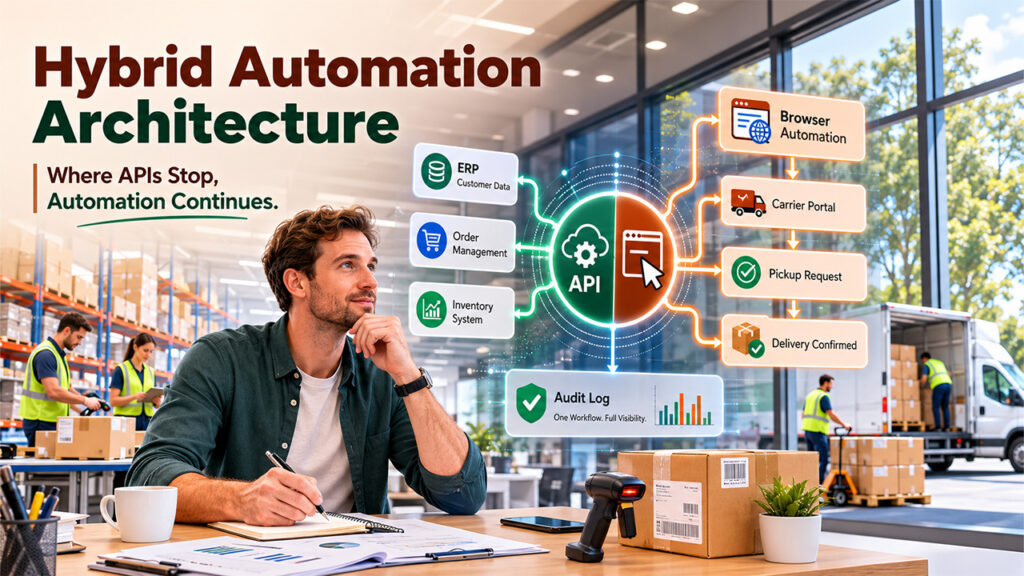
A well-planned API vs browser automation strategy gives businesses the flexibility to automate every step instead of being limited by API availability. The best operational workflows use both. An API call fetches your customer list from the ERP. A browser automation step logs into the carrier portal and requests pickups for each customer. Another API call logs the results back to your ERP. One audit log covers the entire flow, showing which steps used APIs, which used browser automation, and where any step failed or required manual review.
This hybrid approach requires tooling that treats both methods as legitimate first-class citizens. You need to define workflows that can switch between API calls and browser steps without rearchitecting the entire process. You need error handling and retry logic that works across both. You need audit trails that don't distinguish between them because from an operational perspective, they're just steps in a larger process.
Another option is that you can run two individual automation systems: an integration platform for APIs and an RPA tool for browser automation. That creates silos, makes handoffs complicated, and makes it harder to track failures across the entire workflow.
Making the Choice Without False Compromises
Reject the false choice between waiting for an API that never arrives and hiring expensive consultants to build custom RPA solutions. Choosing the right API vs browser automation approach allows organizations to build scalable, resilient workflows without compromising efficiency. For the portions of your workflow with no API, browser-based automation using modern agents is a legitimate scaling strategy. It's slower than APIs and requires more thoughtful error handling, but it's faster than manual work and doesn't require you to rewrite vendor systems.
Start by auditing your actual workflows. Identify which steps have APIs, which don't, and which gaps are causing the most operational friction. Use APIs for what they cover. Use browser automation for the rest. Build one system that coordinates both.
%201.png)

%201.png)

%201.png)