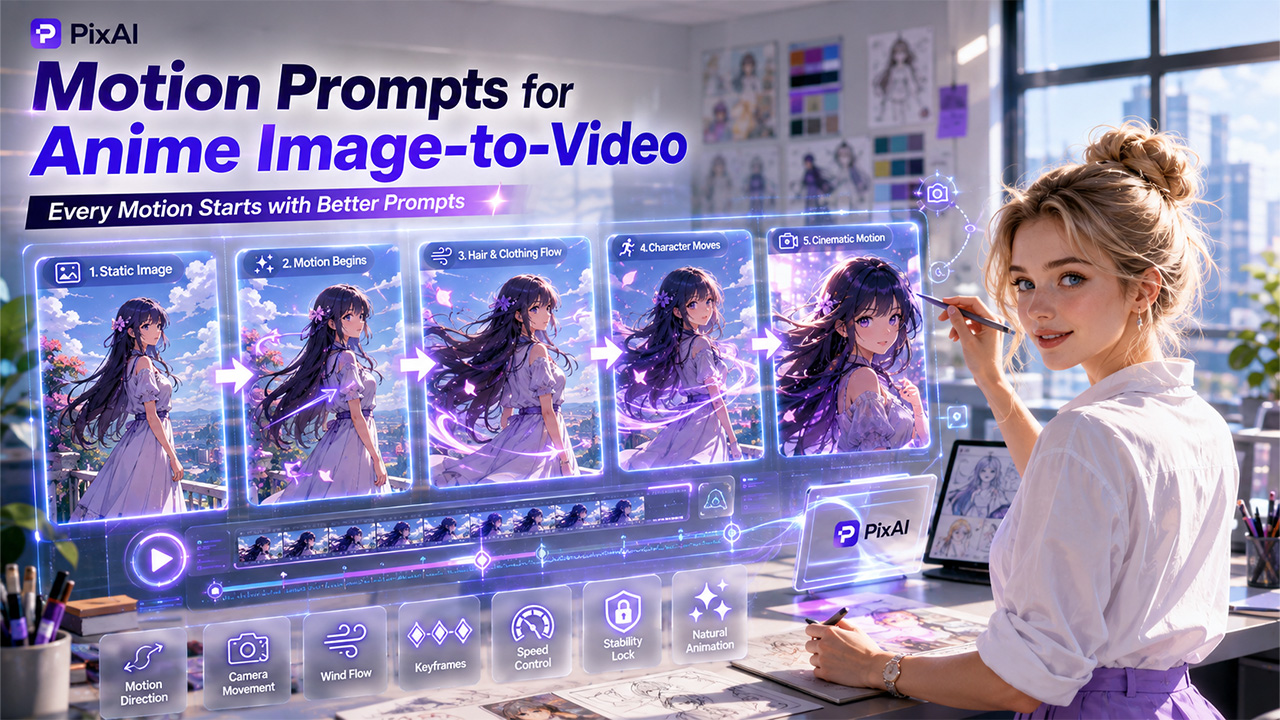

Your source image has already done a lot of work. The character exists, the setting exists, the art style is set. If you created the source image using AI anime art, the visual style and character details are already established. Describing all of that again in an anime image to video prompt adds words without adding direction.
Motion prompts have a narrower job: explain what changes. That means action, timing, camera behavior, environmental movement, and just as importantly — what should stay exactly as it is.
The framework below breaks that into five parts you can write in a couple of minutes.
| Part | What to Write | Simple Example |
| 1. Main Subject | Name the person or object that moves | The character |
| 2. Main Movement | Describe one central action | slowly turns toward the camera |
| 3. Supporting Motion | Add one or two small environmental or clothing movements | hair and coat move gently in the wind |
| 4. Camera Behavior | State the camera movement, or say it stays fixed | slow forward push |
| 5. Stability Direction | State what should remain visually stable | keep the face, outfit, and composition consistent |
The Five Parts of a Clear Motion Prompt
The best motion prompts usually follow the same simple structure.
1. Main Subject
Question to answer: who or what moves?
Name it explicitly. “The character,” “her left hand,” “the paper lantern.” Without a named subject, motion can land anywhere in the frame.
2. Main Movement
Question to answer: what is the one central action?
Choose a single action and describe it plainly — raises her head, steps forward, draws the sword. One clear movement reads better than three competing ones.
3. Supporting Motion
Question to answer: what small movement makes the scene feel alive?
One or two details are enough: hair drifting, a coat shifting, rain falling, light flickering. These support the main action rather than compete with it.
4. Camera Behavior
Question to answer: does the camera move, and how?
Say “slow forward push,” “gentle pan left,” or “the camera stays fixed.” Silence here often produces drift you did not ask for.
5. Stability Direction
Question to answer: what must not change?
Usually the face, outfit, character design, and composition. Naming them gives the generation something to hold steady.
Combined into one sentence:
The character slowly turns toward the camera while her hair and coat move gently in the wind, with a slow forward camera push, keeping her face, outfit, and the original composition consistent.
Five-part checklist: subject → main movement → supporting motion → camera → stability.
Weak vs Improved Motion Prompt
| Weak Prompt | Improved Prompt |
| “Make the anime girl move in a cinematic way.” | “The character slowly raises her head and looks toward the camera. Her hair and coat move gently in the wind while neon reflections shimmer on the wet street. The camera makes a slow forward push. Keep her face, outfit, and the original composition stable.” |
The weak version names no subject beyond “the anime girl,” no action, and no camera behaviour. “Cinematic” describes a feeling, not a movement, so the generation has to invent all of it.
The improved version fills every gap. It gives a main action (raising her head and looking toward the camera), supporting motion (hair, coat, neon reflections), camera behaviour (a slow forward push), and a stability direction (face, outfit, composition). Nothing important is left to chance.
Three Motion Prompt Examples for Anime Artwork
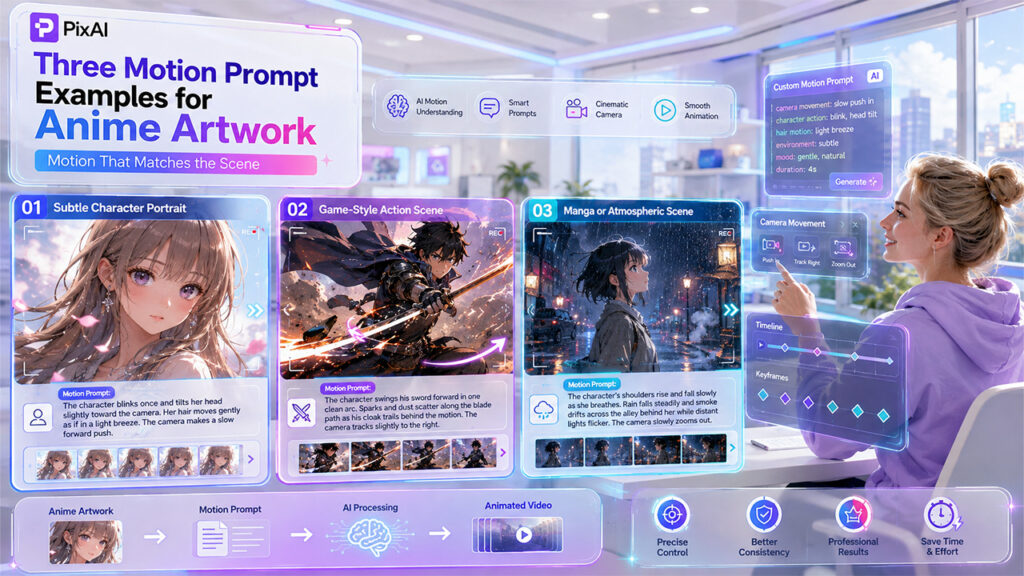
Subtle Character Portrait
The character blinks once and tilts her head slightly toward the camera. Her hair moves gently as if in a light breeze. The camera makes a slow forward push. Keep her face, hairstyle, outfit, and expression consistent throughout.
This suits close-up artwork where the face carries the whole shot. The movement is small on purpose — subtle motion keeps facial details stable in a way that larger action rarely does.
Game-Style Action Scene
The character swings his sword forward in one clean arc. Sparks and dust scatter along the blade path as his cloak trails behind the motion. The camera tracks slightly to the right, following the swing. Keep his armour design, face, and colour palette stable.
Here the action is deliberately single and directional. One committed movement with supporting particles reads far more clearly than a combination of attacks in a short clip.
Manga or Atmospheric Scene
The character’s shoulders rise and fall slowly as she breathes. Rain falls steadily and smoke drifts across the alley behind her while distant lights flicker. The camera slowly zooms out. Keep the panel composition, line work, and character design unchanged.
Atmospheric artwork works best when the environment carries the motion and the character stays nearly still. The stability line matters here because panel framing and line quality are the first things to degrade.
Common Motion Prompt Mistakes
- Repeating the static image description. Listing hair colour, outfit, and setting again crowds out the motion instructions. Correction: describe only what changes.
- Adding several unrelated actions. Turning, walking, and raising a weapon in one short clip splits the result. Correction: pick one main action and cut the rest.
- Not naming the subject that moves. “Make it move” leaves the target undefined. Correction: name the character or object explicitly.
- Giving conflicting camera instructions. A zoom-in and a pull-back cannot both happen. Correction: use one camera behaviour per generation.
- Animating the entire background unnecessarily. Moving everything makes nothing stand out. Correction: move one or two environmental elements and hold the rest.
- Using vague words like cinematic or dynamic. These describe a feeling, not a visible action. Correction: replace each with a specific movement. Most weak motion prompts fail because they describe ideas instead of visible actions.
- Forgetting to state what should remain stable. Without it, faces and outfits drift. Correction: close every prompt with a stability line.
Test and Revise the Motion Prompt in PixAI Studio
In PixAI Studio, revision works best as a loop with one variable at a time:
Add source image → enter motion prompt → generate → review → identify one issue → change one instruction → regenerate.
When reviewing, check six things: the face, the hair, the clothing, background motion, camera movement, and whether the intended action is actually visible. Most disappointing results fail on one of these rather than all of them.
Change only the instruction tied to that issue. If the camera moved too fast, adjust the camera line and leave everything else untouched — that way you learn what the change did.
Motion Prompt Checklist
Run through these before generating:
- Who or what moves?
- What is the one main action?
- What supporting motion is needed?
- How fast or intense is the motion?
- What does the camera do?
- What should remain stable?
- Are any instructions conflicting?
- Can one action be removed to make the scene clearer?
If the last question produces a yes, remove it. Shorter, clearer motion prompts almost always outperform longer, busier ones.
Conclusion
Focused motion prompts beat elaborate descriptions because they tell the model exactly what should move and what should remain stable. Name the subject, choose one main movement, add small supporting motion, decide what the camera does, and state what should stay stable.
Take one of your own anime images into PixAI Studio, write a five-part motion prompt, and see how much clearer the result becomes.
%201.png)

%201.png)

%201.png)