

Applying for work in 2026 feels quite overwhelming. In fact, according to Monster’s Application Black Box Report, 60% of US job seekers say their biggest frustration is sending an application and not knowing whether a human ever viewed their resume. Part of the reason is that everyone now fires off the same AI-generated resume everywhere, which floods recruiters and makes each application count for less.
JobAssist follows a different approach altogether as compared to traditional job search methods. It is an AI job application tool that scores how well each role fits you before you apply, then tailors your resume and cover letter to that specific posting instead of sending one generic file everywhere.
We tested it hands-on for this JobAssist review. Let’s see how it works, its features, tracking, pricing, and more.
What Is JobAssist?
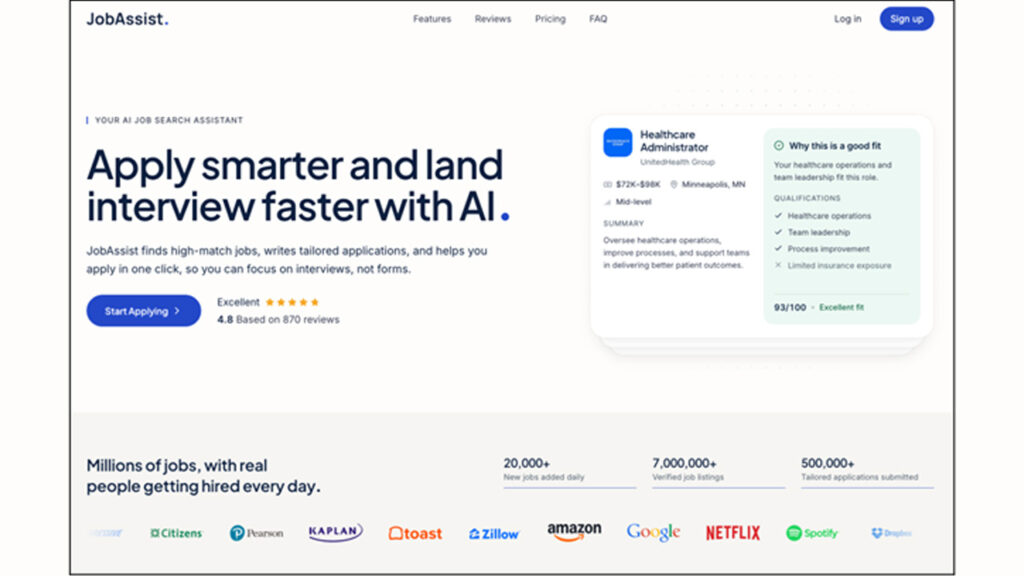
JobAssist is an AI job search and application platform. It pulls job discovery, your profile, applications, and messages into one place instead of spreading them across boards, resume files, and a spreadsheet.
It scans new postings daily and scores each against your profile from 0 to 100. For roles you want, it tailors your resume, writes a matched cover letter, fills the form, and submits once you approve. Yes, it does not submit anything without your sign-off.
However, it is not a recruiter or a job board to browse. And it definitely doesn’t guarantee interviews. What it does is cut the repetitive work between finding a role and hitting submit.
How Does JobAssist Work?
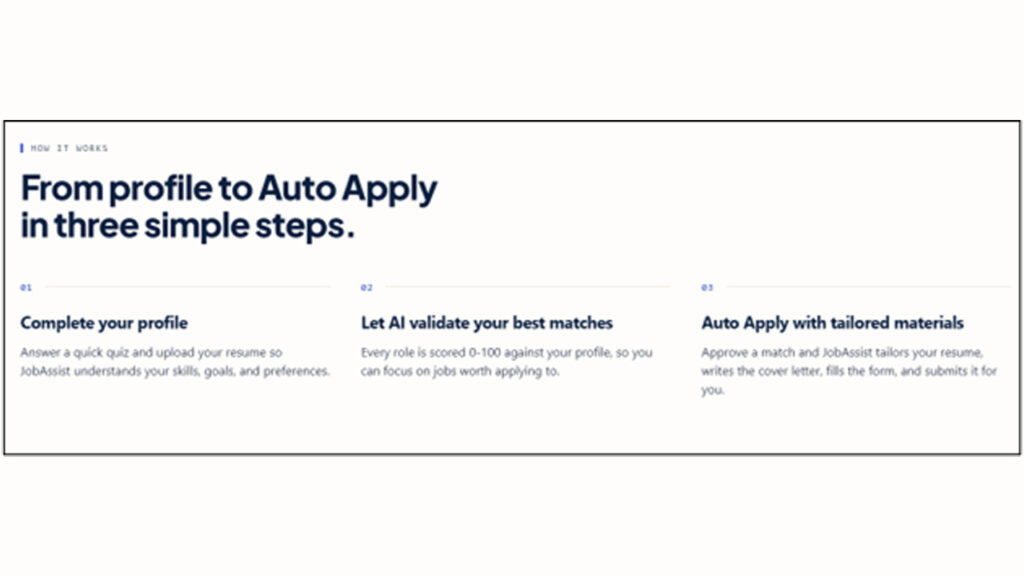
The flow of JobAssist is actually based on three steps.
First and foremost, you have to build your profile. You should upload your base resume, and JobAssist will parse it to pull your experience, education, and skills. Then you need to set your target title, salary, and location. Once your profile is ready, JobAssist can help you automate your job search by finding roles that match your preferences.
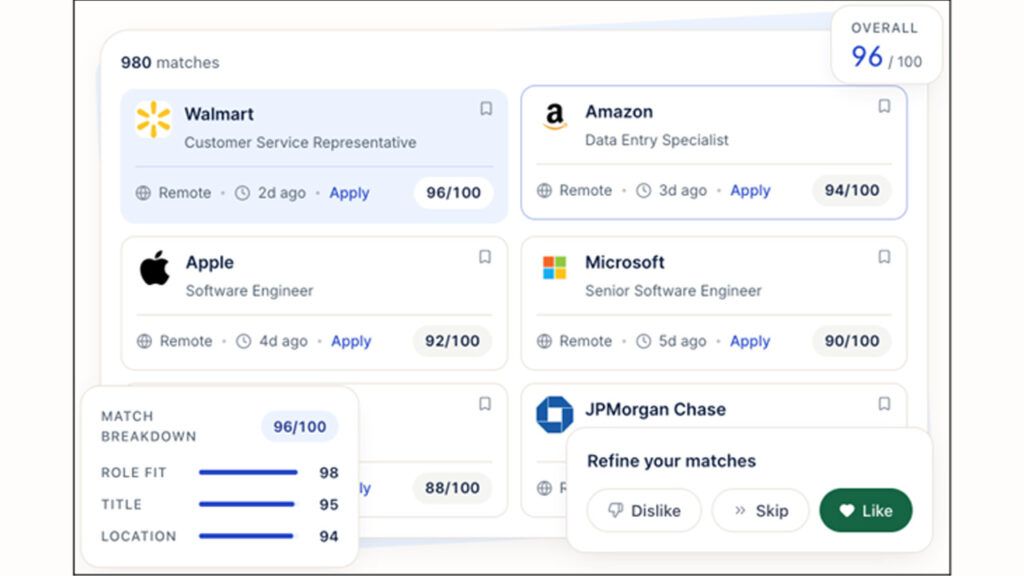
Second, you should review your daily matches. Each role carries a 0 to 100 score, broken into role fit, title, and location, plus a short note on why it suits you and a qualifications list that flags where you fall short.
Third, you approve and apply. Your profile is already built, so the tool tailors your resume to the posting, writes a cover letter, and fills the form. You can read and edit the cover letter first, and nothing is sent until you approve it.
JobAssist Review: Quick Overview (TL;DR)
Before we get into the review and talk about its features in detail, here is the platform at a glance. Everything mentioned in the table reflects what we saw in testing.
| What It Does | Key Features | User Interface | Best For | Price |
| AI job matching and auto-apply jobs | Daily scored matches (0 to 100) | Web-based, no install | Active job seekers applying at volume | Trial from $9.99 for 7 days |
| AI resume tailoring per posting | AI resume rewrite per role | Clean feed and card layout | Career changers | $19.99 first month |
| Cover letter writing | Role-specific cover letter in your voice | Approval step before submit | Anyone applying to 10+ roles a week | $39.99 first quarter |
| Application tracking | Applied, viewed, interview counters | Built-in inbox for replies | People losing track of applications | Renews monthly, cancel anytime |
Key Features of JobAssist
There are essentially five core tools or features of the platform that you will find most helpful.
1. AI Job Matching and Match Scores
Every role gets a 0 to 100 score split into role fit, title, and location. A qualifications list flags where you match and where you fall short, so you spot gaps fast.
2. Auto Apply
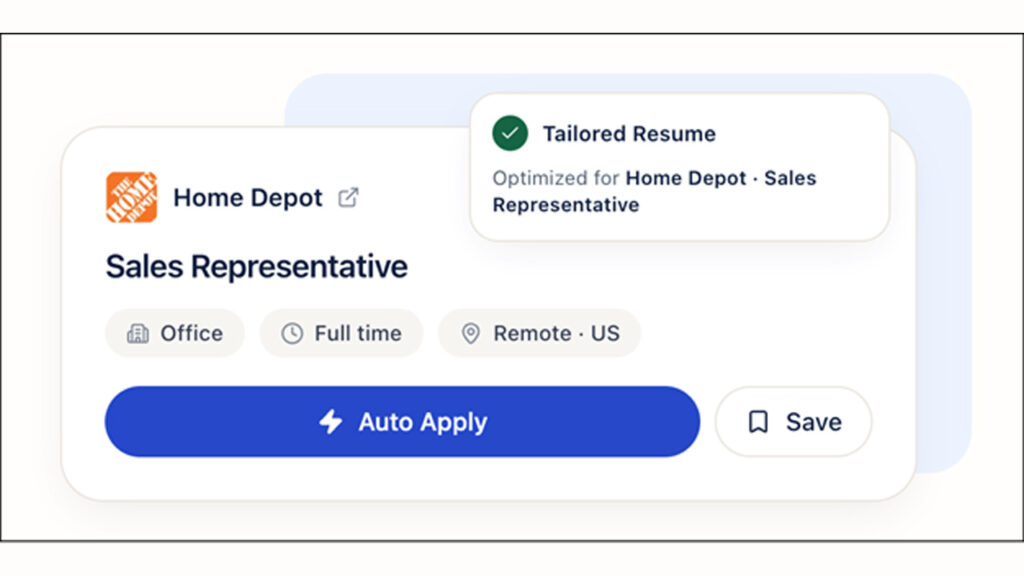
JobAssist gives you the ability to automatically apply to jobs that fit your profile. Only one tap can start an application. JobAssist will tailor your resume, draft the cover letter, and fill the form on your behalf.
However, as we mentioned before, it won’t submit the application on its own, though. Your review will be required at the end, and you need to confirm before anything goes out.
3. AI Tailored Resume
Instead of using one resume on every other job (like you manually do when sending out multiple applications), JobAssist will rewrite your resume for each posting and make sure it is aligned with the specific job. It reads the job description, pulls the skills that matter most for that role, and leads with them to clear keyword filters.
4. AI Cover Letters
JobAssist first reads the posting you want to apply for and builds an understanding of the job. Then, based on your profile and the info you have provided JobAssist about yourself, it writes a short but role-specific cover letter for you.
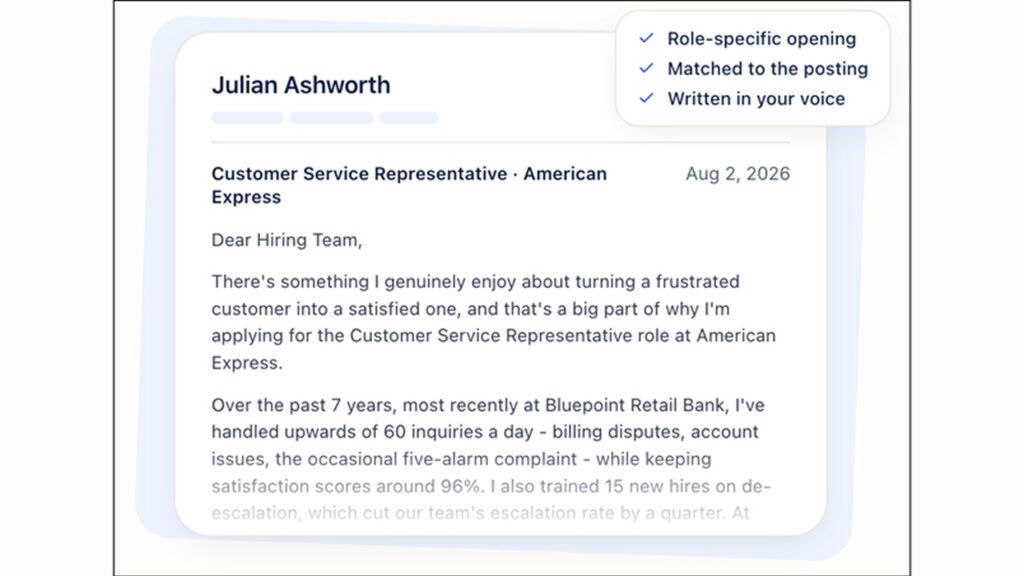
The cover letter it writes sounds like you, though you must read each one before approving.
5. Application Tracking and Inbox
This is the feature we ended up leaning on the most, and it is the one nobody thinks about until they need it.
Every role you apply to moves through the Applications tab in stages:
- From submitted
- To waiting for a response
- To interview
- To offer
The dashboard keeps the applied, viewed, and interview counters on top of that. So on a Monday morning you are not staring at a pile of jobs you sent off at some point. You can see exactly where each one sits.
This helps you a lot. For example, if a role has been viewed and then gone quiet for three weeks, you can stop waiting on it and put the time somewhere else.
The inbox is in the same place. Recruiter replies, and interview invites come into JobAssist and stay attached to the role they belong to.
We rated this higher than we expected to. If you have ever hunted for a recruiter's reply three weeks later in a Gmail inbox stuffed with job alerts, you already know the problem it fixes.
JobAssist User Interface and Experience
We spent our testing time moving between the feed, the profile, and the application tracker. This is what we found out.
Ease of Use
JobAssist runs in the browser, so there is nothing to install and nothing to update. The feed lays roles out as cards, and each card shows you the salary range, the location, how old the posting is, and the match score before you click into anything.
You can skim twenty roles in about a minute and only open the ones worth reading.
The filters do the heavy lifting in the Explore tab. You can narrow by location, workplace type, work arrangement, and salary range, then sort by best match or by newest first.
We used both. Best match when we wanted quality, newest when we wanted to be early on a posting, and being early on a posting matters more than most people give it credit for.
Under each match, you get three more controls, like, skip and dislike. These controls tell the tool what to send you tomorrow, so the feed gets tighter the more you use it.
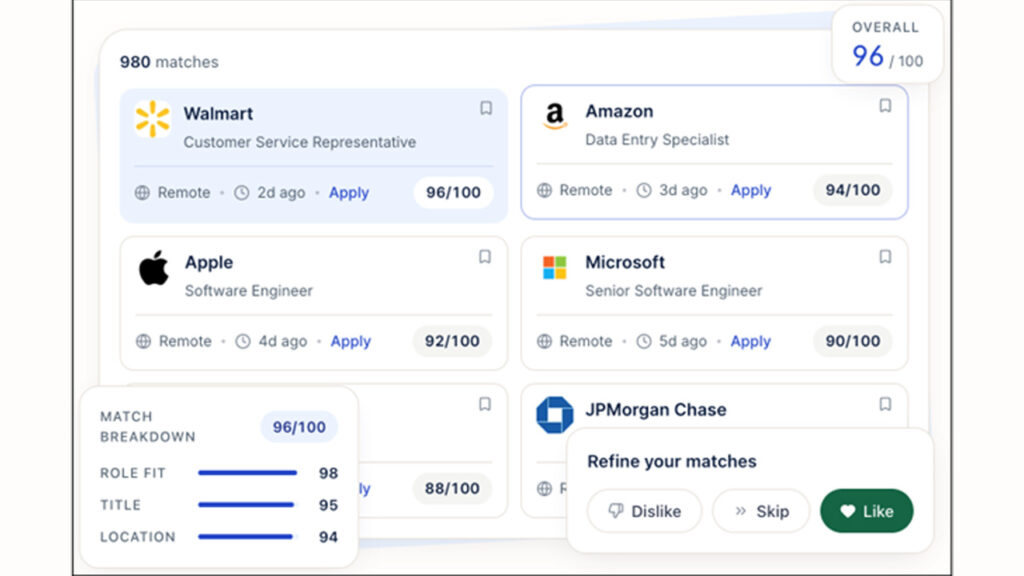
Once our profile was built, going from opening the dashboard to submitting an application took a minute or two per role.
You should know that the setup includes a self-identification section that can prefill EEO forms, and that information is not shown to recruiters. It’s worth knowing before you decide whether to fill it in.
Customer Support
The site lists a Help Center plus Customer Support and How to Cancel pages, and the footer carries Refund Policy and Terms links worth reading before the trial converts.
We did not have to contact the support team, so we cannot speak about how fast or how slow the support replies.
How Good Are JobAssist's Matches and Applications?
The scores mostly lined up with the postings we looked at.
When a role came back at 90 plus, it usually was a good fit on paper, and when a score dropped, the role fit, title, and location breakdown told us why. So we can say that the number JobAssist gives is not a black box, which is more than we can say for most matching tools.
But the catch is that the matching is only as good as the profile behind it. JobAssist shows a completion bar while you set up, and we would treat that as a target rather than a suggestion.
Our feed got noticeably sharper once we filled in the qualifications section properly and tightened the target title and salary range. If you upload a resume and skip the rest, you can not expect magic. You will get a loose feed in that case.
Honestly, tailored resumes and cover letters were surprisingly good. They read as if a person wrote them, and they pulled the right experience out of the profile instead of restating the job ad back at the company.
But there are a couple of things that still need your supervision. You should check the salary and location filters, because a wrong setting there will quietly waste applications. And read every cover letter before you approve it.
JobAssist Pricing: How Much Does It Cost?
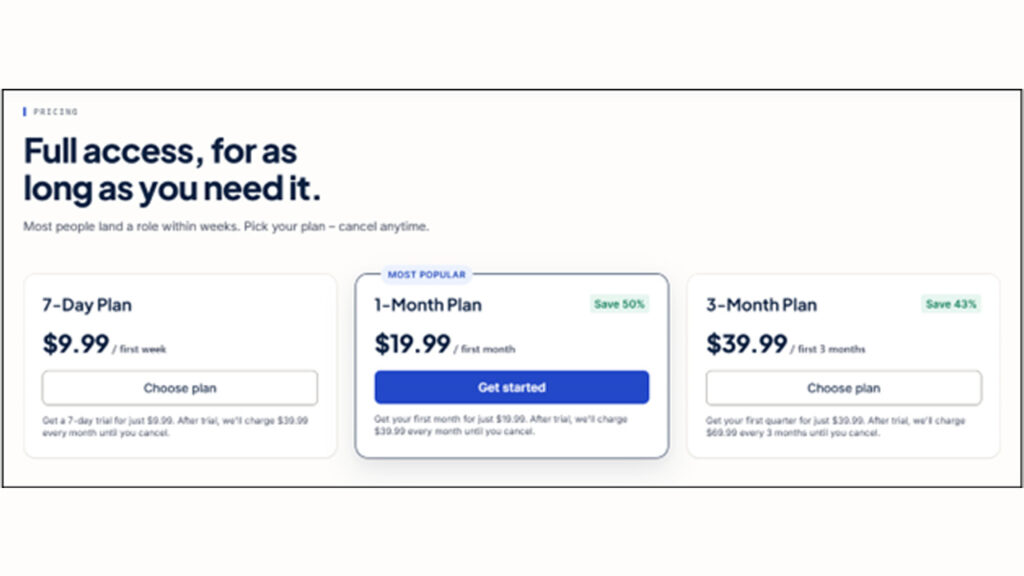
JobAssist runs on a trial-to-subscription model. You pay a low intro price to start, and if you do not cancel, the plan renews at the full rate and keeps going until you stop it. There are three options:
- 7-day plan: $9.99 for the first week, then renews monthly at $39.99.
- 1-month plan: $19.99 for the first month, then renews monthly at $39.99.
- 3-month plan: $39.99 for the first quarter, then renews quarterly at $69.99
Keep in mind that the pricing may vary by region, since the site shows figures based on your location.
How JobAssist Compares to Other AI Job Application Platforms
There are a lot of tools that automate some part of the job hunt process. But there are a few tools that cover the whole process from match to submission. Here is how JobAssist lines up against four of the better-known names.
| Platform | Auto Apply | AI Resume Tailoring | AI Cover Letters | Match Scoring | Application Tracking | Starting Price |
| JobAssist | Yes | Yes | Yes | Yes | Yes | $9.99 for first week |
| LazyApply | Yes | Limited | No | No | Basic | $119/year (usually), currently $99/year |
| Simplify | Limited | Yes | Limited | Yes | Yes | $19.99/week |
| AIApply | Yes | Yes | Yes | No | Yes | $29/month |
| Jobscan | Yes | Yes | Yes | Yes | No | $29.98/month (Billed as $89.95 every 3 months) |
JobAssist ticks every column. Most of the others are strong in one or two areas and lack in the rest. What makes JobAssist stand out is having scored matches, per-posting tailoring, and tracking under one subscription.
With most setups, you would stitch that together from two or three tools and pay for each. JobAssist puts the full loop- find, tailor, apply, track- in one place, which is the main reason to pick it over a single-purpose alternative.
Who Is JobAssist Best For?
JobAssist makes the most sense for the following type of job applicants:
- High-volume applicants, where the tailoring and auto-fill save real hours.
- Career changers who need a different resume angle for each role. For candidates looking to strengthen their online presence alongside their applications, it also helps to optimize your LinkedIn profile for job search.
- Anyone who loses track of where they applied, since the dashboard and inbox keep it all in one place.
- Daily-match seekers who would rather get fresh roles served than trawl boards every night.
It is a weak fit if you are chasing two or three specific senior roles. At that level, a handwritten application to a named hiring manager will beat volume every time, and you do not need a tool for four applications a month.
Final Verdict: Is JobAssist Legit?
Yes, JobAssist is a legitimate AI job search and application tool. We found features like these quite useful and working as they should:
- Matching
- Per-posting resume and cover letter tailoring
- Tracking dashboard
- And the approval step
But it is not hands-off, and you should not treat it that way. You need to set your filters properly, keep your profile current, and read each cover letter before you approve it. If you do that, then the tool does the boring 80% of a job hunt for you.
When it comes to pricing, we think it is quite fair for what it saves. One week of manually tailoring resumes and filling out the same application form costs more in hours than a month of the subscription. You just need to keep in mind the renewal date so the trial does not roll over on you by accident.
If you are applying to ten or more roles a week and losing track of them, JobAssist is worth a trial. If you are applying to just two roles a month, we would recommend you to save your money instead and do it manually.
Frequently Asked Questions
Q1. How to check if a job is real or fake?
To check the authenticity of the job, you should look at the description first. If there are vague duties, no named team, and a salary that is well above the market rate, then these are all warning signs (red flags). You should also check whether the listing has been reposted for months, and go to the company's own careers page to confirm the role exists. You must never send bank details, ID documents, or a payment to anyone before a real interview.
Q2. What are the benefits of using JobAssist?
JobAssist scores every role against your profile so you stop applying blind, rewrites your resume for each posting, drafts a matching cover letter, fills the application form, and keeps every application and reply in one dashboard. If you apply often, that is several hours a week you get back without dropping the quality of what you send.
Q3. Is JobAssist better than ChatGPT?
JobAssist and ChatGPT both do different jobs. ChatGPT will write you a good resume or cover letter when you prompt it right, one at a time, and you still have to find the roles and fill in every form yourself. JobAssist handles the whole workflow, including finding matches, scoring them, tailoring the documents, applying, and tracking. If you are after a structured job search, JobAssist wins by a big margin.
Q4. Is AI apply worth it?
AI apply is worth it as a volume tool, provided you review each application before it goes out. It saves many hours on repetitive work, and it stops you from sending the same generic resume everywhere. What it will not do is raise your response rate on its own. A weak profile applied to 100 jobs is still a weak profile.
%201.png)

%201.png)

%201.png)